

How to hide apps on the Redmi Pad SE 8.7 4G?
The application hiding function on the Redmi Pad SE 8.7 4G allows you to conceal specific applications from the Home screen, providing an extra layer of privacy and security. This feature is useful for keeping sensitive applications, such as messaging or financial applications, out of plain sight, helping to prevent unauthorized access or casual browsing by others who can use the device.
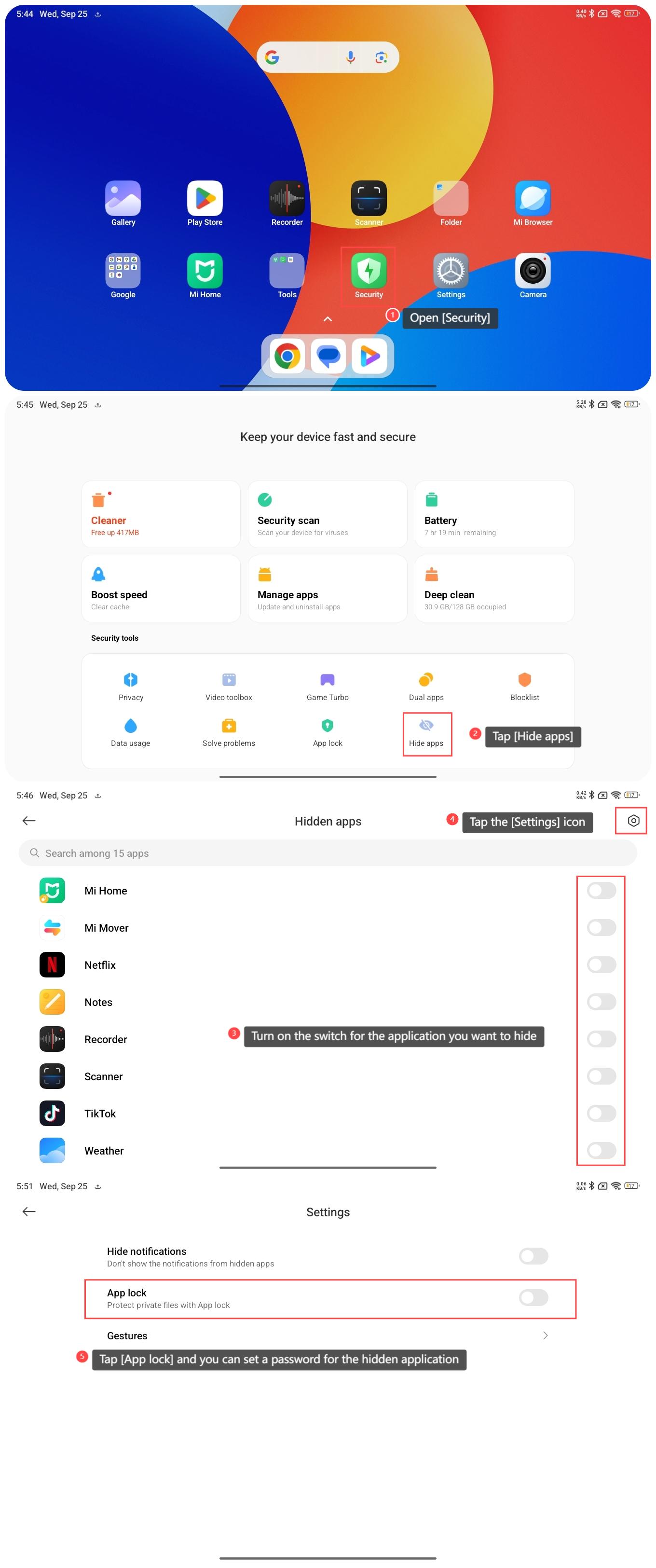
To hide the applications on the Redmi Pad SE 8.7 4G, please refer to the following steps:
1. Open [Security] on your tablet;
2. Tap [Hide apps];
3. Turn on the switch for the application you want to hide;
4. Tap the [Settings] icon in the upper right corner;
5. Tap [App lock] and you can set a password for the hidden application.
Note:
If you want to open the hidden applications, spread two fingers on the screen, and you will see a message asking you to enter your App lock password. After you enter your password, the folder with hidden apps will appear.
To hide the applications on the Redmi Pad SE 8.7 4G, please refer to the following steps:
1. Open [Security] on your tablet;
2. Tap [Hide apps];
3. Turn on the switch for the application you want to hide;
4. Tap the [Settings] icon in the upper right corner;
5. Tap [App lock] and you can set a password for the hidden application.
Note:
If you want to open the hidden applications, spread two fingers on the screen, and you will see a message asking you to enter your App lock password. After you enter your password, the folder with hidden apps will appear.
Does it help?
Yes
No