

How to set up the location tagging function for photos on the Redmi Pad SE 8.7?
The Redmi Pad SE 8.7 features a location tagging function that allows you to save geographical information alongside your photos when capturing images. Enabling location tagging can be beneficial for organizing and recalling memories, as it helps you remember the places associated with your photos. It can also enhance sharing experiences, allowing friends and family to see the locations of captured moments. However, turning off this feature can help protect privacy, as it prevents sharing sensitive location information inadvertently.
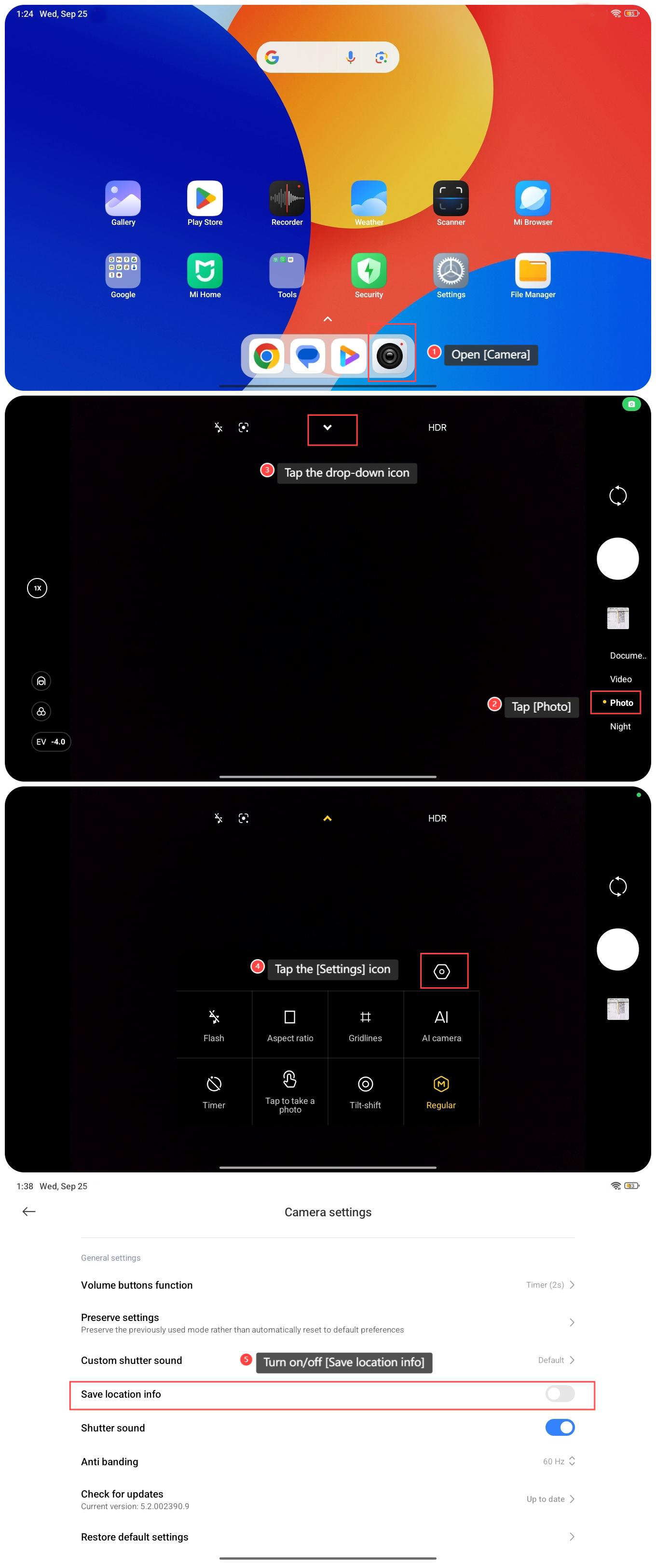
To set up the location tagging function for photos on the Redmi Pad SE 8.7, please refer to the following steps:
1. Open [Camera];
2. Tap [Photo];
3. Tap the drop-down icon;
4. Tap the [Settings] icon;
5. Turn on/off [Save location info].
To set up the location tagging function for photos on the Redmi Pad SE 8.7, please refer to the following steps:
1. Open [Camera];
2. Tap [Photo];
3. Tap the drop-down icon;
4. Tap the [Settings] icon;
5. Turn on/off [Save location info].
Does it help?
Yes
No