

How to adjust the resolution of the video on the Redmi Pad SE 8.7?
Adjusting the resolution for shooting video on the Redmi Pad SE 8.7 allows you to select between 1080P and 720P. Higher resolution, like 1080P, captures more detail and clarity, making it ideal for high-quality recordings, while 720P is suitable for conserving storage space and producing smaller file sizes. This flexibility is particularly useful when you want to save memory or when shooting in environments with less lighting. By choosing the appropriate resolution, you can optimize your video quality based on your needs and ensure better playback performance when sharing or editing your videos.
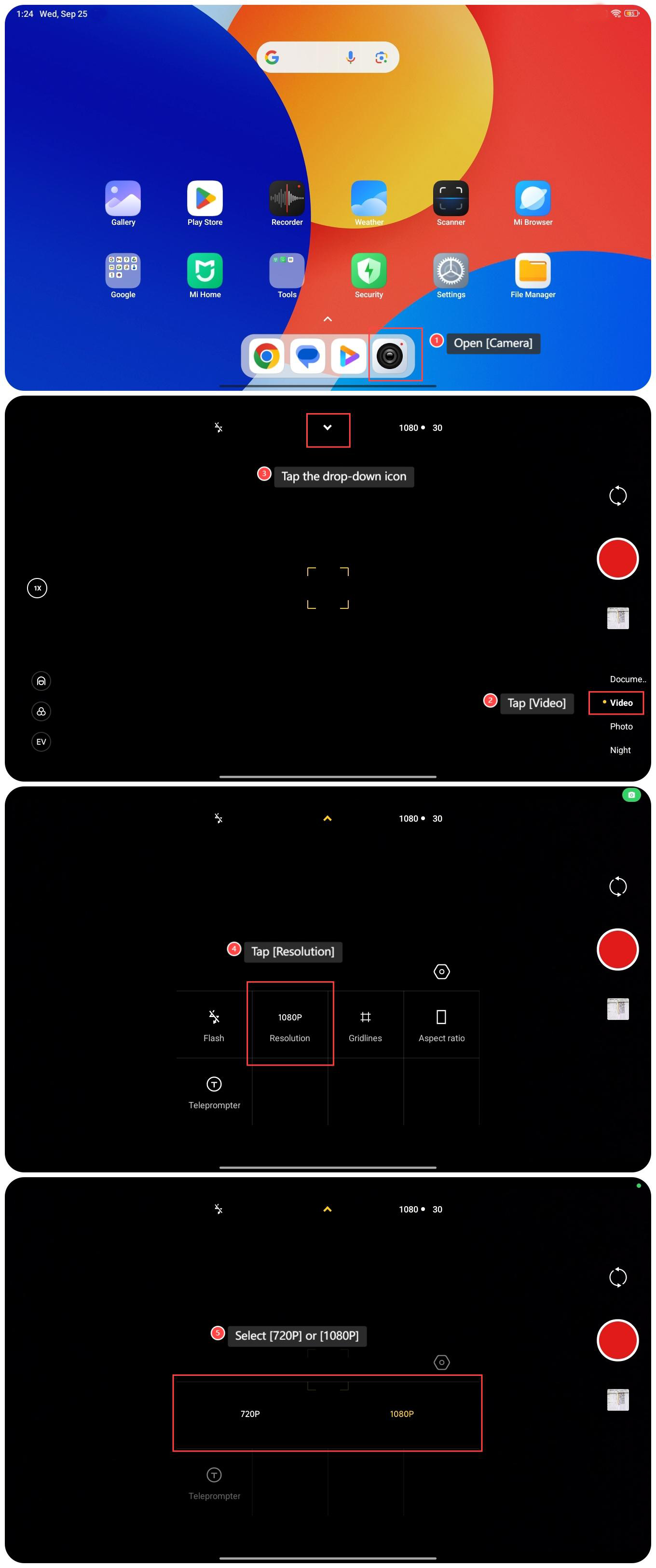
To adjust the resolution of the video on the Redmi Pad SE 8.7, please refer to the following steps:
1. Open [Camera];
2. Tap [Video];
3. Tap the drop-down icon;
4. Tap [Resolution];
5. Select [720P] or [1080P].
To adjust the resolution of the video on the Redmi Pad SE 8.7, please refer to the following steps:
1. Open [Camera];
2. Tap [Video];
3. Tap the drop-down icon;
4. Tap [Resolution];
5. Select [720P] or [1080P].
Does it help?
Yes
No