

How to fill the app icon after uninstalling apps on the Redmi Pad SE 8.7?
On the Redmi Pad SE 8.7, the app icon will be removed entirely after uninstalled. You can also enable an option in the settings to automatically fill the layout. Filling the empty spaces can maintain a tidy and consistent appearance on the home screen, preventing gaps that can make the interface look cluttered. This visual consistency allows you to quickly identify available applications without needing to manually rearrange icons.
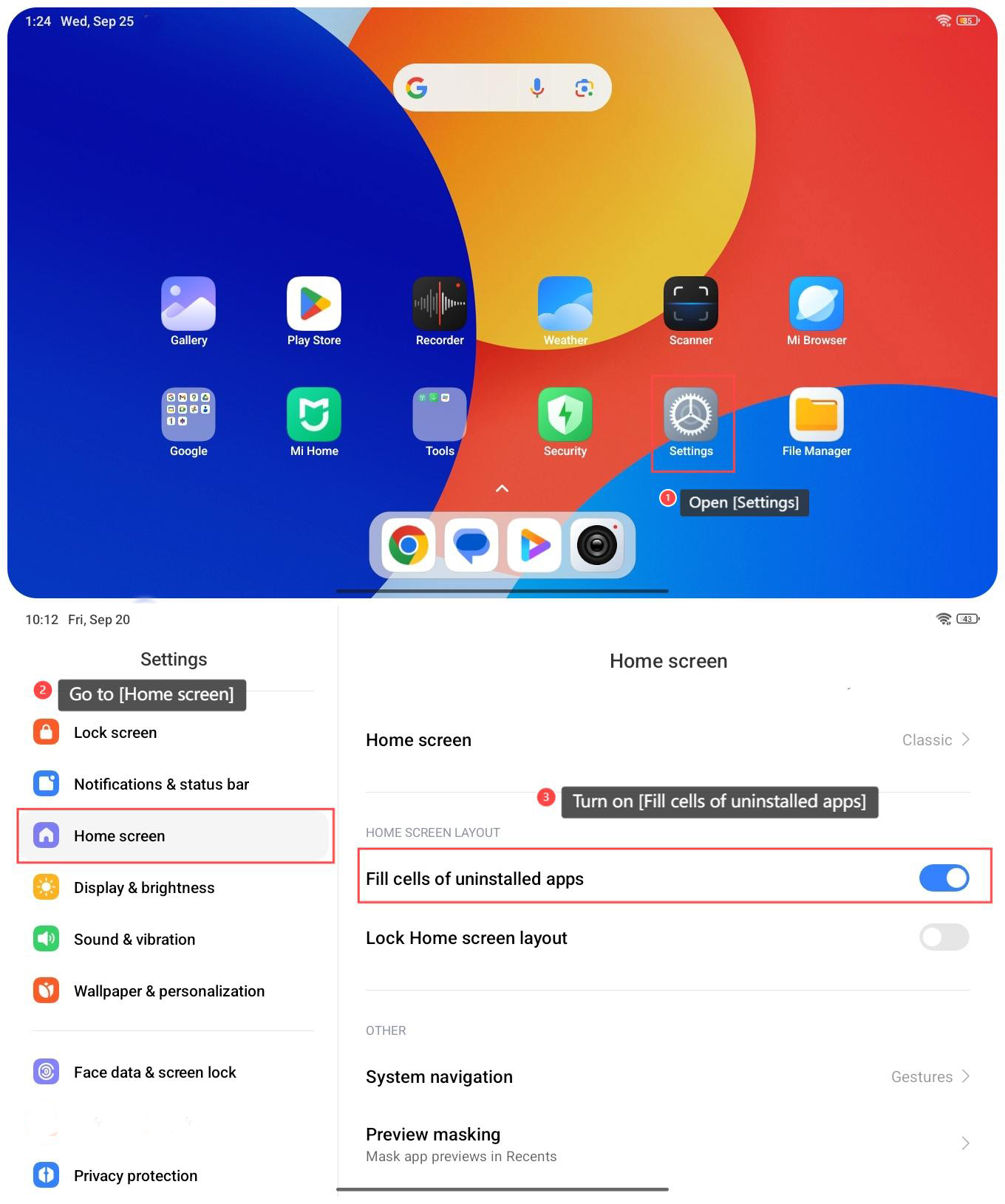
To fill the app icon after uninstalling apps on the Redmi Pad SE 8.7, please refer to the following steps:
1. Open [Settings] on your tablet;
2. Go to [Home screen];
3. Turn on [Fill cells of uninstalled apps];
4. Once turned on, the empty spaces of deleted application icons will be automatically filled.
To fill the app icon after uninstalling apps on the Redmi Pad SE 8.7, please refer to the following steps:
1. Open [Settings] on your tablet;
2. Go to [Home screen];
3. Turn on [Fill cells of uninstalled apps];
4. Once turned on, the empty spaces of deleted application icons will be automatically filled.
Does it help?
Yes
No