

How to turn on/off the icon labels on the control center of the Redmi Pad SE 8.7 4G?
Displaying icon labels in the control center on the Redmi Pad SE 8.7 4G enhances clarity, making it easier for you to understand each function. This helps prevent errors by reducing confusion over icon meanings. It also speeds up navigation, allowing for quicker access to settings, and serves as a learning aid. Ultimately, labeled icons contribute to a more friendly interface.
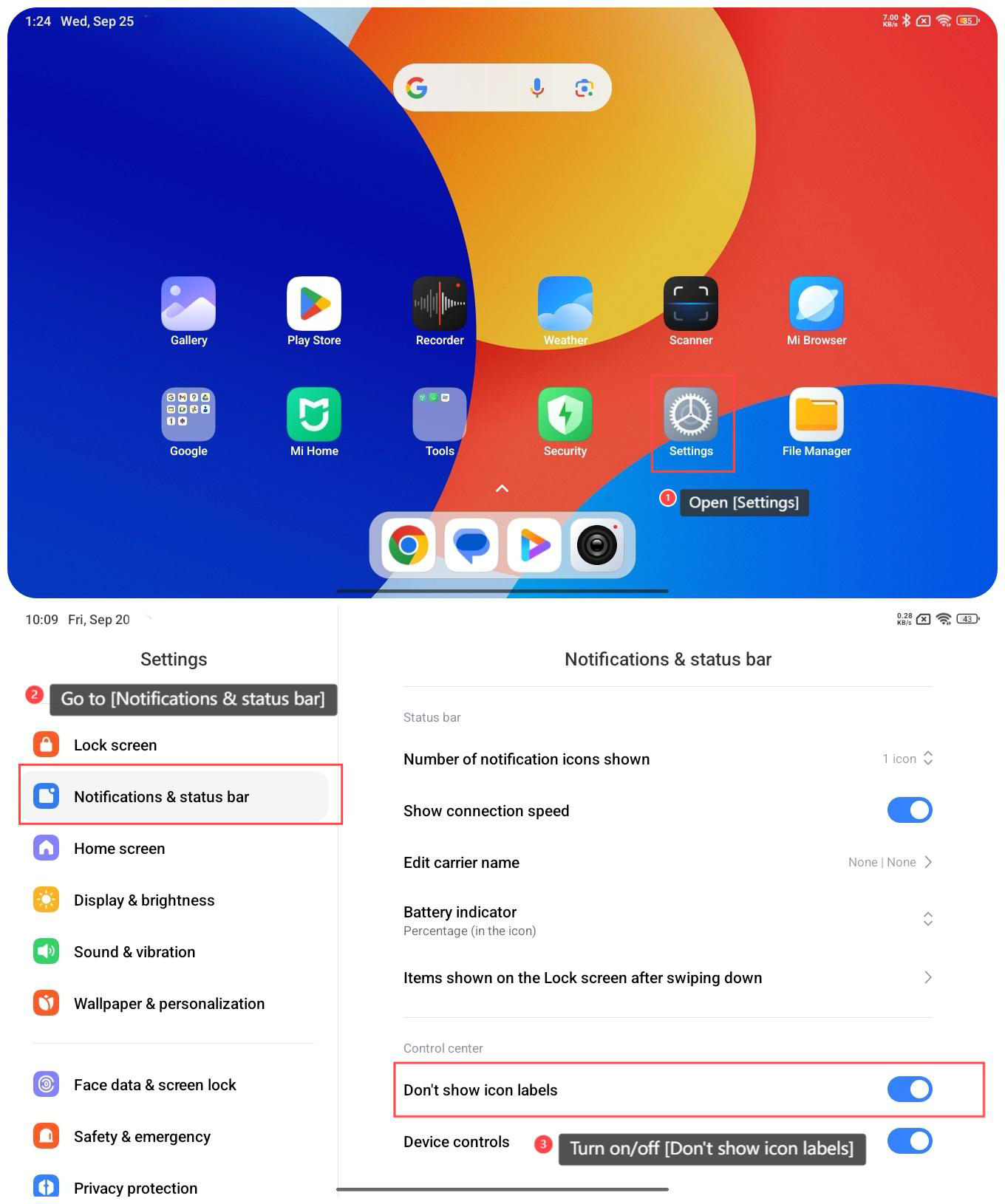
To turn on/off the icon labels on the control center of the Redmi Pad SE 8.7 4G, please refer to the following steps:
1. Open [Settings] on your tablet;
2. Go to [Notifications & status bar];
3. Turn on/off [Don’t show icon labels].
To turn on/off the icon labels on the control center of the Redmi Pad SE 8.7 4G, please refer to the following steps:
1. Open [Settings] on your tablet;
2. Go to [Notifications & status bar];
3. Turn on/off [Don’t show icon labels].
Note:
If you are not familiar with the icons, it is recommended that you turn on the icon labels, with which you can better manage your control center.
If you are not familiar with the icons, it is recommended that you turn on the icon labels, with which you can better manage your control center.
Does it help?
Yes
No