

How to set the dual clock on the Redmi Pad SE 8.7 4G?
The dual clock feature on the Redmi Pad SE 8.7 4G allows you to display two different time zones simultaneously. This is particularly useful for those who frequently communicate with people in different time zones, travel often, or have family and friends in various locations. You can set one clock to your local time and the other to another time zone of your choice, making it easier to keep track of important meetings, calls, or events. This feature enhances convenience and helps manage time more effectively across regions, ensuring you’re always in sync with others.
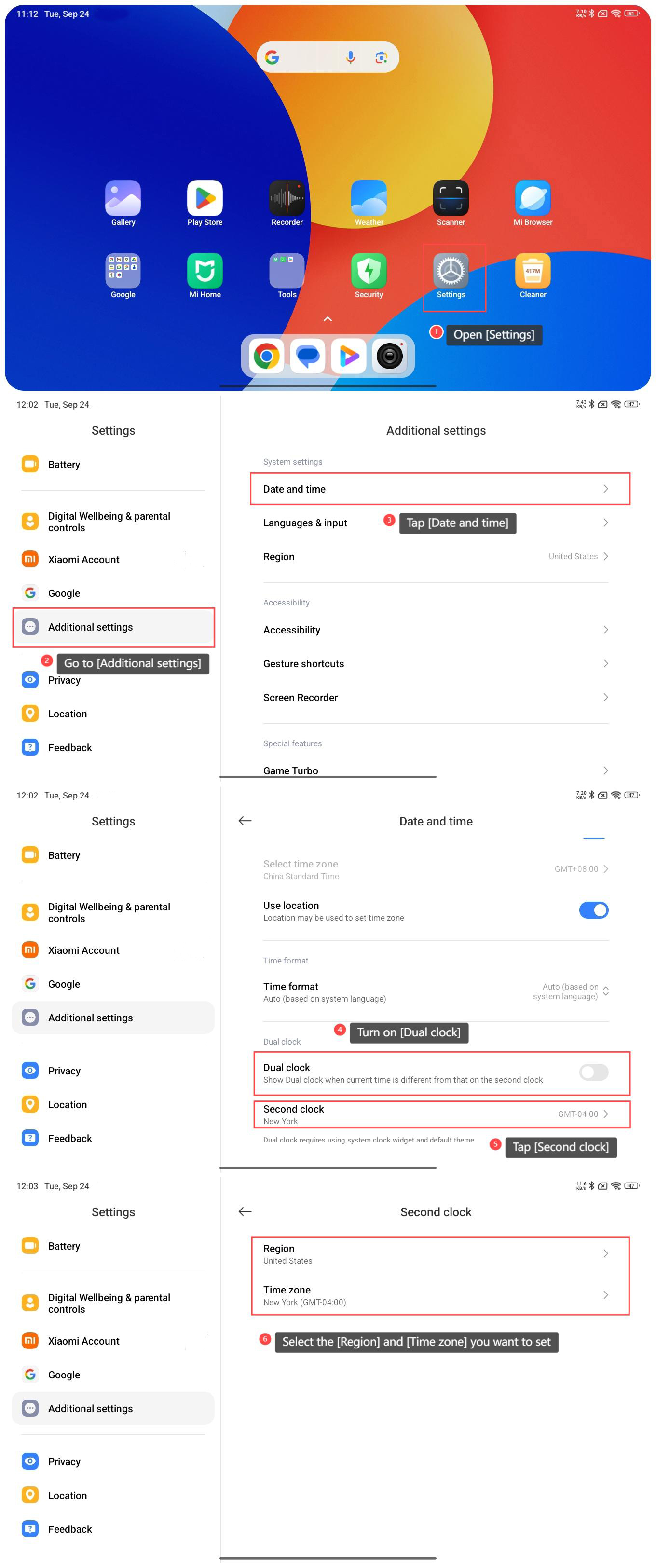
To set the dual clock on the Redmi Pad SE 8.7 4G, please refer to the following steps:
1. Open [Settings];
2. Go to [Additional settings];
3. Tap [Date and time];
4. Turn on [Dual clock];
5. Tap [Second clock];
6. Select the [Region] and [Time zone] you want to set.
To set the dual clock on the Redmi Pad SE 8.7 4G, please refer to the following steps:
1. Open [Settings];
2. Go to [Additional settings];
3. Tap [Date and time];
4. Turn on [Dual clock];
5. Tap [Second clock];
6. Select the [Region] and [Time zone] you want to set.
Does it help?
Yes
No