

How to optimize the battery usage manually on the Redmi Pad SE 8.7?
Battery optimization on the Redmi Pad SE 8.7 refers to a set of features and settings designed to improve battery efficiency and extend usage time. This includes managing app activity, reducing background processes, and limiting resource-intensive apps that can drain power quickly. By enabling battery optimization, your device can adjust settings based on usage patterns, and prioritize essential apps. These adjustments help ensure that you can enjoy longer usage between charges.
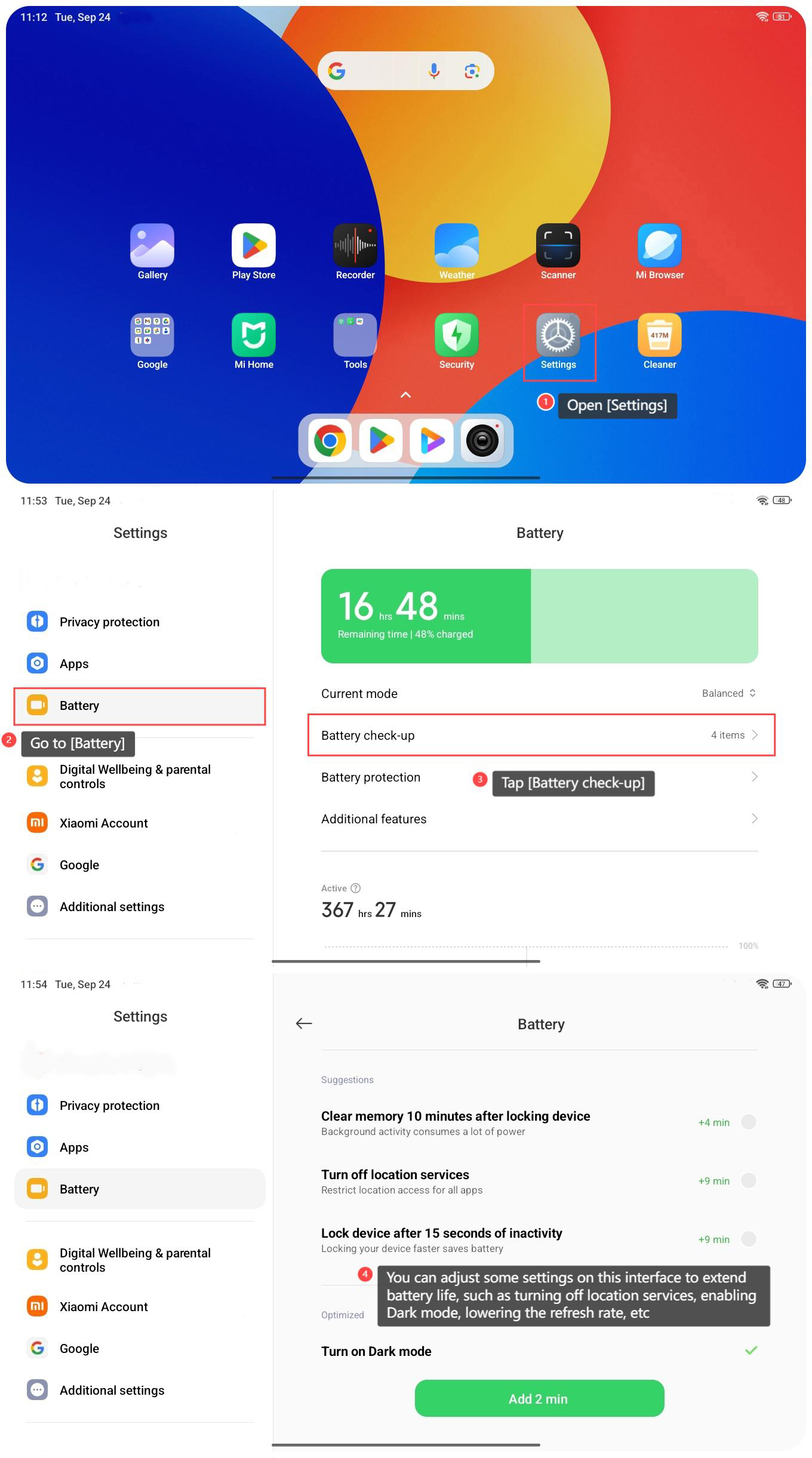
To optimize the battery usage manually on the Redmi Pad SE 8.7, please refer to the following steps:
1. Open [Settings] on your tablet;
2. Go to [Battery];
3. Tap [Battery check-up];
4. You can adjust some settings on this interface to extend battery life, such as turning off location services, enabling Dark mode, lowering the refresh rate, etc.
To optimize the battery usage manually on the Redmi Pad SE 8.7, please refer to the following steps:
1. Open [Settings] on your tablet;
2. Go to [Battery];
3. Tap [Battery check-up];
4. You can adjust some settings on this interface to extend battery life, such as turning off location services, enabling Dark mode, lowering the refresh rate, etc.
Does it help?
Yes
No