

How to unlock all apps by entering the App lock password once on the Redmi Pad SE 8.7?
The feature on the Redmi Pad SE 8.7, which allows you to unlock all apps by entering the App lock password once, simplifies access to multiple locked applications. Instead of entering the password for each app individually, you only need to enter it once, making it more convenient for those who frequently switch between apps while still maintaining security. It streamlines the experience and saves time. By ensuring that sensitive apps remain secure, it offers peace of mind while allowing quick access.
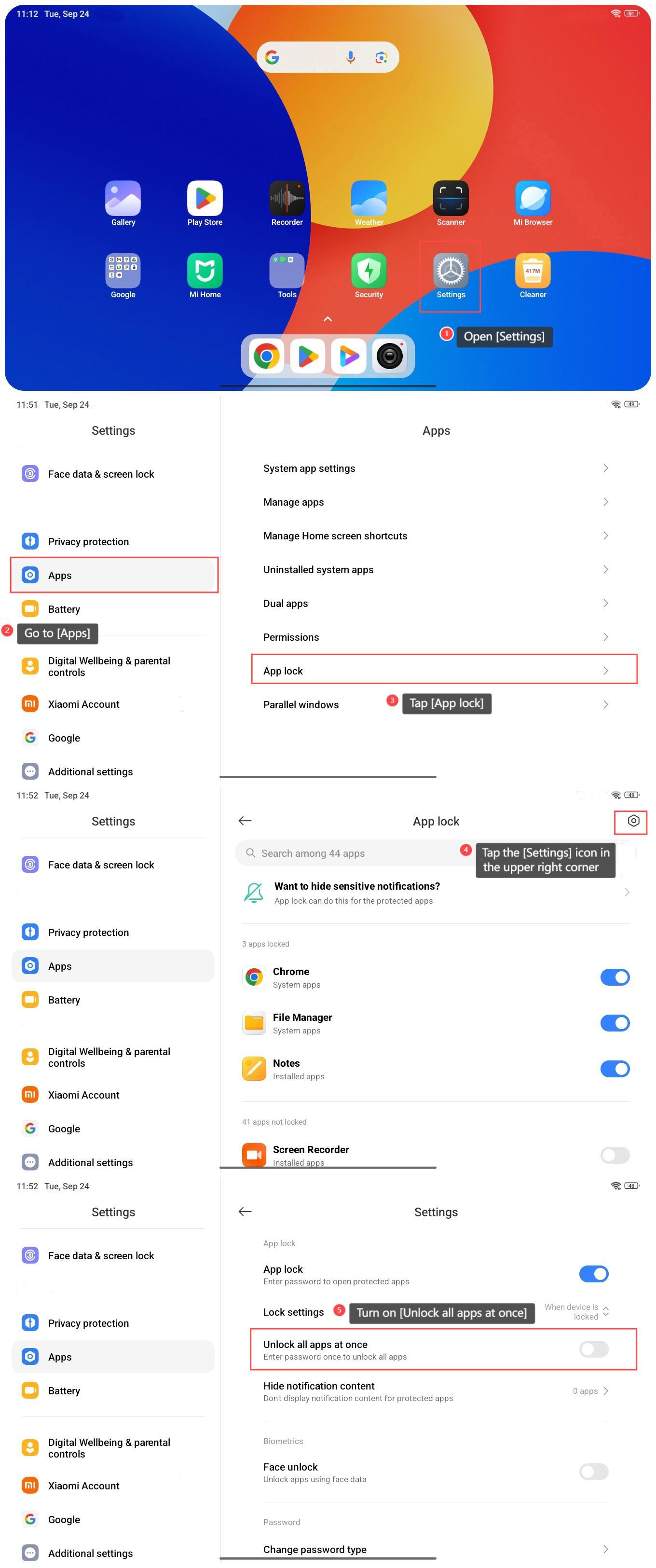
To unlock all apps by entering the App lock password once on the Redmi Pad SE 8.7, please refer to the following steps:
1. Open [Settings];
2. Go to [Apps];
3. Tap [App lock];
4. Tap the [Settings] icon in the upper right corner;
5. Turn on [Unlock all apps at once].
To unlock all apps by entering the App lock password once on the Redmi Pad SE 8.7, please refer to the following steps:
1. Open [Settings];
2. Go to [Apps];
3. Tap [App lock];
4. Tap the [Settings] icon in the upper right corner;
5. Turn on [Unlock all apps at once].
Does it help?
Yes
No