

How to manage the third-party apps on the Redmi Pad SE 8.7?
Managing third-party apps on the Redmi Pad SE 8.7 involves overseeing the installation, permissions, updates, and settings of the third-party applications. This includes controlling which apps can access your device's resources, ensuring they function properly, and deleting any unnecessary or potentially harmful apps. By regularly managing these apps, you can enhance your device's performance and security. Additionally, staying informed about app reviews and permissions helps you make better choices regarding the apps you choose to install.
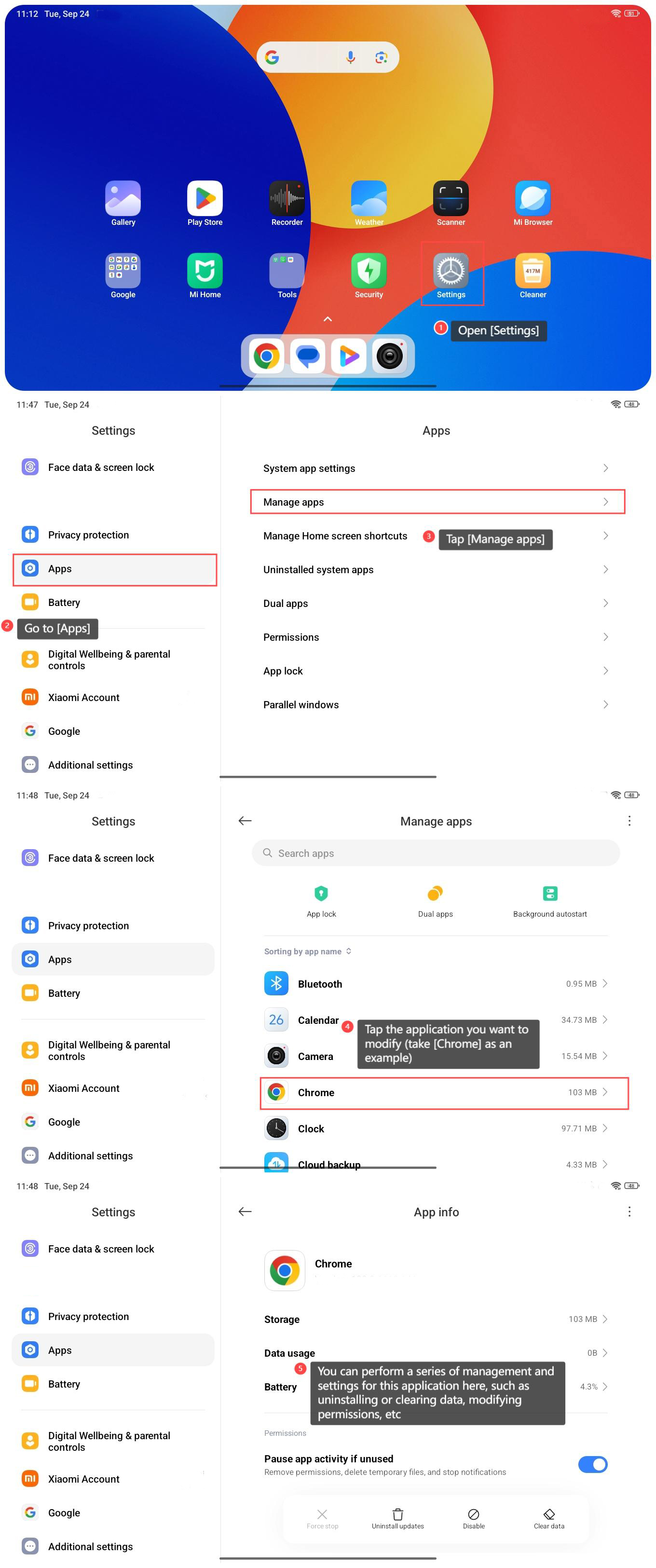
To manage the third-party apps on the Redmi Pad SE 8.7, please refer to the following steps:
1. Open [Settings] on your tablet;
2. Go to [Apps];
3. Tap [Manage apps];
4. Tap the application you want to modify (take [Chrome] as an example);
5. You can perform a series of management and settings for this application here, such as uninstalling or clearing data, modifying permissions, etc.
To manage the third-party apps on the Redmi Pad SE 8.7, please refer to the following steps:
1. Open [Settings] on your tablet;
2. Go to [Apps];
3. Tap [Manage apps];
4. Tap the application you want to modify (take [Chrome] as an example);
5. You can perform a series of management and settings for this application here, such as uninstalling or clearing data, modifying permissions, etc.
Does it help?
Yes
No