

How to set a VPN on the Redmi Pad SE 8.7 4G?
A VPN (Virtual Private Network) on the Redmi Pad SE 8.7 4G is a service that creates a secure and encrypted connection over the internet. It allows you to browse the web privately by masking your IP address and encrypting your data, which can protect your information from hackers, especially on public Wi-Fi networks. Additionally, a VPN can help you access region-restricted content by allowing you to connect to servers in different locations.
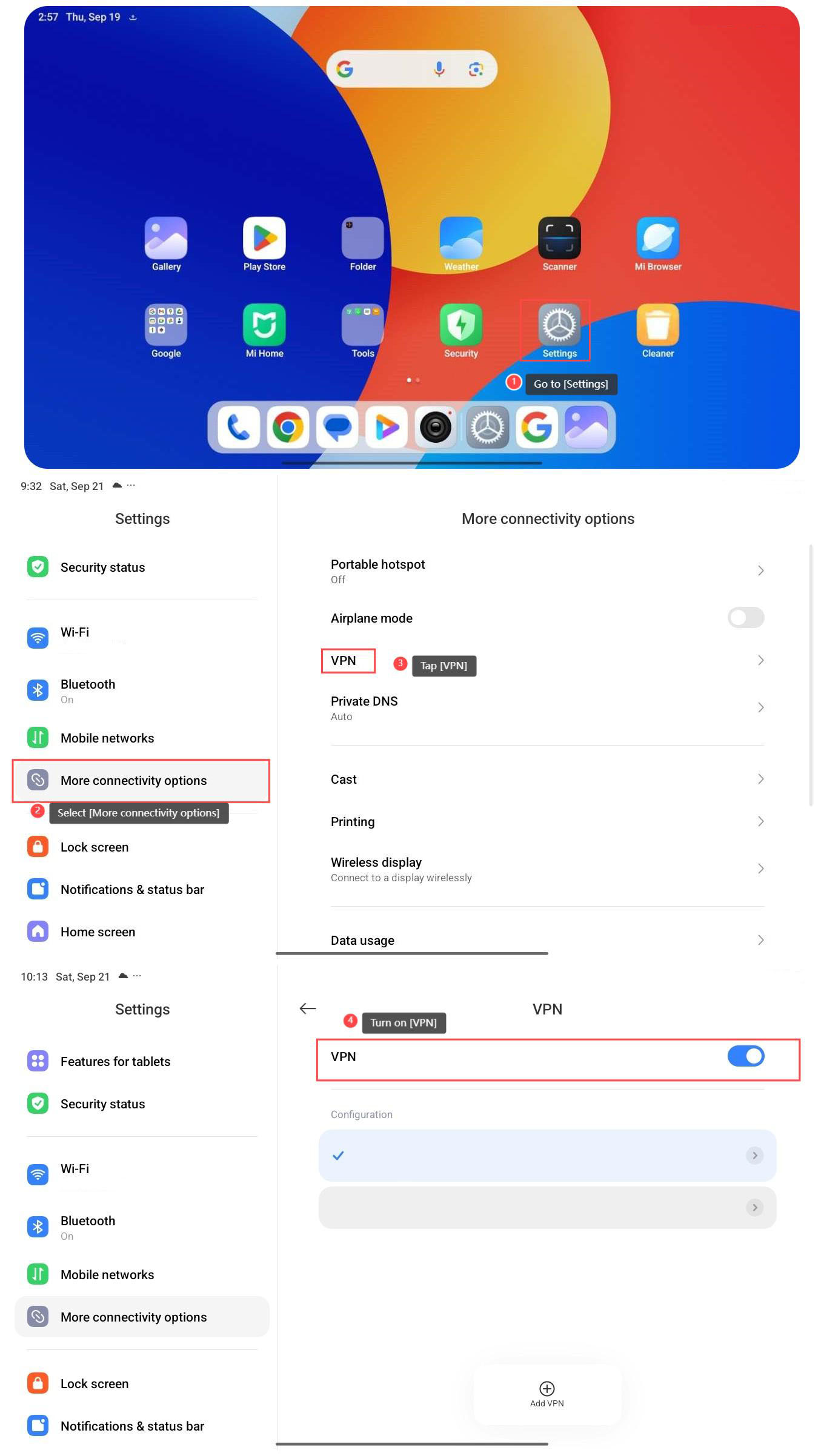
To set a VPN, please refer to the following steps:
1. Go to [Settings];
2. Select [More connectivity options];
3. Tap [VPN];
4. Turn on [VPN], and you can configure the VPN as you need.
Note:
VPNs can slow down your internet connection due to encryption and routing through remote servers. Some apps or services will not work properly with a VPN enabled, especially those that detect VPN usage.
To set a VPN, please refer to the following steps:
1. Go to [Settings];
2. Select [More connectivity options];
3. Tap [VPN];
4. Turn on [VPN], and you can configure the VPN as you need.
Note:
VPNs can slow down your internet connection due to encryption and routing through remote servers. Some apps or services will not work properly with a VPN enabled, especially those that detect VPN usage.
Does it help?
Yes
No