

How to set the graphic equalizer on the Redmi Pad SE 8.7?
The graphic equalizer on the Redmi Pad SE 8.7 is a feature that allows you to adjust the sound output by modifying various frequency bands. This tool enables you to enhance audio playback based on your preferences, whether you prefer more bass, treble, or a balanced sound. By customizing the equalizer settings, you can optimize the audio experience for different types of content, such as music, movies, or games.
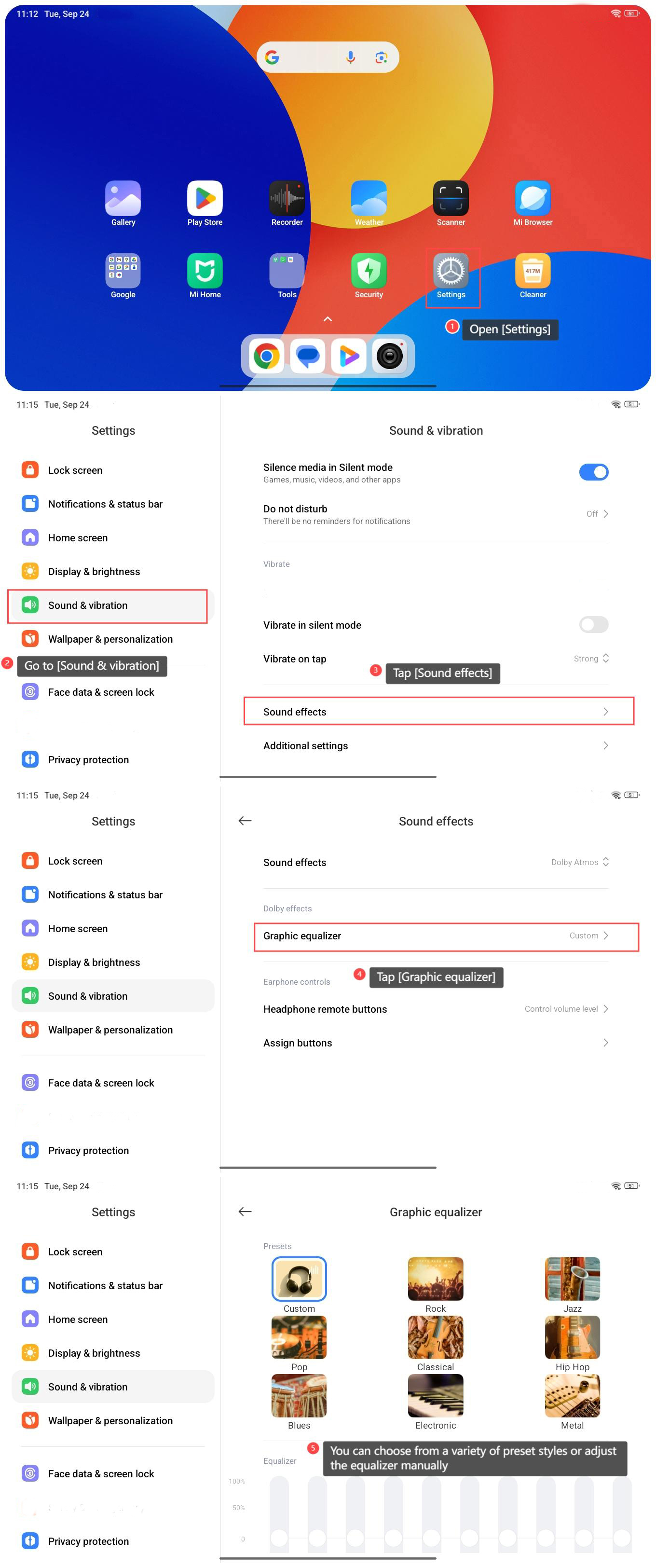
To set the graphic equalizer on the Redmi Pad SE 8.7, please refer to the following steps:
1. Open [Settings] on your tablet;
2. Go to [Sound & vibration];
3. Tap [Sound effects];
4. Tap [Graphic equalizer];
5. You can choose from a variety of preset styles or adjust the equalizer manually.
To set the graphic equalizer on the Redmi Pad SE 8.7, please refer to the following steps:
1. Open [Settings] on your tablet;
2. Go to [Sound & vibration];
3. Tap [Sound effects];
4. Tap [Graphic equalizer];
5. You can choose from a variety of preset styles or adjust the equalizer manually.
Does it help?
Yes
No