

How to format the SD card on the Xiaomi Outdoor Camera CW700S?
To format the SD card on the Xiaomi Outdoor Camera CW700S, please refer to the following steps:
1. Open the Mi Home/Xiaomi Home APP;
2. Select the Xiaomi Outdoor Camera CW700S;
3. Tap the three-dot icon at the upper right corner;
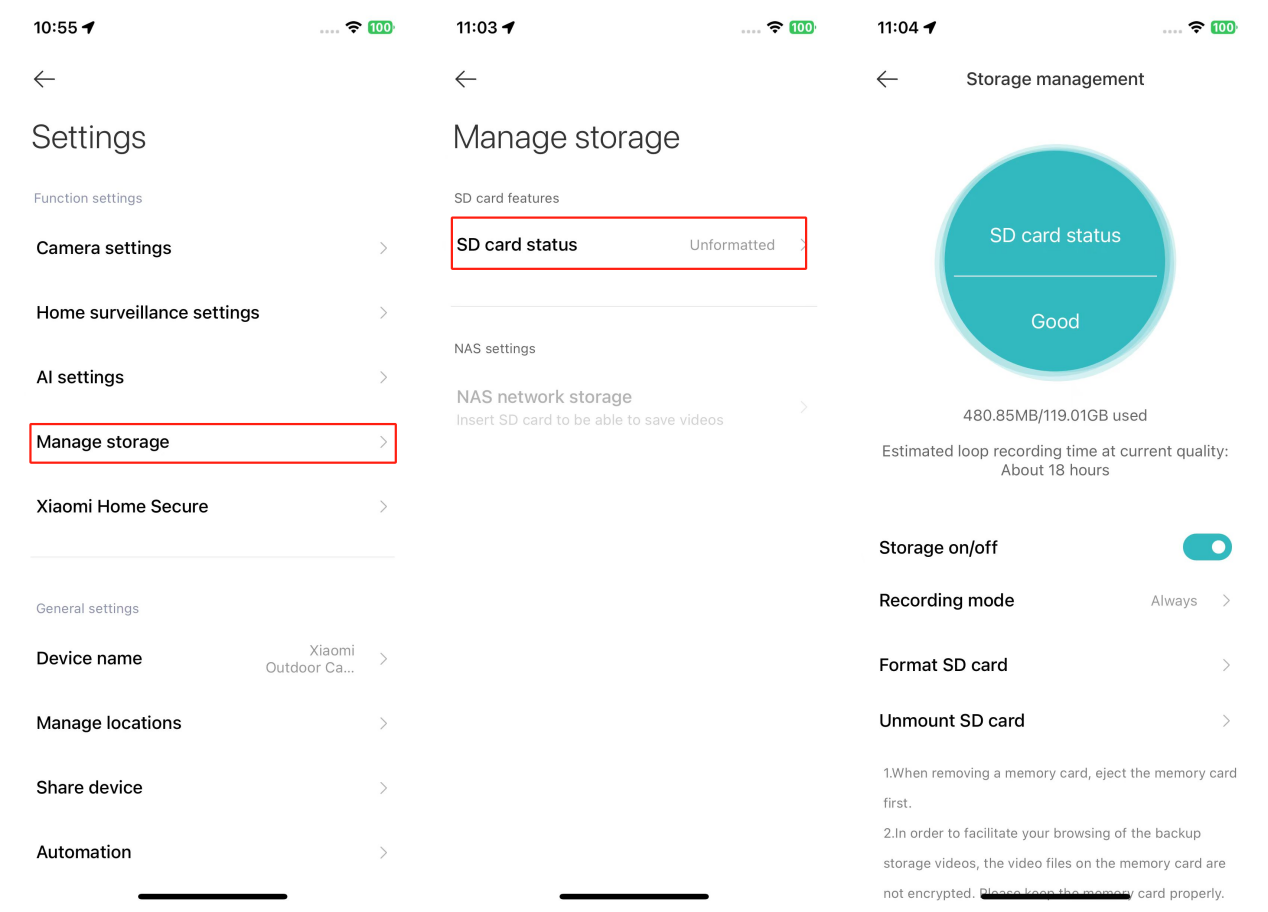
4. Go to [Manage storage];
5. Tap [SD card status];
6. Select [Format SD card].
Note:
1. Formatting will erase all videos on the SD card. Ensure you save any important videos first;
2. You can select the recording mode as always or record moving scenes. In the mode of recording moving scenes, the camera records only when motion is detected. Intermittent recording is normal when turning on this mode.
1. Open the Mi Home/Xiaomi Home APP;
2. Select the Xiaomi Outdoor Camera CW700S;
3. Tap the three-dot icon at the upper right corner;
4. Go to [Manage storage];
5. Tap [SD card status];
6. Select [Format SD card].
Note:
1. Formatting will erase all videos on the SD card. Ensure you save any important videos first;
2. You can select the recording mode as always or record moving scenes. In the mode of recording moving scenes, the camera records only when motion is detected. Intermittent recording is normal when turning on this mode.
Does it help?
Yes
No