

What are the meanings of icons on the Redmi Watch 5 Lite?
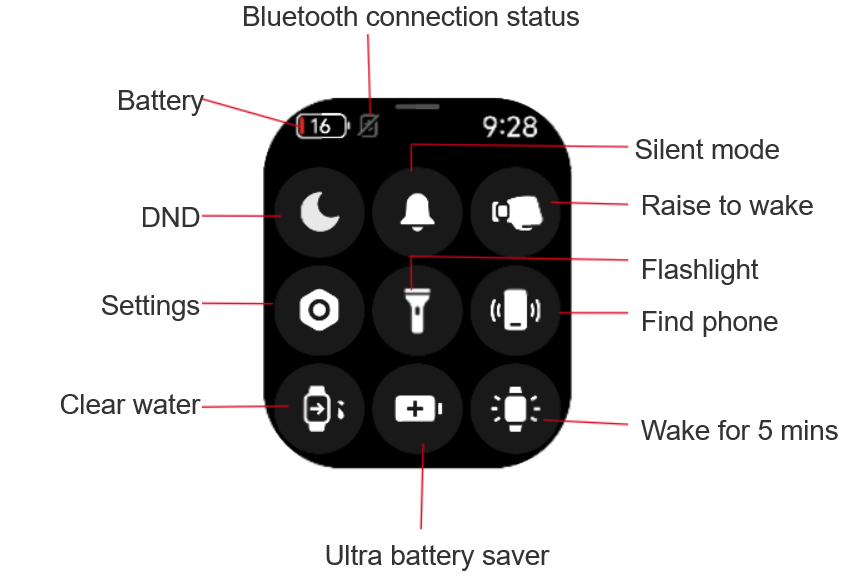
The meanings of icons in the control center are as follows:
1. The icon at the upper left corner is Battery. You can check the percentage of the remaining battery here;
2. Beside the Battery icon, there is an icon that means the Bluetooth connection status. When the Bluetooth connection is normal, this icon will light up. If the Bluetooth is disconnected, the icon will become gray with a slash on it;
3. You can view the time at the upper right corner;
4. The moon icon on the far left of the first row represents the Do Not Disturb (DND) mode;
5. The bell icon in the middle of the first row represents the Silent mode;
6. The icon on the far right of the first row represents the Raise to wake feature, which looks like a hand wearing a watch;
7. The icon on the far left of the second row represents the Settings;
8. The electric torch icon in the middle of the second row represents the Flashlight function;
9. The icon on the far right of the second row represents the Find phone feature, which looks like a vibrating phone;
10. The icon in the lower-left corner represents the Clear water function, which looks like a watch draining water;
11. The icon in the middle of the bottom row represents the Ultra battery saver mode, depicted as a battery with a “+” on it;
12. The icon in the lower-right corner represents the Wake for 5mins feature, which looks like a watch lighting up.
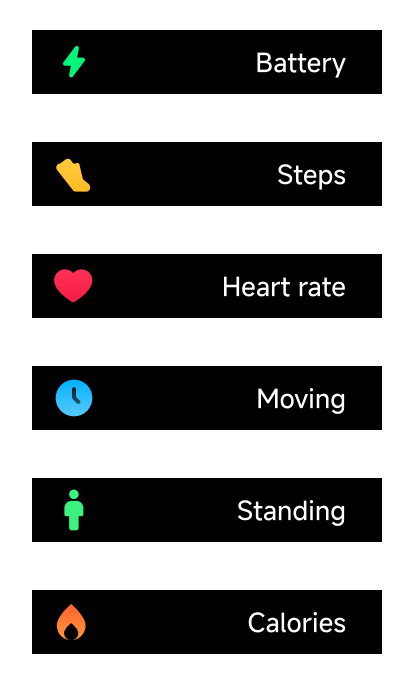
The meanings of function icons are as follows:
1. The green lightning bolt icon represents the Battery function;
2. The yellow shoe icon, which looks like walking, represents the Steps function;
3. The pink heart icon represents the Heart rate function;
4. The blue watch icon represents the Moving function;
5. The green standing figure represents the Standing function;
6. The burning flame icon represents the Calories function.
1. The icon at the upper left corner is Battery. You can check the percentage of the remaining battery here;
2. Beside the Battery icon, there is an icon that means the Bluetooth connection status. When the Bluetooth connection is normal, this icon will light up. If the Bluetooth is disconnected, the icon will become gray with a slash on it;
3. You can view the time at the upper right corner;
4. The moon icon on the far left of the first row represents the Do Not Disturb (DND) mode;
5. The bell icon in the middle of the first row represents the Silent mode;
6. The icon on the far right of the first row represents the Raise to wake feature, which looks like a hand wearing a watch;
7. The icon on the far left of the second row represents the Settings;
8. The electric torch icon in the middle of the second row represents the Flashlight function;
9. The icon on the far right of the second row represents the Find phone feature, which looks like a vibrating phone;
10. The icon in the lower-left corner represents the Clear water function, which looks like a watch draining water;
11. The icon in the middle of the bottom row represents the Ultra battery saver mode, depicted as a battery with a “+” on it;
12. The icon in the lower-right corner represents the Wake for 5mins feature, which looks like a watch lighting up.
The meanings of function icons are as follows:
1. The green lightning bolt icon represents the Battery function;
2. The yellow shoe icon, which looks like walking, represents the Steps function;
3. The pink heart icon represents the Heart rate function;
4. The blue watch icon represents the Moving function;
5. The green standing figure represents the Standing function;
6. The burning flame icon represents the Calories function.
Does it help?
Yes
No