

What do the icons on the control center and watch face of the Redmi Watch 5 Active mean?
There are several icons on the control center and watch face.
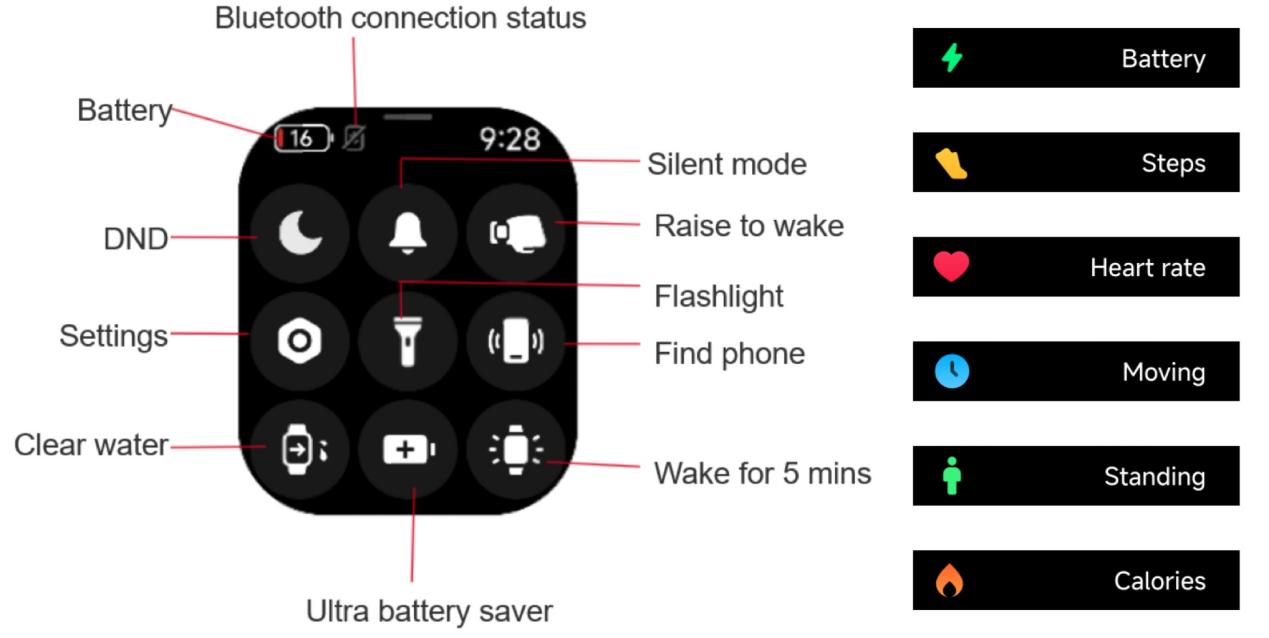
On the control center, the icons are Battery, Bluetooth connection status, DND, Silent mode, Raise to wake, Settings, Flashlight, Find phone, Clear water, Ultra battery saver, Wake for 5 mins.
On the Watch face, the icons are Battery, Steps, Heart rate, Moving, Standing, Calories.
The image below shows the meanings of the corresponding icons:
On the control center, the icons are Battery, Bluetooth connection status, DND, Silent mode, Raise to wake, Settings, Flashlight, Find phone, Clear water, Ultra battery saver, Wake for 5 mins.
On the Watch face, the icons are Battery, Steps, Heart rate, Moving, Standing, Calories.
The image below shows the meanings of the corresponding icons:
Does it help?
Yes
No