

Why doesn’t the screen turn off while the phone is charging?
If your phone screen doesn’t turn off while charging, it is due to the Keep screen on feature being enabled. This setting keeps your screen active during charging, which can cause unnecessary battery drain and potential overheating.
To resolve this issue, please refer to the following steps:
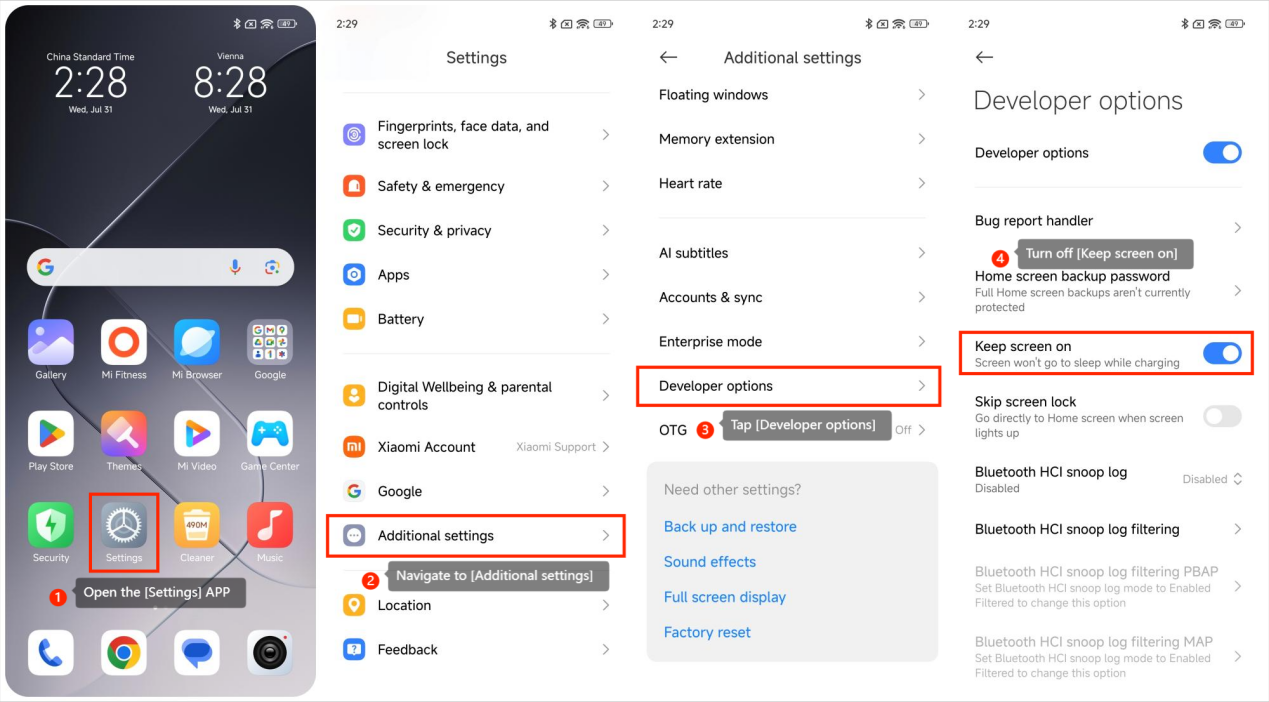
1. Open the [Settings] APP on your phone;
2. Navigate to [Additional settings];
3. Tap [Developer options];
4. Locate and turn off the [Keep screen on] option.
Disabling this feature will allow your phone’s screen to automatically turn off when not in use, which helps conserve battery life and prevent excessive heat buildup.
To resolve this issue, please refer to the following steps:
1. Open the [Settings] APP on your phone;
2. Navigate to [Additional settings];
3. Tap [Developer options];
4. Locate and turn off the [Keep screen on] option.
Disabling this feature will allow your phone’s screen to automatically turn off when not in use, which helps conserve battery life and prevent excessive heat buildup.
Does it help?
Yes
No