

How to adjust the temperature and the airflow speed of the Xiaomi High-speed Ionic Hair Dryer?
Press the temperature button to cycle through modes of cool air, low heat, medium heat, and high heat. Press and hold the cool shot button when the hair dryer is running to immediately switch to the cool air mode, and release the button to return to the temperature mode used previously.
The indicator status of selecting the different temperature levels:
1. Cool air: All temperature indicators off;
2. Low heat: 1 temperature indicator on;
3. Medium heat: 2 temperature indicators on;
4. High heat: 3 temperature indicators on.
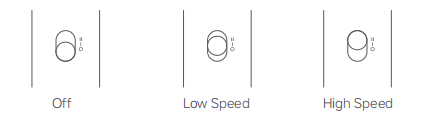
To turn on/off and change the speed, please refer to the following steps:
1. Make sure the on/off/speed button is set to the off [O] position, then insert the power plug into an electrical outlet and push the button to the [I] position to turn on the hair dryer at low speed. Continue pushing the button to the [II] position to switch the hair dryer to high speed;
2. Push the on/off/speed button down to the [O] position to turn off the hair dryer.
The indicator status of selecting the different temperature levels:
1. Cool air: All temperature indicators off;
2. Low heat: 1 temperature indicator on;
3. Medium heat: 2 temperature indicators on;
4. High heat: 3 temperature indicators on.
To turn on/off and change the speed, please refer to the following steps:
1. Make sure the on/off/speed button is set to the off [O] position, then insert the power plug into an electrical outlet and push the button to the [I] position to turn on the hair dryer at low speed. Continue pushing the button to the [II] position to switch the hair dryer to high speed;
2. Push the on/off/speed button down to the [O] position to turn off the hair dryer.
Does it help?
Yes
No