

What is Quick ball on the POCO F6?
Quick ball is a movable floating button, located at the edge of the screen, appearing as a floating ball icon, by which you can quickly access preset functions or applications. You can customize the shortcut operations of Quick ball according to your personal needs, including common applications, settings, screenshots, screen recording, etc. This function can help you operate more efficiently and improve the convenience of daily use. Meanwhile, it provides more convenience for some one-handed operation scenarios.
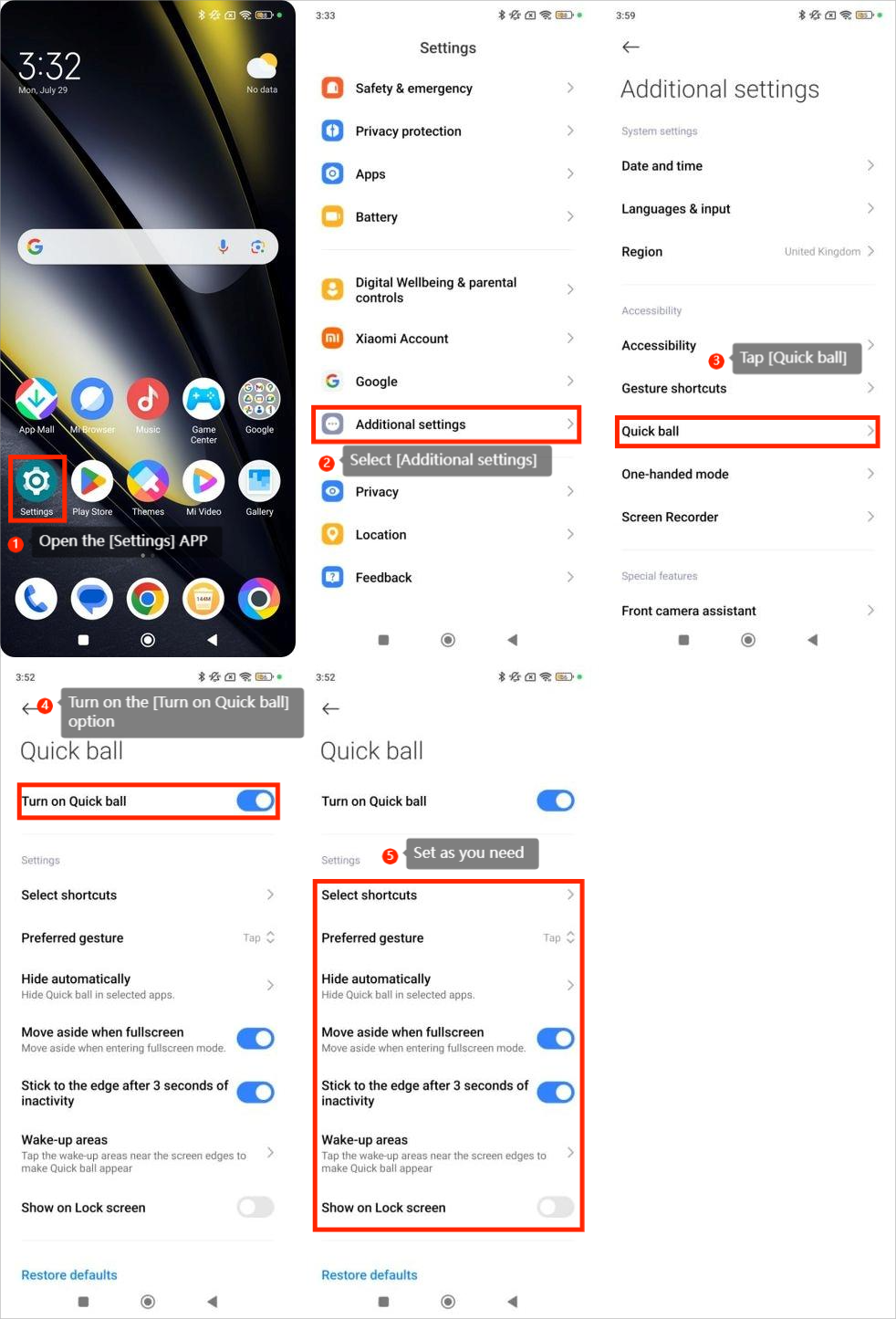
To use the Quick ball, you can refer to the following steps:
1. Open the [Settings] APP;
2. Select [Additional settings];
3. Tap [Quick ball];
4. Turn on the [Turn on Quick ball] option;
5. Set as you need.
To use the Quick ball, you can refer to the following steps:
1. Open the [Settings] APP;
2. Select [Additional settings];
3. Tap [Quick ball];
4. Turn on the [Turn on Quick ball] option;
5. Set as you need.
Does it help?
Yes
No