

How to turn on and set AI air gestures on the POCO F6 Pro?
Contactless gestures technology uses various sensors and technologies to realize gesture control functions. Through specific gestures, you can control music playback, pause or skip tracks without touching the device. You can also answer or reject calls through gesture control. This function not only improves the convenience of operation, but also increases the interactivity and futuristic sense of device use.
To use this function, you can refer to the following steps:
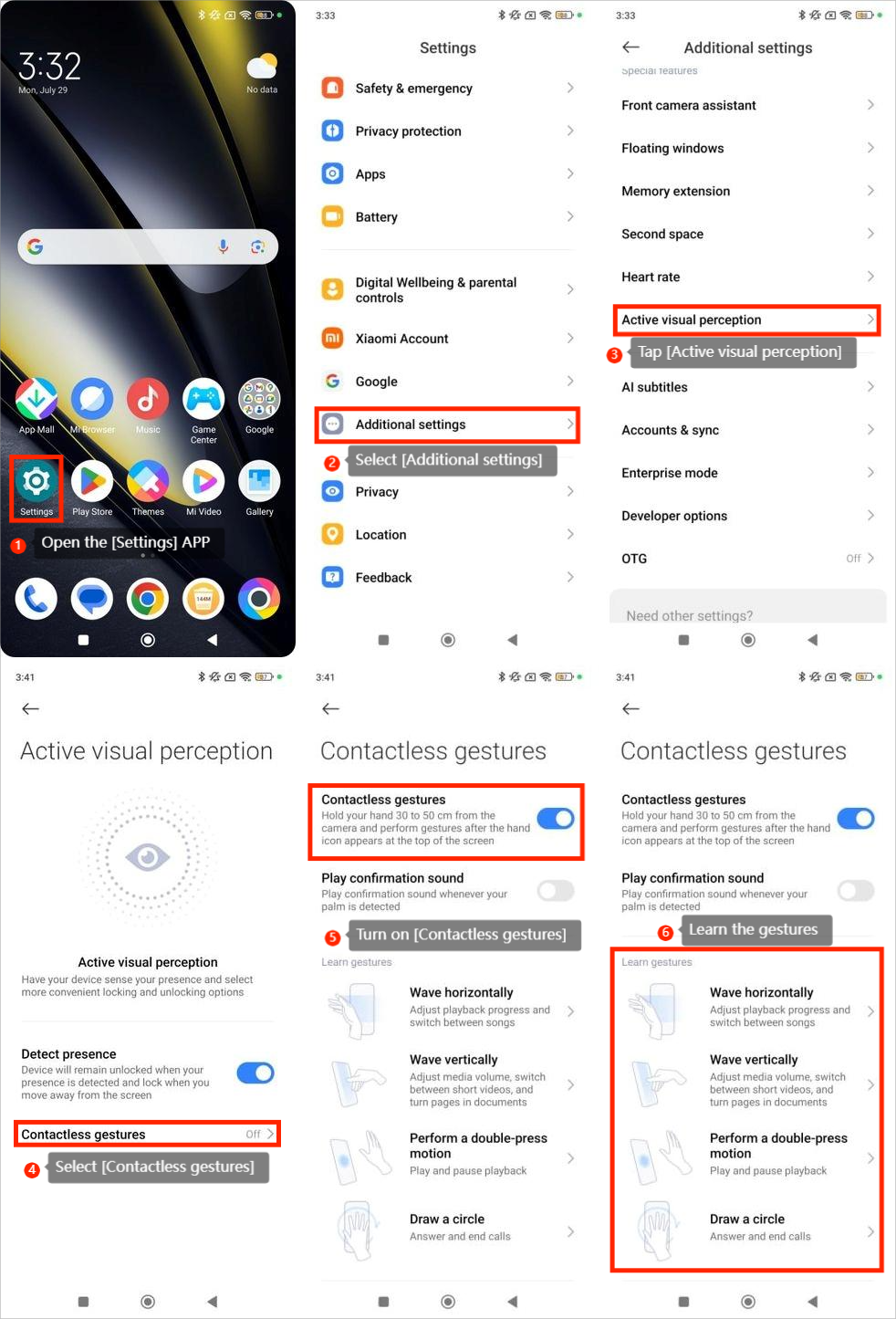
1. Open the [Settings] APP;
2. Select [Additional settings];
3. Tap [Active visual perception];
4. Select [Contactless gestures];
5. Turn on [Contactless gestures];
6. Learn the gestures.
Note:
When this feature is on, this device will detect and analyze your gestures. Your personal information will not be processed, no data will be stored locally or in the cloud.
To use this function, you can refer to the following steps:
1. Open the [Settings] APP;
2. Select [Additional settings];
3. Tap [Active visual perception];
4. Select [Contactless gestures];
5. Turn on [Contactless gestures];
6. Learn the gestures.
Note:
When this feature is on, this device will detect and analyze your gestures. Your personal information will not be processed, no data will be stored locally or in the cloud.
Does it help?
Yes
No