

What do the various icons on the Xiaomi Vacuum Cleaner G20 Max screen mean?
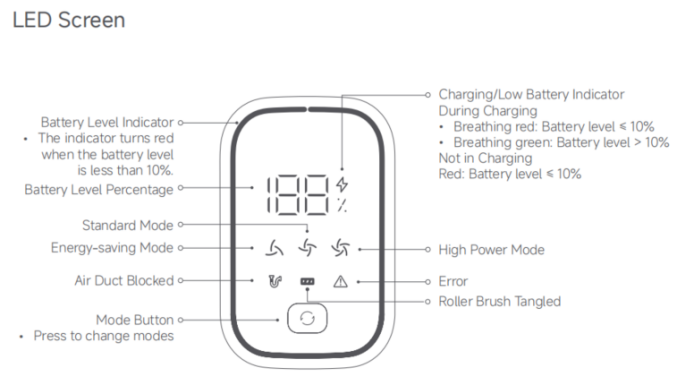
1. Battery Level indicator
The indicator turns red when the battery level is less than 10%;
2. Battery Level Percentage
3. Charging/Low battery Indicator
(1). During charging:
When the indicator is breathing in red, it means that the battery level is ≤ 10%. When the indicator is breathing in green, it means that the battery level is >10%;
(2). Not in Charging:
When the indicator is red, it means that the battery level is ≤ 10%.
4. Energy-saving Mode/Standard Mode/High Power Mode
5. Air Duct Blocked/Roller Brush Tangled/Error
6. Mode Button (Press to change the modes).
Note:
If the vacuum cleaner cannot work properly, the screen will show the relevant error messages. For solutions, refer to the troubleshooting. If the issue persists, contact the after-sales service team.
The indicator turns red when the battery level is less than 10%;
2. Battery Level Percentage
3. Charging/Low battery Indicator
(1). During charging:
When the indicator is breathing in red, it means that the battery level is ≤ 10%. When the indicator is breathing in green, it means that the battery level is >10%;
(2). Not in Charging:
When the indicator is red, it means that the battery level is ≤ 10%.
4. Energy-saving Mode/Standard Mode/High Power Mode
5. Air Duct Blocked/Roller Brush Tangled/Error
6. Mode Button (Press to change the modes).
Note:
If the vacuum cleaner cannot work properly, the screen will show the relevant error messages. For solutions, refer to the troubleshooting. If the issue persists, contact the after-sales service team.
Does it help?
Yes
No