

Xiaomi Smart Blender FAQ
Overview
Q1: What is a blender?
A: Blenders use ultra-high-speed motors to drive the mixing blades, cutting and pulverizing ingredients at extremely high speeds within the blending cup. This breaks down the cell walls of the ingredients, fully releasing the vitamins, minerals, phytochemicals, proteins, and water within the cells.
The blender integrates the functions of various appliances, such as juicers, soy milk makers, ice cream makers, and food processors, into a single, versatile unit.
Key factors influencing the rate and effectiveness of a blender include the motor's loaded rotational speed, the speed transmitted to the blades via the connector, the number and geometric parameters of the blades (such as length and thickness), and the shape parameters of the blending jar.
These factors are ultimately reflected in the instantaneous speed and cutting frequency of the blade when cutting or impacting food, thereby achieving a balanced effect of cell wall breaking and pulverizing.
Product introduction and use
Q1: What are the selling points of the Xiaomi Smart Blender?
A: For your reference, here are the selling points of the Xiaomi Smart Blender:
1. The device features a variable frequency high-power motor that delivers added torque for thorough, fine blending and consistent results even under high loads.
2. It offers hot and cold dual-mode blending, allowing for up to 1200 mL of hot drinks or 1600 mL of cold drinks to be made in a single batch.
3. The 8 stainless steel, multi-angle blades are designed with three layers to break down large pieces, blend small pieces, and churn bottom ingredients for smooth textures.
4. Nine adjustable speed settings (1-3 for mixing, 4-6 for soft foods, and 7-9 for harder ingredients) provide precise control for achieving the perfect consistency.
5. The built-in heating plate with 800-950 W power enables the preparation of hot soups and beverages, with a keep-warm function that maintains temperature for up to 4 hours.
6. Smart control is available via the Xiaomi Home app, which enables recipe sending, remote operation, and scheduling up to 12 hours in advance.
7. The high borosilicate glass jar is durable, heat and cold resistant, features clear measurement marks, and has a 1600 mL capacity for large batches.
8. An intuitive OLED knob with touch buttons serves as both a control dial and a display, while the Manual mode allows real-time speed adjustments during blending.
9. A convenient cleaning mode uses high-speed blending with water to clean the jar with minimal effort.
10. Multiple safety features are incorporated, including magnetic induction protection, automatic stop when the lid is opened, overheat protection, and jar lifting protection.
Q2: What are the functions of the Xiaomi Smart Blender?
A: Xiaomi Smart Blender has 3 general functions: [Press & hold to clean], [Manual], and [Settings]. 4 hot beverage functions: [Jam], [Smooth soup], [Chunky soup], and [Soy milk]. 3 cold drink management functions: [Smoothie], [Fruit & vegetable juice], and [Milkshake]. More recipes can also be selected through the Xiaomi Home app.
Q3: What is the cooking time for the Xiaomi Smart Blender?
A: The cooking time of different cooking functions is different, and the amount of water, water temperature and working voltage also have an impact. The cooking time of the Xiaomi Smart Blender is as follows: (The actual completion time is related to the ambient temperature and water temperature)
Q4: How to choose the function of the Xiaomi Smart Blender?
A: 1. After connecting the Xiaomi Smart Blender power supply, press and hold the power-on rotary knob to select the desired cooking function.
2. Press the screen to start the selected function.
3. Press the screen again to pause the selected function, turn the knob to the right to select other functions, and press the cancel button to return to the function selection.
4. Press the cancel button to exit cooking in any cooking mode.
Q5: How to use the Xiaomi Smart Blender?
A: 1. Take out the blender and clean the lid plug, lid, and tamper.
2. Wash the ingredients, cut them into 3 cm cubes, and place them in the jar.
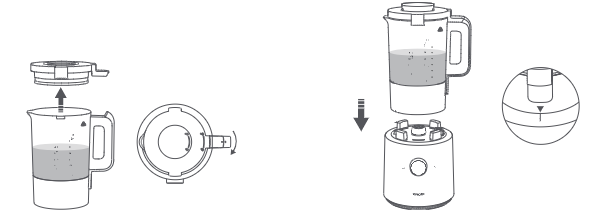
3. Install the lid plug onto the lid, and turn the lid clockwise to lock it with the jar.
4. Place the jar onto the base properly by aligning the small triangle under the handle with the marking on the base. Ensure the base is placed on a stable surface.
5. Once the blender is powered on, turn the knob to cycle through functions. When the desired function appears on the screen, press the knob to enable it
Q6: How to use the measuring cup of the Xiaomi Smart Blender?
A: The scale on the Xiaomi Smart Blender measuring cup corresponds to the scale that needs to be reached when adding water to the blender when cooking the corresponding ingredients. For example, to make rice cereal, when the measuring cup reaches the 800 mL mark, you need to add water to the 800 mL hot drink mark in the mixing cup for cooking.
To make soymilk, when the measuring cup reaches the 800 mL level of soybeans, add water to the mixing cup to the 800 mL hot drink level and cook.
Q7: How to use the appointment mode through the Xiaomi Smart Blender button?
A: The appointment mode of the Xiaomi Smart Blender can only select the hot drink function.
In order to reserve the time when cooking is completed, press the Schedule button, and the device will enter the reservation mode. The reservation LED indicator lights up. At this time, the current function name is displayed on the OLED screen, and the function that needs to be reserved can be adjusted by rotating the knob left and right.
After selecting the function, press the knob to adjust the appointment time. First, the time required to complete the cooking of the current function is displayed, and the time is adjusted by rotating the knob.
After setting the countdown duration, press the knob to confirm, start the appointment, and count down. During the reservation adjustment process, if the operation is not confirmed, the screen will be turned off after 10 minutes.
Note:
Each different function has a different maximum reservation time limit, and the maximum adjustment is to the limit time position of the reservation. For example, under the soy milk function, the maximum reservation time is 12 hours.
Q8: How to operate the function mode of the Xiaomi Smart Blender?
A: After connecting to the power supply, the screen will display "Jam". Turn the knob to the right to select other cooking functions, and press the knob to start cooking drinks. Pressing the knob after starting work will pause the work, and pressing it again will resume work.
Note:
Press the cancel button to exit the current mode when the product is working or paused.
Q9: Does Xiaomi Smart Blender support factory reset?
A: This product does not support factory reset.
Q10: How to use the [Press & hold to clean] mode of the Xiaomi Smart Blender?
A: The [Press & hold to clean] function is generally used when the food is not fully blended, and then enable this function to blend thoroughly in a short time. After connecting the power supply, turn the knob to the [Press & hold to clean] mode. Once the ingredients or water are added, press and hold the knob to start the task.
Q11: How to use the Manual mode of the Xiaomi Smart Blender?
A: In Manual mode, you can adjust the speed setting as needed while blending. Rotate the knob to swiftly increase or decrease the speed for efficient blending. Turn the knob to Manual mode, press and turn it to select the speed. There are 9 speed settings you can select to blend soft or hard ingredients.
Q12: Can the Xiaomi Smart Blender be used in high altitude areas?
A: It is not recommended to use it in high altitude areas. The higher the altitude in the area, the lower the air pressure. When using the Xiaomi Smart Blender, there may be so-called "can't boil", "undercook", and "overflow" phenomena when cooking food.
Note:
The normal working altitude range of the Xiaomi Smart Blender is 0 m~2000 m.
Q13: Will the Xiaomi Smart Blender overflow during cooking?
A: 1. The cooking function of the Xiaomi Smart Blender is designed for specific ingredients. Please be sure to strictly follow the recommended standard recipe. Adding excessive water or ingredients may cause the liquid or food to overflow or even lead to operational malfunctions.
2. Check if the device is being used in a high-altitude area. The Xiaomi Smart Blender cannot be used in areas with an altitude exceeding 2000 meters.
3. Check for any after-sales performance malfunctions.
Q14: Will the Xiaomi Smart Blender automatically power off after cooking? Is there a voice function?
A: Xiaomi Smart Blender will automatically enter standby mode or keep warm mode after the cooking function is completed, so you can use it with confidence.
There will be a sound reminder after the cooking is finished, but there is no voice function.
Note:
The default keep warm temperature is 70 ℃. You can change the keep warm temperature or cancel the keep warm in the Xiaomi Home app.
Q15: Why can't the water level be lower than the minimum water level line or higher than the maximum water level line when using the Xiaomi Smart Blender?
A: When using the heating function, the water level must be kept between the minimum and maximum lines (these lines are marked on the glass jar). If the water level falls below the minimum line, it may shorten the blender's lifespan or damage the device; if it exceeds the maximum line, there is a risk of liquid splashing, which could cause burns. Please ensure you operate the device according to the water level markings specific to each function.
Q16: Can the Xiaomi Smart Blender share a power outlet with other appliances? What is the required current rating?
A: It is not recommended that the Xiaomi Smart Blender share a socket with other appliances, because the device has a large operating current and is best used with a separate socket with a rated current of not less than 10 A. We recommend unplugging the device when it is not in use.
Q17: Will it continue to heat or keep warm when I lift the jar of Xiaomi Smart Blender and put it on the stand?
A: After lifting the jar, the display will show a "Place the jar" prompt. The product features a "jar-lift memory" function: if the jar is replaced and the function knob is pressed within 2 minutes, the machine will resume the current cooking program; if the pause exceeds 2 minutes, the machine will revert to the standby screen of the previous function menu.
Note:
Press the knob during the pause countdown to resume operation.
Q18: Can the blades of Xiaomi Smart Blender be removed?
A: The blender features an integrated design where the blade unit and the blending jar are one single piece; the blade unit cannot be detached separately. The blades are sharp; do not touch them directly with your hands. To clean, add an appropriate amount of water to the jar and run the machine for a short period to clean the blades. Please clean the unit promptly after each use.
Q19: Is the handle of the Xiaomi Smart Blender securely fixed? Will it come loose?
A: The handle of the Xiaomi Smart Blender features a plastic frame design that has passed high and low temperature tests; it has also passed a high-intensity reliability swing test, so you can use it with confidence.
Q20: Can the lid be opened while the Xiaomi Smart Blender is working?
A: When using the non-heating function, if you need to add ingredients, you can open the lid to add them. However, since the blender can reach temperatures of up to 100 °C during operation, opening the lid while a heating function is active is strictly prohibited to prevent burns caused by food splashing.
Q21: How to clean the limescale of the Xiaomi Smart Blender?
A: If you find limescale inside the Xiaomi Smart Blender, please use limescale cleaner to clean it, or add an appropriate amount of vinegar and boil water to clean it.
Q22: How to clean and maintain the Xiaomi Smart Blender in daily use?
A: 1. Watch out for burns from residual heat. Please wait for the jar to cool down before cleaning.
2. Once the jar has cooled down and is empty, please add clean water and run the [Press & hold to clean] mode to clean several times to properly clean the jar.
3. The exterior of the base can be wiped down with a damp cloth once the power is disconnected. Do not soak the base, jar, power cord, and other parts with electronics. Do not directly rinse the base or other parts that contain electronics, such as the bottom of the jar.
4. Please rinse the jar's interior and accessories with clean water before wiping them dry. The blades are sharp, so please be careful when cleaning to avoid injury.
5. Do not use abrasive cleaners or corrosive liquids (gasoline, acetone, etc.) to clean the blender.
6. When parts are stained with fruit or vegetable juice, wiping these parts with several drops of cooking oil before cleaning can help remove stains more easily. Thoroughly dry the parts after rinsing them with clean water.
7. If the residue in the jar forms a hard spot that is difficult to remove, please add an appropriate amount of water to soak it before cleaning and wiping the blender dry.
8. If the inner bottom of the jar is not cleaned up even after multiple cleanings, and a residual layer has adhered to it, soak it in clean water for a period of time before gently wiping it clean with a cloth dipped in white vinegar. Please mind the blade while wiping to avoid any accidents. (Do not power on the blender when cleaning.)
9. The blender should be used frequently to keep the motor dry.
10. If the blender will not be used for an extended period of time, please store it in a well-ventilated and dry place to prevent the motor from getting wet and affecting its future use
Q23: What is the keep-warm function of the Xiaomi Smart Blender?
A: The keep-warm function of the Xiaomi Smart Blender is only suitable for hot drinks. Once blending is complete, the machine automatically enters keep-warm mode. The default temperature is 70 °C (adjustable via the app within the 60 °C–80 °C range), and the default duration is 2 hours (this duration cannot be changed).
Note:
Note: The machine has a "jar lift memory" function during the keep-warm process, which lasts for 3 minutes. If you lift the jar or open the lid and put it back, the machine will pause. Press the knob to resume keep-warming. The pause time is 3 minutes.
Q24: Is the Xiaomi Smart Blender noisy?
A: The Xiaomi Smart Blender will produce sound when running because the operation of the motor, etc., will produce noise. Different gears and different ingredients produce different noises. The measured data is about 67-82 decibels. Please use it with confidence.
Xiaomi Home App Related
Q1: Does the Xiaomi Smart Blender support internet connectivity?
A: The Xiaomi Smart Blender supports Wi-Fi. Once connected via the Xiaomi Home app, you can access features such as viewing recipes, scheduling operations, setting automatic keep-warm functions and temperatures, selecting additional modes, and performing firmware upgrades.
Q2: Does the Xiaomi Smart Blender have to be connected to a Xiaomi router?
A: Xiaomi Smart Blender is compatible with mainstream routers on the market. It should be noted that the Xiaomi Smart Blender has the following requirements for the wireless network:
1. Only supports connections to 2.4GHz Wi-Fi networks; 5GHz Wi-Fi is not supported.
2. The Wi-Fi name (SSID) must not contain Chinese characters or special characters.
3. The Wi-Fi encryption method must be WPA/WPA2; WEP is not supported.
4. The router must have the DHCP function enabled; static IP assignment, web-based authentication, and enterprise-grade 802.1X networks are not currently supported.
Q3: How to bind Xiaomi Smart Blender with the Xiaomi Home app?
A: 1. Download the App: Use your mobile phone to scan the QR code in the manual or search for the Xiaomi Home App through the mobile app store to download and install. Make sure that your home Wi-Fi can access the Internet normally.
2. Open the Xiaomi Home app, tap the [+] icon in the upper right corner. You can add it from a nearby device, or you can add it manually.
3. Select the Wi-Fi that Xiaomi Smart Blender will connect to and enter the password, then tap [Next].
4. After the device is successfully connected to the Internet, you can control the blender using the Xiaomi Home App.
Q4: What recipes does Xiaomi Smart Blender have in the Xiaomi Home App?
A: Through the Xiaomi Home app, you can directly use the 8 recipes on the Xiaomi Smart Blender, or you can choose your favorite recipe from more recipes to cook according to your personal preference.
Q5: What are the precautions for remotely controlling the Xiaomi Smart Blender through the Xiaomi Home App?
A: The Xiaomi Smart Blender connects to your smartphone via Wi-Fi, enabling remote operation. Please ensure the appliance is in proper working condition before operating it remotely; strictly avoid starting the device remotely if the water or ingredient levels do not meet the required specifications.
Q6: Does the Xiaomi Smart Blender turn off the beep sound through the Xiaomi Home App?
A: The product's notification sounds are for operation guidance and cannot be temporarily turned off.
Q7: Does the Xiaomi Smart Blender have a child lock?
A: The Xiaomi Smart Blender has no child lock function.
Q8: Does the Xiaomi Smart Blender support control by multiple people?
A: The Xiaomi Smart Blender supports being controlled by multiple people. You can tap the three-dot icon in the upper right corner of the Xiaomi Smart Blender plugin and select [Share device].
Q9: Does the Xiaomi Smart Blender support firmware updates?
A: The Xiaomi Smart Blender supports firmware updates. You can tap the three-dot icon in the upper right corner of the Xiaomi Smart Blender plugin and select [Firmware update].
Q10: After the Xiaomi Smart Blender is shared with others, can the shared person upgrade the firmware?
A: Currently, users who are shared are not supported to upgrade the firmware of the product.
Q11: How to unbind the Xiaomi Smart Blender?
A: 1. You can open the Xiaomi Home App, enter the Xiaomi Smart Blender plug-in, tap the three-dot icon in the upper right corner to enter settings, tap [Delete device] to delete the device, and then unbind.
2. You can also unbind by resetting the Wi-Fi on the device.
Q12: Why does the Xiaomi Home App indicate that the Xiaomi Smart Blender is abnormal?
A: The faulty details are as follows:
FAQ and Troubleshooting
Q1: What to do if the Xiaomi Smart Blender consistently shows as "offline" in the Xiaomi Home app or fails to connect to Wi-Fi?
A: 1. This product does not support 5GHz Wi-Fi; please ensure your home router is broadcasting a 2.4GHz Wi-Fi signal.
2. Check if the distance between the router and the device is too great. Try moving the device closer to the router and re-pairing it.
3. Check if the Wi-Fi name (SSID) or password contains special characters or Chinese characters. Try changing the Wi-Fi name and password.
4. Check if the router has MAC address filtering enabled, or if a blacklist/whitelist function is active.
5. Verify that the Wi-Fi password has been entered correctly.
6. Check if your smartphone allows the app to access the network.
7. If security software is installed on your phone or the system has security restrictions, please mark the app as "trusted" and grant it network access permissions.
8. Try connecting via a different network environment.
Q2: Why can't the Xiaomi Home app on my phone detect the Xiaomi Smart Blender?
A: 1. Go to your phone's settings and make sure the Xiaomi Home app has permission to access your location, Bluetooth, and others.
2. Please ensure that the Xiaomi Home region matches the location where the product was purchased.
3. Please reset the Wi-Fi on the blender and try adding the device again.
4. If you still can't get it to connect after trying all these steps, please contact the after-sales center.
Q3: What to do if food overflows, cannot be blended, or is not cooked properly when using the Xiaomi Smart Blender?
A: 1. Check if the quantity of ingredients is excessive or insufficient.
2. Check if the water level is too high or too low, and adjust it to the appropriate level.
3. Check if the wrong function mode was selected. Please choose the correct mode according to the user manual.
4. Check if the program stopped midway, resulting in insufficient blending time.
5. Adding water or other ingredients during the program, or terminating the program early, may result in the food being undercooked.
6. If the issue persists, please contact the after-sales center.
Q4: What to do when there is a paste-like food when using the Xiaomi Smart Blender?
A: 1. Check if the quantity of ingredients exceeds the limit.
2. Check if ingredients prone to sticking or burning (such as flour) are used.
3. Check if the water level is too low and add water to the correct level.
4. Check if the bottom of the jar was not cleaned thoroughly.
5. Check if the wrong function mode was selected; please choose the appropriate function according to the user manual.
6. If none of the above issues apply, it is recommended to contact after-sales support to check for potential equipment malfunctions.
Q5: Why is the food not hot even though the Xiaomi Smart Blender program has finished running?
A: 1. Check if the wrong function mode was selected. Some modes perform blending only without heating; please ensure you select the correct function mode according to the user manual.
2. Contact after-sales support to check for any equipment malfunction.
Q6: Why is the display screen of the Xiaomi Smart Blender lit up, but the machine is not working?
A: 1. Check if you attempted to start the machine without pressing the knob to confirm after selecting a function. Please re-select the function, confirm your choice, and then tap the screen to start.
2. Check if the blender lid is properly installed (ensure it is not attached backwards or left unlatched).
3. Check if there is water in the blending jar. A lack of water may trigger the overheat protection mechanism. Please add water to the appropriate level mark and restart the machine after it has cooled down.
4. If a beeping alarm sounds during operation, unplug the power cord, reconnect it, and then operate the machine according to standard procedures.
5. If the above methods do not resolve the issue, please contact after-sales support to check for potential hardware malfunctions.
Note:
If the display screen does not light up, please check that the power cord is securely plugged in and the power supply is active.
Q7: What to do if there is no response when turning the knob while the Xiaomi Smart Blender is operating?
A: When the Xiaomi Smart Blender is in operation, it is not possible to select the desired function by rotating the knob. You must first press the screen to pause operation; this is normal behavior.
Q8: What to do if the Xiaomi Smart Blender makes noise while operating?
A: 1. Please check that the power connection is secure and that the blending jar and lid are properly installed.
2. The Xiaomi Smart Blender generates some noise during operation due to the high-speed rotation of the motor. This is normal, and the product has passed rigorous noise testing prior to leaving the factory.
3. The blender relies on upper and lower clutches for power transmission; slight contact between the clutches during operation may produce a "clicking" sound, which is normal.
4. Additionally, if the motor emits an unusual noise, please disconnect the power immediately, stop using the device, and contact after-sales support to check for any mechanical malfunctions.
Q9: Why can't I select the "soy milk" function again after the soy milk made with the Xiaomi Smart Blender has not been poured out?
A: The soymilk that has already been cooked cannot be heated again by the soymilk function, which is likely to cause a paste bottom. After removing the mixing jar, put it back on the base within 120 seconds, and press the knob to continue the heat preservation. After the heat preservation is over, if you want to reheat the soy milk, you need to pour it out and heat it up.
Q10: How to clean the Xiaomi Smart Blender after it appears sticky?
A: 1. It is recommended to clean the blender promptly after use to prevent residue from adhering to the base plate surface over time, which makes cleaning more difficult. If this has already occurred, soak the base in hot water for one hour before cleaning.
2. Certain water qualities (particularly water with high mineral content) can cause soy milk or rice paste to congeal into sticky clumps after preparation. When cleaning, add a small amount of table salt to the water, heat the mixture, and then scrub the base plate surface directly with a brush or scouring pad.
3. Add a small amount of water and two tablespoons of baking soda, or a mixture of white vinegar and water (1:10 ratio), and let it soak for one hour. Then, run the blender on the highest manual speed setting for one minute and finally scrub the base plate surface directly with a brush or scouring pad.
Q11: Why does the Xiaomi Smart Blender that I just bought emit a burnt smell when using it?
A: 1. If the machine emits smoke, please cut off the power immediately, stop using it, and check whether the performance is faulty after sale.
2. If you only detect a burnt smell, this is because the new motor inside the Xiaomi Smart Blender contains insulating varnish. As the motor operates and the coil temperature rises, the heat causes the varnish to release a burnt odor. This is a normal phenomenon for a brand-new motor. The smell will dissipate after a few uses, so you can continue using the appliance with confidence.
Q12: Why is the Xiaomi Smart Blender’s actual heating time inconsistent with the preset time?
A: The preset time of the Xiaomi Smart Blender is tested in the laboratory under the conditions of predetermined water temperature, water volume, and voltage. When the product is actually used, different water temperature, water volume, and voltage will affect the actual cooking time.
Q13: What to do if the Xiaomi Smart Blender cannot be turned on (cannot be heated)?
A: 1. Check whether the power cord is damaged, whether the socket has electricity, and whether it is turned on.
2. Check whether the Xiaomi Smart Blender lid is properly closed (whether the lid is reversed, whether the lid is not properly closed, etc.).
3. Check whether there is any debris in the contact part between the bottom of the jar and the base. If there is debris, please remove it after turning off the power.
4. If you cook food that is easy to stick to the bottom, it may trigger the dry-burning protection function of the electric kettle. Please clean the jar after cooling to normal temperature, and use it after removing the burnt food.
5. If it still cannot be heated, after-sales inspection is required.
The Xiaomi Smart Blender features dual anti-dry-burning safety protection (including a thermostat and a thermal fuse), so you can use it with confidence.
Q14: Why are there small rust spots on the bottom of the Xiaomi Smart Blender?
A: The bottom heating plate and top decorative sheet of the Xiaomi Smart Blender are made of standard Ni, Fe, Mn (SUS304) materials, which have excellent anti-rust effect and can meet the normal use conditions of wall breakers. The appearance of small rust spots may be caused by a reaction between the stainless steel and substances present in the water. You can try cleaning the affected area with citric acid or vinegar
Q15: Why is there scale (white spots) in the blender jar after using Xiaomi Smart Blender only a few times?
A: There is scale formation in the Xiaomi Smart Blender or the boiled water becomes cloudy. This is caused by the hard water quality and calcium carbonate and magnesium carbonate in the water. If you want no scale formation, it is recommended to use pure water.
Q16: After the Xiaomi Smart Blender is heated to boiling (the countdown starts), what to do if the program is accidentally terminated?
A: When using the heating function, do not stop the program once the ingredients have reached a boil (i.e., after the countdown has begun). If the program is stopped due to accidental operation, do not simply restart the heating function to continue. Doing so could cause repeated boiling, hot food to overflow, or the mixture to burn and stick to the bottom of the jar. It is recommended to either replace the ingredients and select the function again, or cook the ingredients in a separate pot first and then use the [Press & hold to clean] mode to blend and pulverize them.
Q17: Why does the lid of the Xiaomi Smart Blender rotate during the working process?
A: 1. Check whether the lid is equipped with a sealing ring (soft rubber ring at the narrow end of the lid). If not, please check whether there is a sealing ring or whether the sealing ring is properly assembled.
2. Check whether the cup cover is installed correctly;
3. Check whether it is a performance failure after sale.
Q18: Why does Xiaomi Smart Blender smell strange when unpacked?
A: The Xiaomi Smart Blender package contains foam, and the foam contains the ingredients of penicillin and Anhui, which will produce a certain peculiar smell, which is a normal phenomenon; the peculiar smell will disappear quickly after opening the box. Please use it with confidence.
Q19: Why is the cooking time displayed on the Xiaomi Smart Blender different from the completion time of the App?
A: The Xiaomi Smart Blender body shows the time as a countdown, and the Xiaomi Home App shows the clock time after completion. The two time measurements are different.
Q20: Is it normal to have cracks on the handle of the Xiaomi Smart Blender?
A: The plastic parts of the Xiaomi Smart Blender handle are assembled on both sides, and the middle seam is designed as a normal structure. Please use it with confidence.
Does it help?
Yes
No