

Mi True Wireless Earphone FAQ
| Specification | 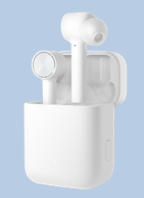 |
| Size | Earphone:44.2x22.5x14.4mmCharging box:52.6x44x31.1mm |
| Product net weight | Earphone:5.8gCharging box:58g |
| Product model | TWSEJ01JY |
| Wireless connection | Bluetooth 4.2 version |
| Communication distance | 10meters |
| Bluetooth protocol | BLE/HFP/HSP/A2DP/AVRCP |
| Audio coding | SBC/AAC |
| Charging way | Earphone:Magnetic suction contactCharging box:USB Type-C |
| Input parameters | 5V/1.1A |
| Speaker impedance | 16Ω |
| Battery capacity | Earphone:55mAhCharging box:410mAh |
| Charging time | Earphone:1hour Charging box:1hours |
| Battery life | Earphone:3hourCharging box:10hours |
| Protection grade | IPX4 |
| Noise reduction method | Beamforming +ENC noise reduction +ANC active noise reduction |
| Mode of operation | Earphone:Touch KeyCharging box:Physical key |
| In-ar detection | Support |
| Stereo call | Support |
| Execution standard | Q/WMSX 002-2016 |
| CMIIT ID | 2018DP6155 |
| Standard | Earphone,charging box,USB cable,silicone earmuffs,Instruction |
A: The protection level of Mi True Wireless Earphone is IPX4.
4.Q: What certifications has Mi True Wireless Earphone passed?
A:The SRRC, CE, NCC safety certification and BQB bluetooth certification.
5.Q: What environmental protection requirements does the Mi True Wireless Earphone pass?
A: The ROHS, HF, REACH and WEEE.
6.Q: What are true wireless headphones (TWS) and what are the features of true wireless headphones?
A: It uses true wireless stereo technology, which enables wireless connection between the two headphones without any wire connection.Compared with the traditional two-ear bluetooth headset, TWS technology completely eliminates the use of wires. Through the wireless series of two headphones, stereo is realized, which greatly reduces the stethoscope effect caused by the wire swing during use.
Q&A
1. Q: How to charge Mi True Wireless Earphone and charging case?
A: As follows:
Earphone: put the earphone into the charging box and enter the charging state automatically.Charging box: after connecting the adapter, the charging box enters the charging state. When charging, the white light of the indicator light flashes slowly (on for 1 second, off for 1 second). After charging, the indicator light lights up.
Note:
1. The device turn off when the first time use, please put the headset into the charging box and press the function button to activate it.It is recommended to charge the device before using it.
2. When the headset is put into the charging box and connected to the adapter, both the headset and the charging box are in the charging state.
3. Both earphone and charging box support quick charging.
4. The rated input voltage/current of the charging box is 5V/ 1.1A. It is recommended to use the adapter with rated output above 1.1A.5. Some tablet computers or laptops have a special charging protocol and may not be able to charge. In this case, it is recommended to replace the charger to charge the headset.6. Avoid charging at high temperature, high humidity or low temperature.
7. Do not use the headset battery case after it is fully charged. The battery will be drained and shut down after 10 days.It is recommended to charge the battery once every month (the earphone battery case is full) to avoid battery damage.
2. Q: How to check the power of Air headset and charging case?
A: As follows:
Headset: in the following two states, you can check the headset power through the headset indicator:
1. When the headset is charging (that is, when the charging box is charged and the headset is put into the charging box), open the charging box cover;
2. When the earphone is removed from the charging box/when the earphone is removed from the ear.
View method:
1. The white light of the headphone indicator is on for 5 seconds, indicating that the power is sufficient. At this time, the power is between 30% and 100%.2. The headphone indicator is flashing white (it flashes once in 0.5 seconds and lasts for 5 times), indicating that the power is low and it needs to be charged in time. At this time, the power is less than 30%.The power of earphone can be displayed in the notification bar of some models. When both ears are in use, the power of earphone with low power can be displayed. The power of the notification bar is for reference only.
Charging box:
Press the function button when the charging box cover is closed, or when the charging box cover is opened, you can check the power through the LED light of the charging box.
View method:
1. The white light of the indicator light of the charging case is on for 5 seconds, indicating that the power is sufficient.
2. The white light of the indicator light of the charging case flashes (flashing once per second for 10 times), indicating low power.It is not enough to charge the two earphones once, so it needs to be recharged in time.
3. When the charging box cover is opened, the indicator light is flashing red or not on, indicating that the battery is exhausted.When charging the charging box, the white indicator light of the charging box flashes slowly (on for 1 second, off for 1 second), and the indicator light lights up long after the charging is completed.
3. Q: How to wear the Mi True Wireless Earphone?
A: As follows:
1. Take the earphone out of the charging box and wear it according to the earphone left and right earphone labels.
2. Appropriate ear muffs can be replaced according to their own comfort level.
Tip: after use, put the headset back to the charging box in time to extend the service life and prevent loss.
4. Q: How to boot the Mi True Wireless Earphone?
A: Open the lid of the charging box and the earphones will turn on automatically.
5. Q: How does Mi True Wireless Earphone connect to devices?
A: 1. Put the headset into the charging box, long press the function button for 2 seconds, the indicator light of the charging box flashes, and the headset enters the waiting state.If there is no connection within 60 seconds, the earphone will go into hibernation.
2. Turn on the bluetooth of the device, search and connect "Mi True Wireless Earphones" of the bluetooth device. If you need to connect the password, enter "0000".
6. Q: How to disconnect the Mi True Wireless Earphone from the device?
A: 1. Put the two earphones into the charging box, close the lid and disconnect automatically after 5S.
2. Click the bluetooth name after the device is connected, and choose disconnect or cancel pairing to complete the disconnect.
3. Turn off the bluetooth switch of the device or disconnect the connection.
7. Q: How many connection records can the Mi True Wireless Earphone keep at most?
A:The Mi True Wireless Earphone can save connection records of up to eight devices.
8.Q: How to connect the left and right earphones to one device respectively?
A: 1. Put the single earphone into the charging box, long press the function button for 2 seconds, and use device A to search and connect the earphone.
2. Take the single earphone connected to device A out of the charging box, put it into the other earphone, long press the function button for 2 seconds, search and connect the earphone with device B, and then connect the two single earphones to different devices.
Tip: clear the connection record of the two unilateral earphones before using this feature.
9. Q: Does the Mi True Wireless Earphone support simultaneous connection to two devices?
A: Mi True Wireless Earphone does not support connecting two devices at the same time (it supports connecting left and right headphones to one device separately).
10. Q: Does the Mi True Wireless Earphone need to be connected in series manually?
A: Mi True Wireless Earphone does not need to be connected in series manually.
11. Q: Will the Mi True Wireless Earphone go into hibernation if it is not connected with the device for a long time?
A: Because the device turns off the bluetooth or goes beyond the range of the headset connection, the headset will automatically enter the waiting connection state. If the headset is not connected to any device within 10 minutes, the headset will enter the sleep state, and the headset can be reworn to wake up and enter the waiting connection state again.
12.Q: Does the Mi True Wireless Earphone support automatic reconnection?
A:The headset is in the charging box. After opening the cover of the charging box, the headset will automatically connect to the recently connected bluetooth device.If the connection record is not detected or cannot be successfully connected back to any bluetooth device, the headset will automatically enter the waiting connection state.
Tip: if the earphone cannot be automatically connected to the device, it should be manually connected on the bluetooth interface of the device.
13.Q: How to clear the connection record of Mi True Wireless Earphone?
A: 1. First put the earphones into the charging box.
2. Long press the function button of the charging box for more than 10 seconds, and release the button when the indicator light is on.
3. The headset is restarted, the old connection record is cleared, and the re-pairing mode is entered.
14. Q: How to restore the Air of Mi True Wireless Earphone?
A: 1. Put the earphones into the charging box first.
2. Long press the function button of the charging box for more than 10 seconds, and the factory setting will be restored after the indicator light flashes -> long light -> flicker -> goes out.
15. Q: Introduction of Mi True Wireless Earphone touch button function.
A: Incoming call: two taps on either side of the headset to answer/hang up the call.
Music and voice assistant:
Binaural wear:
Tap right earphone twice to play/pause music.
Tap the left earphone twice to wake up the voice assistant.
Remove one of the headphones and pause the music.
Single ear wear:
Tap the earphone twice to play/pause music.
Remove the headphones and pause the music.
Active noise reduction:
When the earphone is working, long press the earphone on either side for 3 seconds to hear the prompt sound: noise reduction on/noise reduction off.Active noise reduction cannot be used during incoming calls or calls.Please choose the appropriate size of the earplug, the better the air tightness of the earplug, the better the noise reduction effect.
Note:
1. Double-click to wake up the voice assistant, the device shall support the voice assistant, and open the voice assistant permission on the device.Some phones may not support double-clicking to wake up a voice assistant.
2. If the time interval between two touches is too long (the frequency is too slow), the corresponding function may not be triggered.3, Finger oil, liquid too much, the contact area is too small, may not be able to trigger the corresponding function.
16. Q: Which devices does Mi True Wireless Earphone support to connect?
A: Support android and iOS systems (some brands of android phones have different functions of double-clicking the touch button).Other types of equipment, such as computers, televisions, etc., may be unable to connect due to the driver, device compatibility and other factors, whether to support the connection, subject to the actual use;Do not support connecting car bluetooth;Don't need to download an APP to use it.
17. Q: Is it possible to charge Mi True Wireless Earphone with mobile power?
A: At present, most mobile power supplies have current protection. When the mobile power supply detects that the output current is too small, it will be disconnected and charged.As the battery capacity of Mi True Wireless Earphone is small, the current during charging is also small, which is generally lower than the current protection trigger value of charging treasure, so it may trigger the current protection function of mobile power supply.You can ask the user to confirm whether the mobile power supports the low current mode. If so, you can use the low current mode to charge the headset.
18. Q:Is the microphone of the headset or the microphone of the device itself used for recording video, recording and other operations after connecting Mi True Wireless Earphone with the device?
A: The microphone of the earphone is used for WeChat voice and WeChat video.However, when recording video or recording, you may use the microphone of your phone. Different devices and different software will have different Settings.
19. Q: Does it support cutting songs and adjusting the volume through Mi True Wireless Earphone?
A: The Mi True Wireless Earphone does not support adjust song and volume. If you need to adjust, please complete the corresponding operation at the device.
20. Q: Why is there a delay in the voice, video and game?
A: It uses true wireless bluetooth technology, audio from the phone first to master the headset (right), the headset to pass the audio from the headset (left), audio transmission will exist in the process of a certain delay, but will not affect the music and phone calls, whether it is the voice of the call details, or rich emotion in the music, film, it can show realistically.
21.Q: When listening to music, why does it stop automatically?
A: The earphone may slide out of the ear canal due to the reason such as the earmuff is too small or the movement. The earphone does not sense that it is in the wearing state, and the music will stop automatically.Please choose the appropriate earmuff to make the earphone fit tightly with the ear, put the earphone back on and start the music (start at the end of the device or double click the right earphone to start).Also, a touch button on the headset may cause the music to pause.
22.Q: When listening to music on the Mi True Wireless Earphone, why do you sometimes take out the headset and the music is still playing?
A: When you take off the earphone, you may cover the infrared optical sensing area of the earphone. At this time, the earphone will think that it is still in the "in-ear state" and will not pause the music.It is recommended to take off the earphone by holding the earphone handle to avoid misjudging the earphone as "in-ear" due to blocking the infrared optical sensing area.
23. Q: Introduction of Mi True Wireless Earphone noise reduction function.
A: 1. Active noise reduction is supported. During the operation of the earphone, when both ears are worn (it will not take effect if one ear is used), long press the earphone on either side for 3 seconds to hear the prompt: noise reduction on/noise reduction off.
Note:
1.Active noise reduction cannot be used during incoming calls or calls.Please choose the appropriate size of the earplug, the better the air tightness of the earplug, the better the noise reduction effect.
2. It supports passive noise reduction, and in-ear earplugs are closely worn to isolate external noise.
3. Support the uplink noise reduction, adopt the design of windproof dryness cavity, and match the uplink noise reduction technology to effectively reduce the surrounding noise and bring high quality call effect.
24.Q:Does Mi True Wireless Earphone fall out easily from the charging box?
A:Mi True Wireless Earphone will magnetically adsorb in the charging box, normal use will not fall out.
25. Q: Will it be uncomfortable when wear Mi True Wireless Earphone for a long time?
A:1. The power of the earphone is very low, so there will be no heating.
2. Earphones are in-ear design. Wearing them for a long time may cause slight fatigue.Suggest to choose appropriate earmuffs, can increase the comfort of the ear.
3. The volume of the earphone should not be too high. If you use the earphone for a long time, your hearing and ear canal nerves will be tired, and your ears will feel pain and acid swelling easily.Suggest turn down the volume, at the same time every 2 hours after wearing can take off the earphone to the ear to do a relaxation or kneading massage.
26.Q:Will it influence Mi True Wireless Earphone using if the charging box is out of power or forget to carry charging box?
A:If the headset has been paired with the device before, the use of the headset will not be affected.If the headset has not been paired with the device, the charging box is out of power, so the headset cannot enter the waiting state by long pressing the function button of the charging box, and can’t complete the pairing.
27.Q:.Why does the Mi True Wireless Earphone’s sound coms from the phone when make calls?
A:Because the iphone can choose to receive or exhale when answering or making a call, and you choose the phone, the sound will come from the phone.
28.Q: How to maintain Mi True Wireless Earphone?
A: 1. Do not expose the earphone to liquid or wet places.
2. Do not use abrasive solvent to clean the earphone.
3. Please try to avoid placing the earphones at low temperature (below 0℃), high temperature (above 45℃) or high temperature difference for a long time, the battery's activity is easily damaged by prolonged exposure to these environments, resulting in battery damage.
4. Do not expose the headset to open fire to avoid the risk of explosion.
5. Do not touch the earphone with sharp objects, which may cause scratches or damage.
6. Do not insert any object into the headset, which will damage the internal components.
7. Do not try to remove the headset.
8. If you do not use the earphone for a long time, please keep it in a dry place. If it is kept for more than one month, please charge it on time.The battery will be drained and shut down after about 10 days. It is recommended to charge the battery once every month (the earphone battery case is fully charged) to avoid battery damage.
29.Q:Why there is a sharp and piercing sound when use Mi Power Bank to listen to the music?
A: If accours situation that there is a sharp and piercing sound,we suggest to pick up earphone to check whether the sound source is harsh and sharp.
30.Q:Why is the service time of right and left earphone different?
A: The right earphone is the main earphone. While responsible for the same function as the left earphone, it is also responsible for transmitting data and connecting devices to the left earphone. Therefore, the power consumption will be higher than the left earphone, and the use time will be shorter about 25 minutes.
31.Q:How does Mi True Wireless Earphones in-ear detection come true?
A: There is an infrared optical sensor on the left and right side of the Air headset. When wearing the headset, the infrared optical sensor will be blocked. The headset is judged to be wearing the headset, and the ear will send a "thrum" sound.When the earphone is removed, the infrared optical sensor detects that there is no occlusion, and the earphone is judged to have removed the earphone. At this time, the earphone indicator will be on for 5 seconds.
Based on this working principle, when the infrared optical sensor is blocked by fingers, clothes, etc. when the finger, clothes, etc., is blocked, the ear will misinterpret as wearing the headset or taking off the headset.
32. Q:Why does the Mi True Wireless Earphone sometimes play music/pause music/start voice assistant/turn on active noise reduction/turn off active noise reduction when taken out from the charging box?
A:If the user blocks the infrared optical sensor when taking the Mi True Wireless Earphone, the earphone will mistake it as wearing the headset. If the user happens to double-click/long-press the touch button, it may play music/pause music/start the voice assistant/turn on the active noise reduction/turn off the active noise reduction.
33.Q: Why is the sound worse when playing games?
A: Because A2DP protocol is activated when you listen to music.When playing the game, the game APP starts the HFP calling protocol, the HFP protocol audio bandwidth is relatively narrow, the sound quality is slightly worse.
34. Q:If there is one left earphone and one right earphone respectively, can they be combined into one for normal use?
A:If the user has two sets of Mi True Wireless Earphone, one of which is lost or damaged on the left and the other one is lost or damaged on the right, the user can recombine the remaining two sets of headset and the headset can be used normally after recombination.
Troubleshooting
1.Q:The notification bar shows the power of Mi True Wireless Earphone is not inaccurate
A: Please make sure whether the headset is used in normal wear, or in the box, if the headset is in a state of in the box and open the lid, the headset is in a state of continuous charging, the battery will fluctuate, mobile phone accepts the headset battery information will be volatile, so we suggest to check the headset battery data when the headset is not in the box.
2. Q:What should I do if the indicator light is not on when charging the Air headset or charging case?
A: 1. The battery may have been unused for A long time and the battery has been exhausted. It is suggested that the user observe whether the indicator light is on after charging for A period of time.
2. Put the two earphones into the charging box, long press the function key of the charging box for more than 10S, and wait until the indicator light flashes -- > long and bright -- > flicker -- > goes out, then the factory setting is restored.Connect the adapter after factory Settings are restored and see if the indicator light is on.
3. After the above investigation, it is impossible to solve the problem and suggest after-sales testing.
Does it help?