

Enabling Dual apps provides flexibility and convenience for managing multiple accounts or instances of an app on the Redmi Note 13. The Dual apps feature provides an extra layer of privacy and security. You can keep personal and sensitive information separate. This reduces the risk of accidental data sharing between accounts.
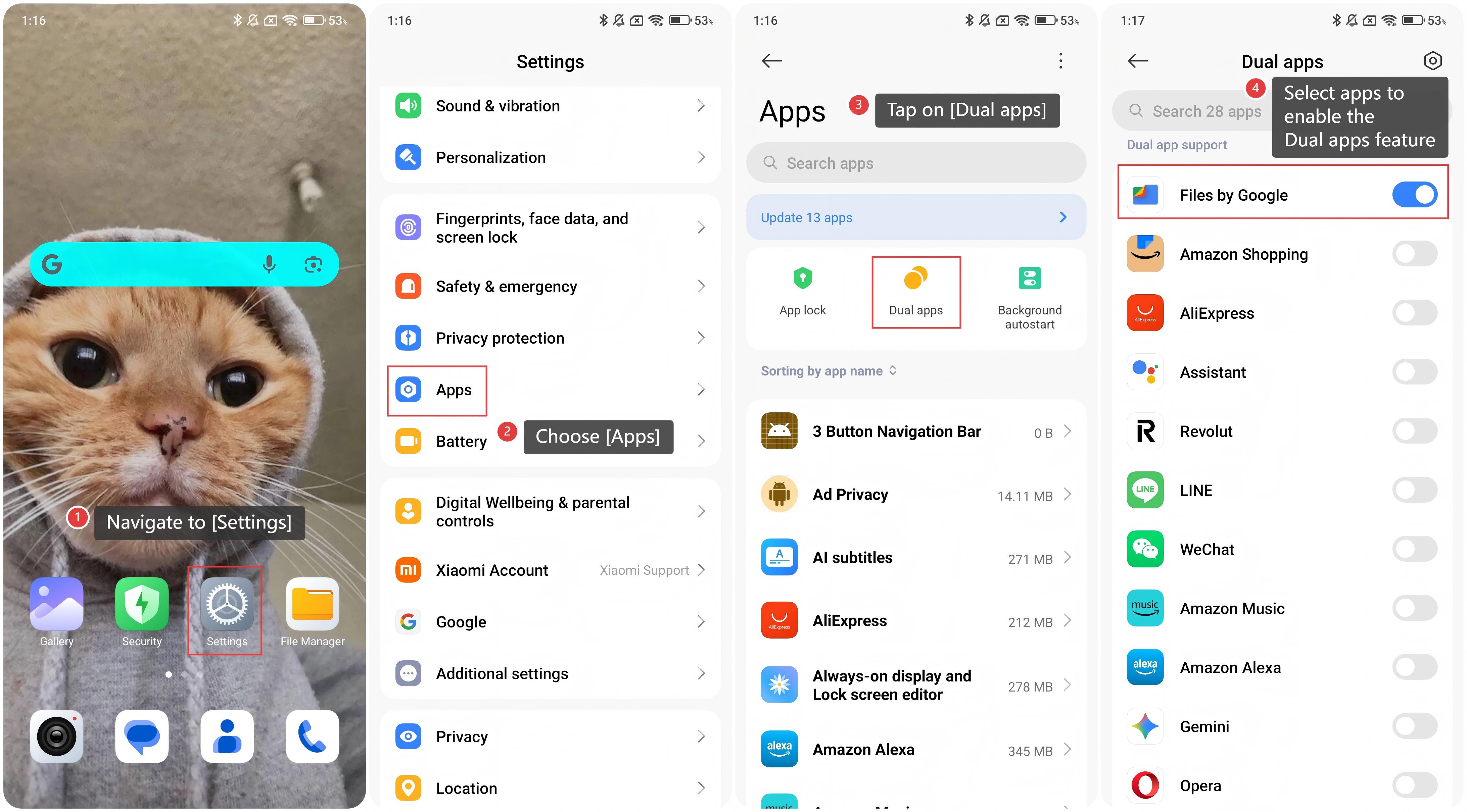
To enable Dual apps on the Redmi Note 13, please refer to the following steps:
1. Navigate to [Settings] on your smartphone;
2. Choose [Apps];
3. Tap on [Dual apps];
4. Select apps to enable the Dual apps feature.
Note:
The Dual apps feature allows you to keep your personal and work accounts separate within the same apps. This is particularly useful for social media, messaging apps, or email clients.
To enable Dual apps on the Redmi Note 13, please refer to the following steps:
1. Navigate to [Settings] on your smartphone;
2. Choose [Apps];
3. Tap on [Dual apps];
4. Select apps to enable the Dual apps feature.
Note:
The Dual apps feature allows you to keep your personal and work accounts separate within the same apps. This is particularly useful for social media, messaging apps, or email clients.