

What to do if the Xiaomi TV A Pro 43 bass effect is abnormal?
If you're experiencing abnormal bass effects on the Xiaomi TV A Pro 43, please refer to the following troubleshooting steps:
Scenario 1:
If the issue occurs when you are using the built-in speaker of your TV, please refer to the following methods:
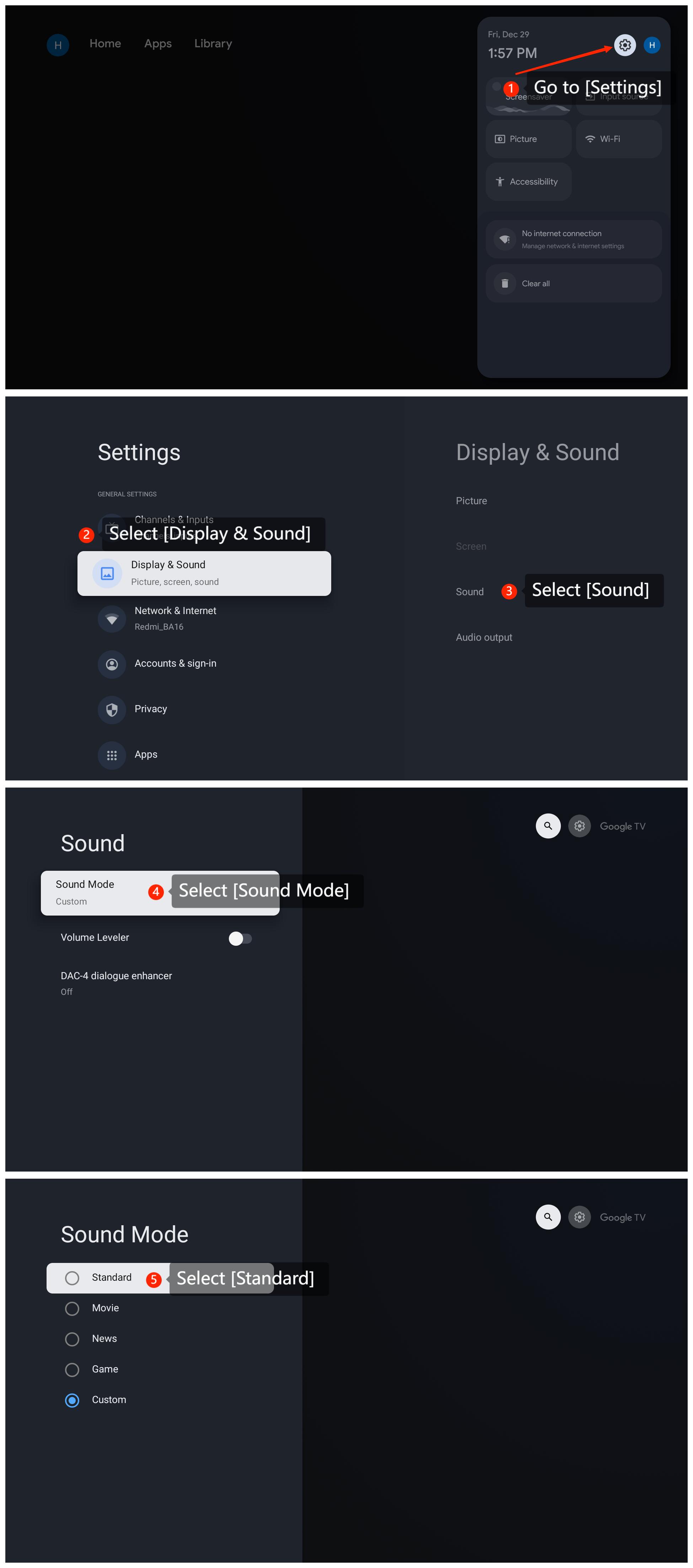
1. You can check audio settings by going to [Settings] >> [Display & Sound] >> [Sound] >> [Sound Mode] >> select [Standard] to check the bass effects;
2. The bass effect also depends on the content you're watching. Movies, music videos, and certain TV shows might have more pronounced bass effects than others. Try playing different types of content to see if the issue persists;
3. Ensure that your TV's firmware is up to date. You can check for updates by navigating to [Settings] >> [System] >> [About] >> [System update];
4. If all else fails, please reset your TV to the factory defaults by going to [Settings] >> [System] >> [About] >> [Reset] >> [Factory reset]. Keep in mind that this will erase all data and settings on the TV.
Scenario 2:
If the issue occurs when you are using an external device like a soundbar, home theater system, or high-quality speakers, please refer to the following methods:
1. If you use an external audio system, please check its settings as well. Many external audio systems have their own equalizer settings that allow you to adjust bass levels;
2. Check the audio cables connecting your TV to the speakers. Loose or damaged cables can affect sound quality, including bass. Consider using high-quality cables for better audio transmission.
If the above troubleshooting methods can’t resolve the issue, please contact our local official service center or your seller for further assistance. They will help you in this regard.
Friendly Tips:
The recommended bit rates of the video stream are shown as below:
1. The 4K UHD video stream requires 10Mbps;
2. The 2K video stream requires 5Mbps;
3. The 720p video stream requires 2.5Mbps.
Scenario 1:
If the issue occurs when you are using the built-in speaker of your TV, please refer to the following methods:
1. You can check audio settings by going to [Settings] >> [Display & Sound] >> [Sound] >> [Sound Mode] >> select [Standard] to check the bass effects;
2. The bass effect also depends on the content you're watching. Movies, music videos, and certain TV shows might have more pronounced bass effects than others. Try playing different types of content to see if the issue persists;
3. Ensure that your TV's firmware is up to date. You can check for updates by navigating to [Settings] >> [System] >> [About] >> [System update];
4. If all else fails, please reset your TV to the factory defaults by going to [Settings] >> [System] >> [About] >> [Reset] >> [Factory reset]. Keep in mind that this will erase all data and settings on the TV.
Scenario 2:
If the issue occurs when you are using an external device like a soundbar, home theater system, or high-quality speakers, please refer to the following methods:
1. If you use an external audio system, please check its settings as well. Many external audio systems have their own equalizer settings that allow you to adjust bass levels;
2. Check the audio cables connecting your TV to the speakers. Loose or damaged cables can affect sound quality, including bass. Consider using high-quality cables for better audio transmission.
If the above troubleshooting methods can’t resolve the issue, please contact our local official service center or your seller for further assistance. They will help you in this regard.
Friendly Tips:
The recommended bit rates of the video stream are shown as below:
1. The 4K UHD video stream requires 10Mbps;
2. The 2K video stream requires 5Mbps;
3. The 720p video stream requires 2.5Mbps.
Does it help?
Yes
No