

What to do if you fail to use AirPlay on the Mi TV 4S 55?
If you encounter issues with AirPlay on the Mi TV 4S 55, several troubleshooting methods can be tried to resolve the issue:
1. Ensure that both the TV and your Apple device attempting to use AirPlay are connected to the same Wi-Fi network. You can also try restarting the router to see if the issue is resolved;
2. Make sure AirPlay is enabled on the TV by going to [Settings] >> [Apps] >> [AirPlay] >> [Open];
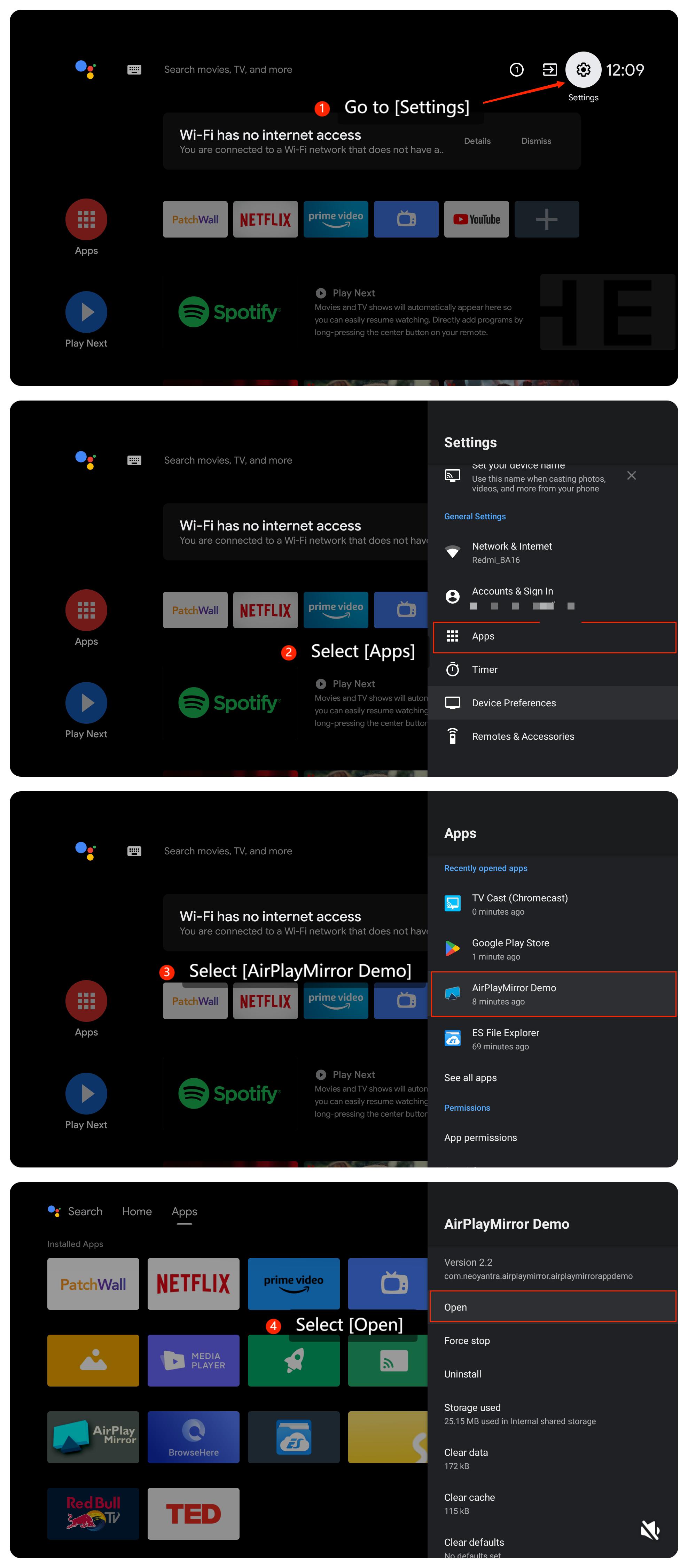
3. Try restarting both the TV and your Apple device. Sometimes, a simple restart can resolve temporary glitches;
4. Ensure your Apple device and the content you want to screen is compatible with your TV;
5. Ensure the TV’s firmware to the latest version available. Please go to [Settings] >> [Device Preferences] >> [About] >> [System update];
6. If the issue persists after the steps above, you can perform a factory reset by going to [Settings] >> [Device Preferences] >> [Reset] >> [Reset].
We hope the above methods can resolve the issue. If the issue still persists, you could submit your feedback on your TV by going to [Settings] >> [Device Preferences] >> [Home screen] >> [Send feedback].
1. Ensure that both the TV and your Apple device attempting to use AirPlay are connected to the same Wi-Fi network. You can also try restarting the router to see if the issue is resolved;
2. Make sure AirPlay is enabled on the TV by going to [Settings] >> [Apps] >> [AirPlay] >> [Open];
3. Try restarting both the TV and your Apple device. Sometimes, a simple restart can resolve temporary glitches;
4. Ensure your Apple device and the content you want to screen is compatible with your TV;
5. Ensure the TV’s firmware to the latest version available. Please go to [Settings] >> [Device Preferences] >> [About] >> [System update];
6. If the issue persists after the steps above, you can perform a factory reset by going to [Settings] >> [Device Preferences] >> [Reset] >> [Reset].
We hope the above methods can resolve the issue. If the issue still persists, you could submit your feedback on your TV by going to [Settings] >> [Device Preferences] >> [Home screen] >> [Send feedback].
Does it help?
Yes
No