

Xiaomi Electric Scooter 5 Plus FAQ
A: The Xiaomi Electric Scooter 5 Plus adopts lithium battery.
2. Q: How to maintain the battery of the Xiaomi Electric Scooter 5 Plus?
A: To maintain the battery of the scooter, please refer to the following methods:
1. In daily use, try to avoid running out of battery power;
2. The battery performs better when used within the normal temperature range. If used in an environment with a temperature below 0℃, the battery life will be shortened. At a temperature environment of -10℃, the battery life will be only half of the room temperature or less. This is due to the characteristics of lithium-ion batteries;
3. If your scooter has not been used for more than 30 days, please charge it to at least 80% and store it in a cool and dry place. To avoid over-discharge of the battery and start-up failure, please fully charge the battery once every 1-2 months;
4. If the battery is not charged in time, it will be unable to charge due to over-discharge. This damage is irreversible and is not covered by the free warranty.
3. Q: Does the Xiaomi Electric Scooter 5 Plus support energy recovery and how to use it?
A: The Xiaomi Electric Scooter 5 Plus supports the function of energy recovery and adjusting the intensity.
To use the function of energy recovery on the scooter, please refer to the following steps:
1. Go to the Mi Home/Xiaomi Home APP;
2. Select [Xiaomi Electric Scooter 5 Plus];
3. Tap [Assisted riding];
4. Tap [Energy recovery intensity];
5. Select from [Low], [Medium], and [High] according to your needs.
4. Q: What to do if the Xiaomi Electric Scooter 5 Plus can’t be charged?
A: If the scooter can’t be charged, please refer to the following methods for troubleshooting:
1. Please connect to the power adapter to the socket without connecting to the scooter and check the power adapter indicator. If the indicator doesn’t light up or turns red (turning green in normal conditions), the power adapter is malfunctioned. If you need to replace the power adapter, please contact the local after-sales service department;
2. If the scooter has not been used or charged for a long time, the battery is over-discharged. Please connect the power adapter to the scooter to activate the battery. If the battery cannot be activated, it means that the battery is severely over-discharged. Please contact the local after-sales service department;
3. If the battery temperature is over 45℃, the over-temperature protection will be triggered and the scooter can’t be charged. When the battery temperature drops to below 40℃, it can be charged normally;
4. If the battery temperature is below 2℃, the under-temperature protection will be triggered and the scooter can’t be charged. When the battery temperature rises to over 5℃, it can be charged normally.
5. Q: What to do if the Xiaomi Electric Scooter 5 Plus can’t be started?
A: If the scooter can’t be started, please refer to the following methods for troubleshooting:
1. If the scooter cannot be turned on, please first plug it into a power source to charge the battery for more than 30 minutes, and then try to turn it on again;
2. If the scooter can be turned on but can’t be accelerated, please refer to the following methods for troubleshooting:
(1) Please check whether there is a red flashing wrench icon on the dashboard and whether there is a red flashing number on the speedometer. If so, please contact the local after-sales service department. If not, try to release the accelerator, kick to start to a speed of no less than 5km/h (factory default value), and then press the accelerator;
(2) Please push the scooter after turning off. If you feel obvious resistance on the rear wheel, it will be a motor problem. Please contact the local after-sales service department;
(3) If the above methods can’t solve the issue, it will be caused by controller faulty, excessive battery over-discharge or other faulty. Please contact the local after-sales service department.
6. Q: How to determine whether the Xiaomi Electric Scooter 5 Plus has errors?
A: When the scooter has errors, a red flashing wrench icon will be displayed on the dashboard and red flashing numbers (error code) will be displayed on the speedometer, with a beeping sound.
7. Q: How to connect the Xiaomi Electric Scooter 5 Plus to the Mi Home/Xiaomi Home APP?
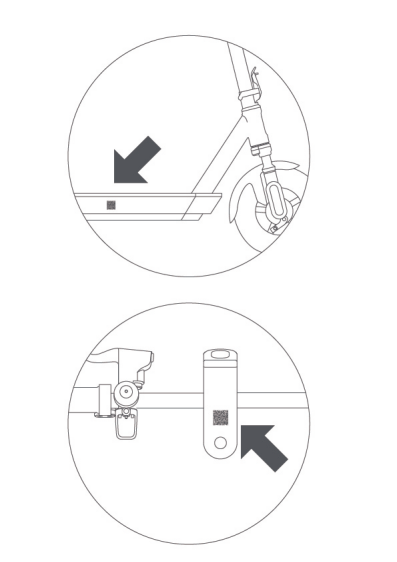
A: Please scan the QR code on the sticker attached on the dashboard and connect according to the instructions on the APP. You can also scan the QR code at the battery compartment area on the right side of the scooter and connect according to the instructions on the APP.
8. Q: How to restore the Xiaomi Electric Scooter 5 Plus to factory settings?
A: To restore the scooter to factory settings, please refer to the following methods:
1. You can select [Restore scooter settings] in the settings interface of the scooter in the APP to reset the scooter;
2. In the power-on status of the scooter, press and hold the accelerator, brake, and power button simultaneously for 7 seconds to reset the scooter.
Note:
The brake must be pressed fully, otherwise the factory reset will fail.
9. Q: How to rebind the Xiaomi Electric Scooter 5 Plus to the Mi Home/Xiaomi Home APP?
A: Please first delete the scooter in the Mi Home/Xiaomi Home APP and press and hold the accelerator, brake, and power button simultaneously for 7 seconds to reset the scooter. After that, reconnect the scooter to the Mi Home/Xiaomi Home APP and rebind.
Note:
The brake must be pressed fully, otherwise the factory reset will fail.
10. Q: How many riding modes does the Xiaomi Electric Scooter 5 Plus support and what is the maximum speed?
A: The Xiaomi Electric Scooter 5 Plus supports three riding modes, Walking mode, Standard mode, and Sport mode.
The maximum speed for Walking mode is 6km/h (3.73mph for American standard). The maximum speed for Standard mode is 15km/h (9.32mph for American standard). The maximum speed for Sport mode is 25km/h (20km/h for European standard and German standard and 20mph for American standard).
11. Q: How to use the Lock the motor function on the Xiaomi Electric Scooter 5 Plus?
A: After the connection to the APP, tap [Lock the motor] on the plug-in interface of the Xiaomi Electric Scooter 5 Plus, tap [OK], and the scooter will be locked. The corresponding function icon will be displayed in blue and the mode display will be displayed in the locking icon. If you need to unlock the scooter, tap [Unlock the motor].
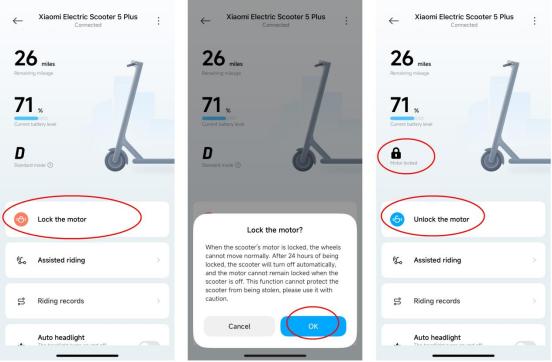
After tapping [Lock the motor] on the APP, the scooter enters the motor lock status, automatically shuts down after 24 hours, and remains in the motor lock status when it is turned on again. If you push the scooter in the motor lock status, the dashboard will sound an alarm, and the scooter button can’t be pressed. This function can’t prevent the scooter from being stolen, please keep the scooter properly. Using the motor lock function will consume the battery of the scooter, please use this function reasonably.
12. Q: Why does the brightness of the dashboard on the Xiaomi Electric Scooter 5 Plus change automatically?
A: When the headlight is enabled, the dashboard will become dim. When the headlight is disabled, the dashboard brightness will be restored.
13. Q: What is the temperature range for using the Xiaomi Electric Scooter 5 Plus?
A: Please refer to the following information to check the temperature range for using the scooter:
1. When the battery temperature is no more than -18℃, the battery is in the low temperature automatic protection state and will automatically shut down;
2. When the battery temperature is less than 2℃, charging is not possible at this time. If you charge the scooter in this temperature range, low temperature abnormality of charging will be prompted and the thermometer icon on the dashboard will flash;
3. When the battery temperature is more than 2℃ and less than 45℃, charging and riding are normal;
4. When the battery temperature is more than 45℃, charging is not possible at this time. If you charge the scooter in this temperature range, high temperature abnormality of charging will be prompted and the thermometer icon on the dashboard will flash;
5. When the battery temperature is more than 55℃ and less than 60℃, charging is not possible at this time. If you charge the scooter in this temperature range, high temperature abnormality of charging will be prompted and the thermometer icon on the dashboard will flash. The scooter can be ridden, but the motor power will be reduced, and high temperature abnormality of discharging will be prompted and the thermometer icon on the dashboard will flash;
6. When battery temperature is more than 60℃ and less than 65℃, charging is not possible at this time. If you charge the scooter in this temperature range, high temperature abnormality of charging will be prompted and the thermometer icon on the dashboard will flash. The scooter can’t be ridden, pressing the accelerator is unresponsive, and high temperature abnormality of discharging will be prompted and the thermometer icon on the dashboard will flash;
7. When the battery temperature is no less than 65℃, the battery will be in the high temperature protection status. Automatic shut-down will be triggered to protect the scooter and personal and property safety.
14. Q: What is the self-discharge rate change on the Xiaomi Electric Scooter 5 Plus?
A: 1. Self-discharge: It is an inherent characteristic of all batteries. When the battery is in storage or not in use, even if the battery is not connected to an external circuit, power loss will occur spontaneously inside the battery;
2. Self-discharge rate: It is an important indicator to measure the self-discharge consumption speed of the battery, expressed as the percentage of power reduction per unit time (such as % per month). It reflects the "self-consumption" characteristics of the battery and is one of the key parameters for evaluating battery performance;
3. Self-discharge rate change: It refers to the regular dynamic change process of the battery's self-discharge rate over its entire life cycle as factors such as usage time, number of cycles, environmental conditions (such as temperature, humidity, depth of charge and discharge), and degree of aging of internal materials change.
The initial self-discharge rate of the Xiaomi Electric Scooter 5 Plus battery is 1.2% per month under a half-charged environment at room temperature. With use, the self-discharge rate increases by an average of about 1%-5% per month for every 100 charge and discharge cycles or every six months (determined by the time sequence).
15. Q: What is the motor temperature range of the Xiaomi Electric Scooter 5 Plus and what to do if the temperature is beyond the range?
A: The normal operating temperature range of the motor is less than 110℃. When the motor temperature is between 110℃ and 130℃, the system will reduce the power output to reduce the temperature rise of the motor. When the motor temperature exceeds 130℃, the motor high temperature protection will be activated and the scooter can’t be ridden. If the scooter can’t be ridden due to high motor temperature, please turn off the scooter power and place the scooter in a ventilated place. When the motor temperature drops to less than 110℃, it will return to normal.
16. Q: Will the low temperature have impacts on the Xiaomi Electric Scooter 5 Plus?
A: For your reference, here are the impacts imposed by low temperature on the scooter:
1. When the battery temperature is no more than -18℃, the battery is in the low temperature automatic protection status and the scooter will be automatically shut down;
2. When the battery temperature is less than 2℃, charging is not possible at this time. If you charge the scooter in this temperature range, low temperature abnormality of charging will be prompted and the thermometer icon on the dashboard will flash;
3. In a low temperature environment, the chemical reaction speed of the lithium battery slows down, and the internal resistance of the battery increases at low temperatures, resulting in a decrease in the actual discharge capacity, which in turn shortens the driving range.
17. Q: Why does the thermometer icon light up on the dashboard of the Xiaomi Electric Scooter 5 Plus?
A: When the thermometer icon on the dashboard lights up, it means that the battery temperature is too high or too low, or the controller temperature is too high. At this time, the scooter's acceleration is weakened, which makes it impossible to ride, and it will not be able to charge. Please wait until the temperature returns to the normal operating temperature range before using or charging.
18. Q: What is the travel range of the Xiaomi Electric Scooter 5 Plus?
A: The standard travel range of the Xiaomi Electric Scooter 5 Plus is 60km. The range is the distance traveled by a driver weighing 75kg, driving at a constant speed of 15km/h (9mph) in an ambient condition of 25℃, and depleting the scooter's power from 100% to 0%. The actual range is affected by factors such as ambient temperature, wind speed, road conditions, driving speed, rider weight, etc. Please judge whether the range is sufficient based on the actual situation to prevent the scooter from running out of power.
19. Q: How to switch the riding mode of the Xiaomi Electric Scooter 5 Plus?
A: Press the power button twice in a row to switch the riding mode. The default mode of the scooter is Standard mode. The selected mode before turning off the scooter will be recorded.
20. Q: Does the Xiaomi Electric Scooter 5 Plus support TCS (Traction Control System)?
A: The Xiaomi Electric Scooter 5 Plus supports TCS (Traction Control System), which is disabled by default. If you need to enable it, please connect the scooter to the Mi Home/Xiaomi Home APP and go to the Mi Home/Xiaomi Home APP >> [Xiaomi Electric Scooter 5 Plus] >> [Assisted riding] >> enable [TCS anti-slip].
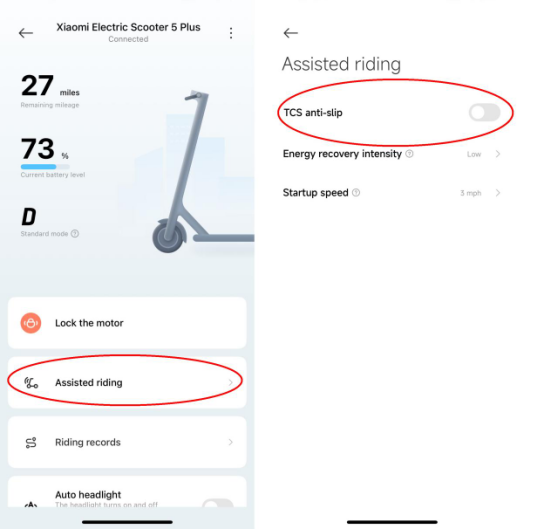
Note:
TCS refers to traction control system. Its core function is to prevent the driving wheels from slipping when the scooter is starting, accelerating or driving on slippery roads, thereby improving the scooter's handling stability and driving safety. Even with TCS, you still need to slow down in bad weather and avoid sudden acceleration or braking. The system can only assist and cannot completely replace safe driving habits.
21. Q: What is the maximum load of the Xiaomi Electric Scooter 5 Plus?
A: The load of the Xiaomi Electric Scooter 5 Plus is no more than 120kg.
22. Q: Is the Xiaomi Electric Scooter 5 Plus waterproof?
A: The Xiaomi Electric Scooter 5 Plus is waterproof, with the IP rating of IPX5. However, it is not completely waterproof, so it is not recommended to ride outdoors in rainy days or wading. It is also not recommended to ride outdoors in other bad weather.
23. Q: What is the tire size of the Xiaomi Electric Scooter 5 Plus?
A: The tire size of the front and rear wheels of the Xiaomi Electric Scooter 5 Plus is 12’’.
24. Q: Why does the Xiaomi Electric Scooter 5 Plus make beep sounds after the faulty?
A: When the scooter has faulty, a red flashing wrench icon will be displayed on the dashboard and red flashing numbers (error code) will be displayed on the speedometer, with beep sounds as the reminder.
25. Q: Can the Xiaomi Electric Scooter 5 Plus be used in high-temperature environments?
A: The Xiaomi Electric Scooter 5 Plus is not suitable to be used in high-temperature environments.
For your reference, here are the reasons for the high-temperature limitation of using the scooter:
1. When the battery temperature is more than 45℃, charging is not possible at this time. If you charge the scooter in this temperature range, high temperature abnormality of charging will be prompted and the thermometer icon on the dashboard will flash;
2. When the battery temperature is more than 55℃ and less than 60℃, charging is not possible at this time. If you charge the scooter in this temperature range, high temperature abnormality of charging will be prompted and the thermometer icon on the dashboard will flash. The scooter can be ridden, but the motor power will be reduced, and high temperature abnormality of discharging will be prompted and the thermometer icon on the dashboard will flash;
3. When battery temperature is more than 60℃ and less than 65℃, charging is not possible at this time. If you charge the scooter in this temperature range, high temperature abnormality of charging will be prompted and the thermometer icon on the dashboard will flash. The scooter can’t be ridden, pressing the accelerator is unresponsive, and high temperature abnormality of discharging will be prompted and the thermometer icon on the dashboard will flash;
4. When the battery temperature is no less than 65℃, the battery will be in the high temperature protection status. Automatic shut-down will be triggered to protect the scooter and personal and property safety;
5. In high temperature environments, the chemical reaction of the scooter's lithium battery intensifies, which will cause the capacity to decay rapidly and reduce the endurance;
6. The air in the pneumatic tire expands and contracts due to heat and cold, and the tire pressure will increase. Exceeding the upper limit of tire pressure will cause a tire blowout.
26. Q: Will the Xiaomi Electric Scooter 5 Plus be automatically powered off after being fully charged?
A: When the Xiaomi Electric Scooter 5 Plus is fully charged, the charger indicator will turn from red to green. At this time, there is also trickle charging. When it is fully charged, the battery will automatically cut off the input power.
27. Q: What is the brake type of the Xiaomi Electric Scooter 5 Plus?
A: The front wheel of the Xiaomi Electric Scooter 5 Plus adopts the mechanical drum brake, and the rear wheel adopts E-ABS.
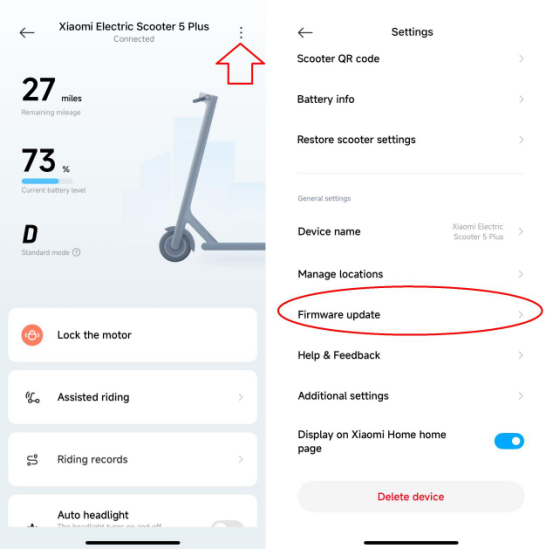
28. Q: How to update the firmware version of the Xiaomi Electric Scooter 5 Plus?
A: After the connection between the Xiaomi Electric Scooter 5 Plus and the Mi Home/Xiaomi Home APP, please go to the Mi Home/Xiaomi Home APP >> [Xiaomi Electric Scooter 5 Plus] >> three-dot icon >> [Firmware update].
29. Q: Where is the QR code attached on the body of the Xiaomi Electric Scooter 5 Plus?
A: The QR code is attached on the dashboard and at the battery compartment area on the right side of the scooter.
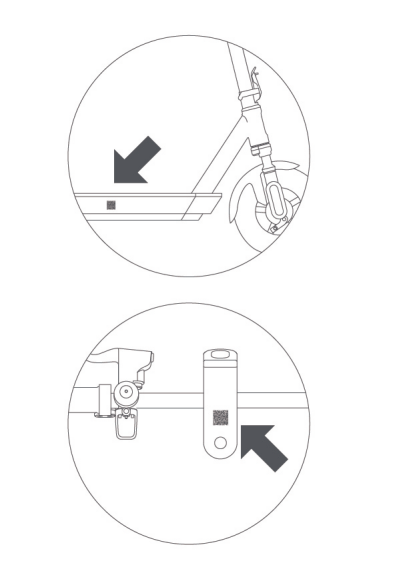
30. Q: What are the error codes of the Xiaomi Electric Scooter 5 Plus and what are the forms, meanings, and dealing methods of the error codes?
A: When the scooter has errors, a red flashing wrench icon will be displayed on the dashboard, and a red flashing number (error code) will be displayed on the speedometer, with a beep sound. If the APP is connected, the error information will also appear on the APP homepage. Press the displayed information to check the detailed description of the error, as shown below.
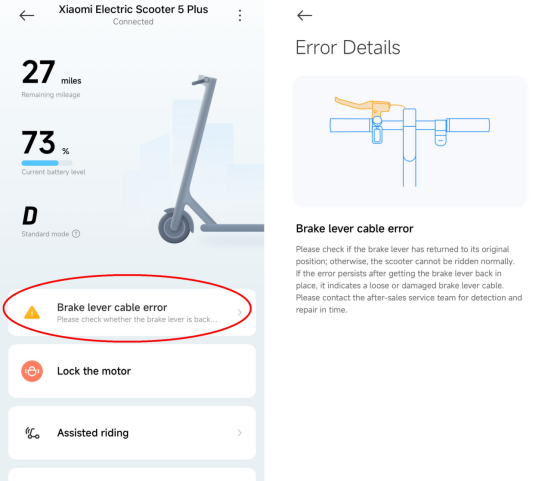
For your reference, here are the error details of the scooter:
| Error code | Error category | Definition | Scenarios triggering the corresponding error | Solution |
| 10 | Controller | Communication error between the dashboard and controller | Water ingress or damage to the dashboard. Poor connection between the dashboard and main controller connection cable. | 1. Check whether the communication cable on the dashboard is damaged or detached and whether it needs to be replaced; 2. Check whether the dashboard communication circuit is damaged. If so, please replace the dashboard; 3. Check whether the dashboard communication circuit on the controller is damaged. If so please replace the controller. |
| 11 | Controller | Over-current protection of the controller | Controller ADC sampling issue, a hardware issue | 1. Check whether there is water ingress in the controller. If so, please replace the controller; 2. Check whether the motor circuit group of the controller is damaged. If so, please replace the circuit group; 3. Check whether the current sampling circuit of the controller is damaged. If so, please replace the controller. |
| 12 | Controller | Error of controller current sampling | Controller ADC sampling issue, a hardware issue | Check whether the controller hardware is damaged. If so, please replace the controller. |
| 14 | Accelerator | Accelerator error/Incorrect position of accelerator when turning on | 1. Accelerator is stuck by foreign objects; 2. The sensor line of accelerator is damaged; 3. Pressing the accelerator when turning on. | 1. Check whether the accelerator is stuck. If so, restore it to the original status; 2. Check whether the accelerator is damaged. If so, please replace the accelerator; 3. Check whether the circuit group is detached. If so, please replace the circuit group or components; 4. If the sampling circuit of the accelerator on the dashboard is damaged, please replace the dashboard. |
| 15 | Brake lever | Brake lever error/Incorrect position of brake lever when turning on | 1. The brake sensor line is damaged; 2. Pressing the brake lever when turning on. | 1. Check whether the brake lever is stuck. If so, restore it to the original status; 2. Check whether the brake lever is damaged. If so, please replace the accelerator; 3. Check whether the circuit group is detached. If so, please replace the circuit group or components; 4. If the sampling circuit of the brake lever on the dashboard is damaged, please replace the dashboard. |
| 18 | Motor | Error of hall sensor on the motor | The connection cable between hall sensor on the motor and the controller is loose or the components of hall sensor are damaged. | 1. If the hall sensor cable on the motor is damaged, please replace the circuit group or motor; 2. If hall sensor on the motor is damaged, please replace the hall sensor board or motor; 3. If the sampling circuit of hall sensor on the controller or the terminal is damaged, please replace the controller. |
| 21 | Controller | Communication error between controller and battery pack | 1. Firmware update; 2. The usage of third-party battery; 3. Flashing third-party battery firmware | 1. If the communication circuit group of the battery pack is damaged, please replace the circuit group or motor; 2. If the communication circuit of the battery pack on the controller or the terminal is damaged, please replace the controller; 3. If the communication circuit of battery pack is damaged, please replace BMS board of battery pack or battery pack; 4. If non-standard battery pack or third-party battery pack is used, please replace it with the standard model. |
| 24 | Battery pack | Over-voltage of battery pack | 1. Battery pack aging; 2. The usage of third-party battery pack | Replace the battery pack with the standard model. |
| 28 | Controller | Controller MOS high-side error | Short circuit of controller hardware | The controller hardware is damaged. Please replace the controller. |
| 29 | Controller | Controller MOS low-side error | Short circuit of controller hardware | The controller hardware is damaged. Please replace the controller. |
| 39 | Battery pack | Short circuit/circuit breaker of battery pack NTC | Battery pack hardware issue | The battery pack hardware is damaged. Please replace battery pack BMS or battery pack. |
| 40 | Controller | Error of temperature sensor on the controller | Controller hardware issue | The temperature sampling circuit on the controller is damaged. Please replace the controller. |
31. Q: Does the Xiaomi Electric Scooter 5 Plus support kicking to start and can it be enabled/disabled in the Mi Home/Xiaomi Home APP?
A: The Xiaomi Electric Scooter 5 Plus supports kicking to start by default. When the startup speed is no less than 5km/h, press the accelerator to start riding.
You can also select the startup speed in the Mi Home/Xiaomi Home APP from 3km/h, 4km/h, and 5km/h (default value).
Please go to the Mi Home/Xiaomi Home APP >> [Xiaomi Electric Scooter 5 Plus] >> [Assisted riding] >> [Startup speed] >> select [3km/h], [4km/h], or [5km/h].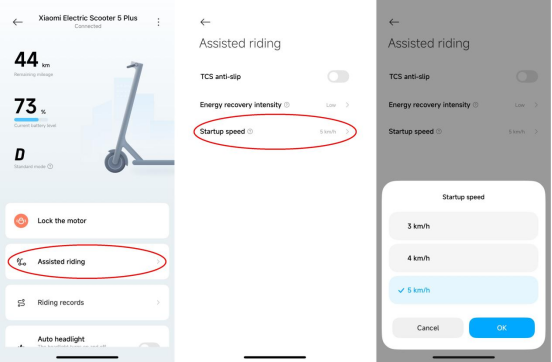
32. Q: Does the Xiaomi Electric Scooter 5 Plus support switch the speed unit between metric and imperial system and how to switch it?
A: The Xiaomi Electric Scooter 5 Plus supports switching the speed unit between metric and imperial system. You can go to the Mi Home/Xiaomi Home APP >> [Xiaomi Electric Scooter 5 Plus] >> three-dot icon >> [Speed unit] >> [Metric system (km/h)]/[Imperial system (mph)].
33. Q: Does the Xiaomi Electric Scooter 5 Plus have wingling light?
A: The Xiaomi Electric Scooter 5 Plus has left and right wingling lights.
34. Q: Does the Xiaomi Electric Scooter 5 Plus support the function of double flash?
A: The Xiaomi Electric Scooter 5 Plus doesn’t support the function of double flash.
35. Q: What is the tire type of the Xiaomi Electric Scooter 5 Plus?
A: The tire type that Xiaomi Electric Scooter 5 Plus adopts is tubeless tire.
36. Q: Will the odometer of the Xiaomi Electric Scooter 5 Plus be kept after rebinding to other account?
A: If you disband the Xiaomi Electric Scooter 5 Plus and rebind it to other account, the odometer will be kept, but the riding record will be deleted.
37. Q: If the Xiaomi Electric Scooter 5 Plus is disbanded from one account and rebind to it again, will the odometer and riding records of the Xiaomi Electric Scooter 5 Plus be deleted?
A: When the Xiaomi Electric Scooter 5 Plus is disbanded from one account and rebind to it again, the odometer will be kept, but the riding record will be deleted.
38. Q: How long does it take to fully charge the Xiaomi Electric Scooter 5 Plus?
A: It takes about 9 hours to charge the Xiaomi Electric Scooter 5 Plus from 0% to 100%.
39. Q: Will the Xiaomi Electric Scooter 5 Plus be automatically stop charging after being fully charged?
A: When the Xiaomi Electric Scooter 5 Plus is fully charged, the charger indicator will turn from red to green. At this time, there is also trickle charging. When it is completely charged to the full status, the battery will automatically cut off the input power.
40. Q: How to install the Xiaomi Electric Scooter 5 Plus?
A: After taking the scooter out of the package, put down the kickstand, lift the seat tube and fasten the folding buckle. Then use the T-type wrench in the package box to pre-tighten the 6 screws on the three sides of the seat tube in the order of left-right-rear, and tighten them thoroughly after fixing the front position of the scooter.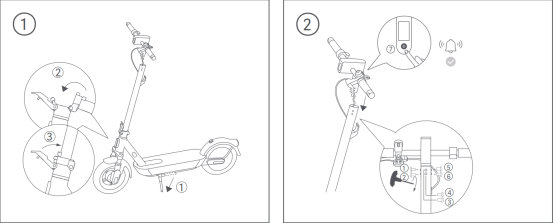
41. Q: What are the precautions for riding the Xiaomi Electric Scooter 5 Plus?
A: For your reference, here are the precautions for riding the scooter:
1. Please wear a helmet, elbow pads and knee pads before riding;
2. When starting, please first kick to start, so that the scooter speedometer displays no less than 5 km/h (factory default value) before pressing the accelerator to start. If you press the accelerator first and then kick to start, the scooter will not start normally;
3. Press the accelerator lightly to accelerate, and not to press it too fast;
4. Avoid wading or riding in rainy days;
5. Avoid riding on muddy and slippery roads;
6. Don’t ride in bad weather.
42. Q: Does the Xiaomi Electric Scooter 5 Plus support tire self-recovery?
A: Not support.
43. Q: How to inflate the tires of the Xiaomi Electric Scooter 5 Plus and what is the tire pressure requirement?
A: To inflate the tires of the scooter, please refer to the following steps:
1. Unscrew the tire inflation nozzle cap;
2. Connect the air pump to the tire inflation nozzle;
3. Use an air pump or other inflation tools to inflate the tire, and tighten the inflation nozzle cap after inflation is completed.
After inflating the tires, the recommended tire pressure of the front and rear tire is 40-45psi.
44. Q: What is the recommended interval of inflating the tires of the Xiaomi Electric Scooter 5 Plus?
A: It is recommended that you check the tire pressure and inflate the tire with the inflation tool every month.
45. Q: Why does tires of the Xiaomi Electric Scooter 5 Plus slowly leak when riding?
A: The Xiaomi Electric Scooter 5 Plus uses inflatable tubeless tires, which will leak air during use and storage.
Note:
Riding with low tire pressure will accelerate tire wear and even cause rupture. It is recommended to check tire pressure every month and inflate in time. The recommended tire pressure after inflation is 40-45psi. Avoid riding with abnormal tire pressure.
46. Q: Does the Xiaomi Electric Scooter 5 Plus support checking the tire pressure condition?
A: The Xiaomi Electric Scooter 5 Plus doesn’t support checking the tire pressure in the APP, but you can set tire pressure maintenance reminder in the APP.
To set the tire pressure maintenance of the scooter in the APP, please refer to the following steps:
1. Go to the Mi Home/Xiaomi Home APP;
2. Select [Xiaomi Electric Scooter 5 Plus];
3. Tap the three-dot icon at the right top of the screen;
4. Enable [Tire pressure maintenance];
5. Go back to the plug-in interface of the scooter and tap [Tire pressure maintenance];
6. Tap [Reminder cycle];
7. Select from [14 days], [30 days], [60 days], [90 days], and [180 days];
8. When the configured time reaches, the tire maintenance icon on the dashboard will light up.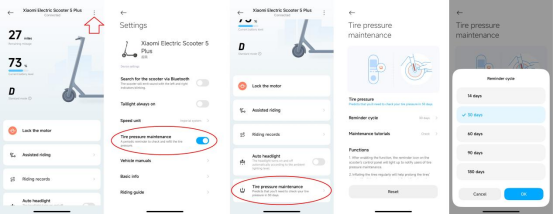
47. Q: What riding data of the Xiaomi Electric Scooter 5 Plus can be checked on the Mi Home/Xiaomi Home APP?
A: You can check Remaining mileage, Riding records, and Total mileage on the Mi Home/Xiaomi Home APP.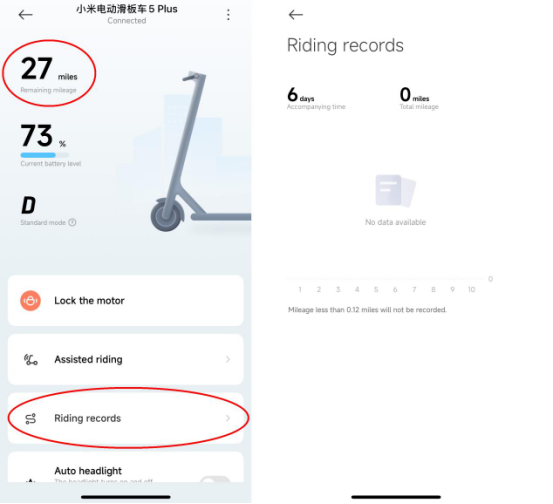
48. Q: Does the Xiaomi Electric Scooter 5 Plus support checking the riding route on the Mi Home/Xiaomi Home APP?
A: The Xiaomi Electric Scooter 5 Plus doesn’t support checking the riding route on the Mi Home/Xiaomi Home APP.
49. Q: Does the Xiaomi Electric Scooter 5 Plus support under-voltage reminder?
A: The Xiaomi Electric Scooter 5 Plus doesn’t support under-voltage reminder, but it supports low-battery reminder. When the battery level is low, the last bar of the battery level on the dashboard will flash in red light.
50. Q: What prompts does the Xiaomi Electric Scooter 5 Plus support when there are errors?
A: When the scooter has errors, a red flashing wrench icon will be displayed on the dashboard, and a red flashing number (error code) will be displayed on the speedometer, with the beep sound. If the APP is connected, the fault information will also appear on the APP homepage. Press the displayed information to check the detailed description of the error, as shown below.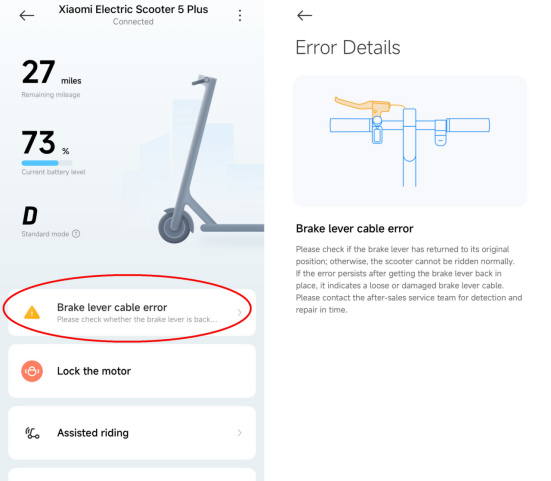
51. Q: What to do if the Bluetooth of the Xiaomi Electric Scooter 5 Plus disconnects?
A: If the Bluetooth of the scooter disconnects, please refer to the following methods for troubleshooting:
1. Check whether the Bluetooth is enabled on the phone and try to reconnect;
2. Delete the scooter on the APP, restore the scooter to factory settings, and try to reconnect;
3. Check the current version of the APP and update it to the latest version.
Note:
When connecting, try to keep the scooter in the efficient Bluetooth range.
52. Q: What is the supported Bluetooth version of the Xiaomi Electric Scooter 5 Plus?
A: The Xiaomi Electric Scooter 5 Plus supports Bluetooth 4.0 and above.
53. Q: What can be displayed on the dashboard of the Xiaomi Electric Scooter 5 Plus?
A: For your reference, the displayed information on the dashboard of the scooter is listed below:
1. Power button;
2. Locking status;
3. TCS anti-slip;
4. Tire maintenance reminder;
5. Wingling light;
6. Battery level;
7. Speedometer;
8. Riding mode;
9. Bluetooth status;
10. Headlight;
11. Auto-light Sensing;
12. Error indication;
13. Temperature warning.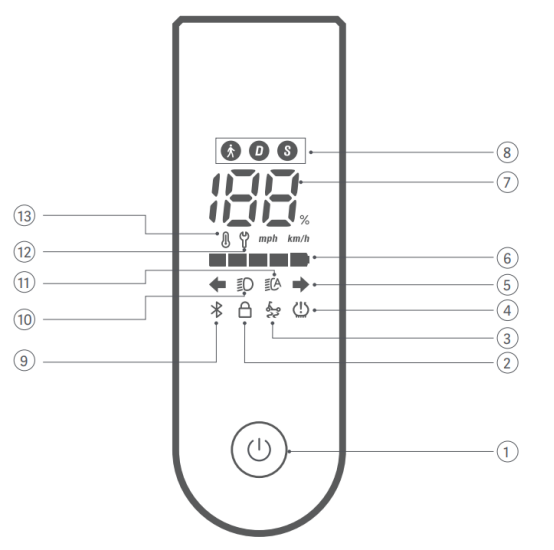
54. Q: How to check the SN of the Xiaomi Electric Scooter 5 Plus?
A: To check the SN of the scooter, please refer to the following methods:
1. You can check the SN at the battery compartment area at the right side of the scooter;
2. After connecting the scooter to the APP, you can go to the Mi Home/Xiaomi Home APP >> [Xiaomi Electric Scooter 5 Plus] >> three-dot icon >> [Scooter QR code] >> check the SN of the scooter.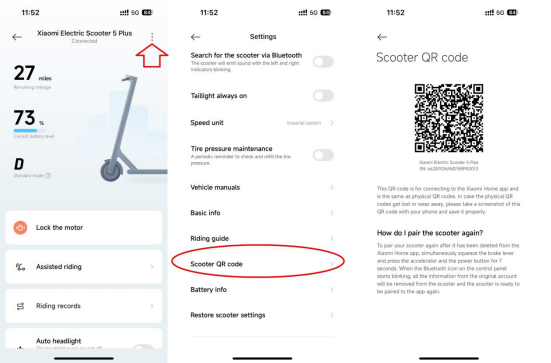
55. Q: Does the Xiaomi Electric Scooter 5 Plus support the positioning function?
A: The Xiaomi Electric Scooter 5 Plus doesn’t support the positioning function.
the
56. Q: Does the Xiaomi Electric Scooter 5 Plus support checking the position remotely?
A: The Xiaomi Electric Scooter 5 Plus doesn’t support checking the position remotely.
57. Q: Why does the Xiaomi Electric Scooter 5 Plus brake automatically and vibrate constantly?
A: 1. When the TCS function (this function is disabled by default in the APP and needs to be enabled manually in the APP) is enabled, if the function is triggered during riding, automatic braking will occur, but the scooter will not vibrate all the time;
2. If the energy recovery intensity is set to High, then if the accelerator is released during riding, the scooter enters the energy recovery status, and there will be a feeling of automatic braking, but the scooter will not vibrate;
3. If the issue is not caused by TCS function and energy recovery intensity, the scooter still brakes automatically and vibrates during riding, which will be a motor failure (such as Hall failure, phase line damage), please contact the local after-sales service department.
Does it help?