

How to turn on Pocket mode on the Xiaomi 14T camera?
The camera's Pocket mode on the Xiaomi 14T is a touch-prevention feature that prevents the camera from being accidentally activated or operated when the phone is in a pocket or bag.
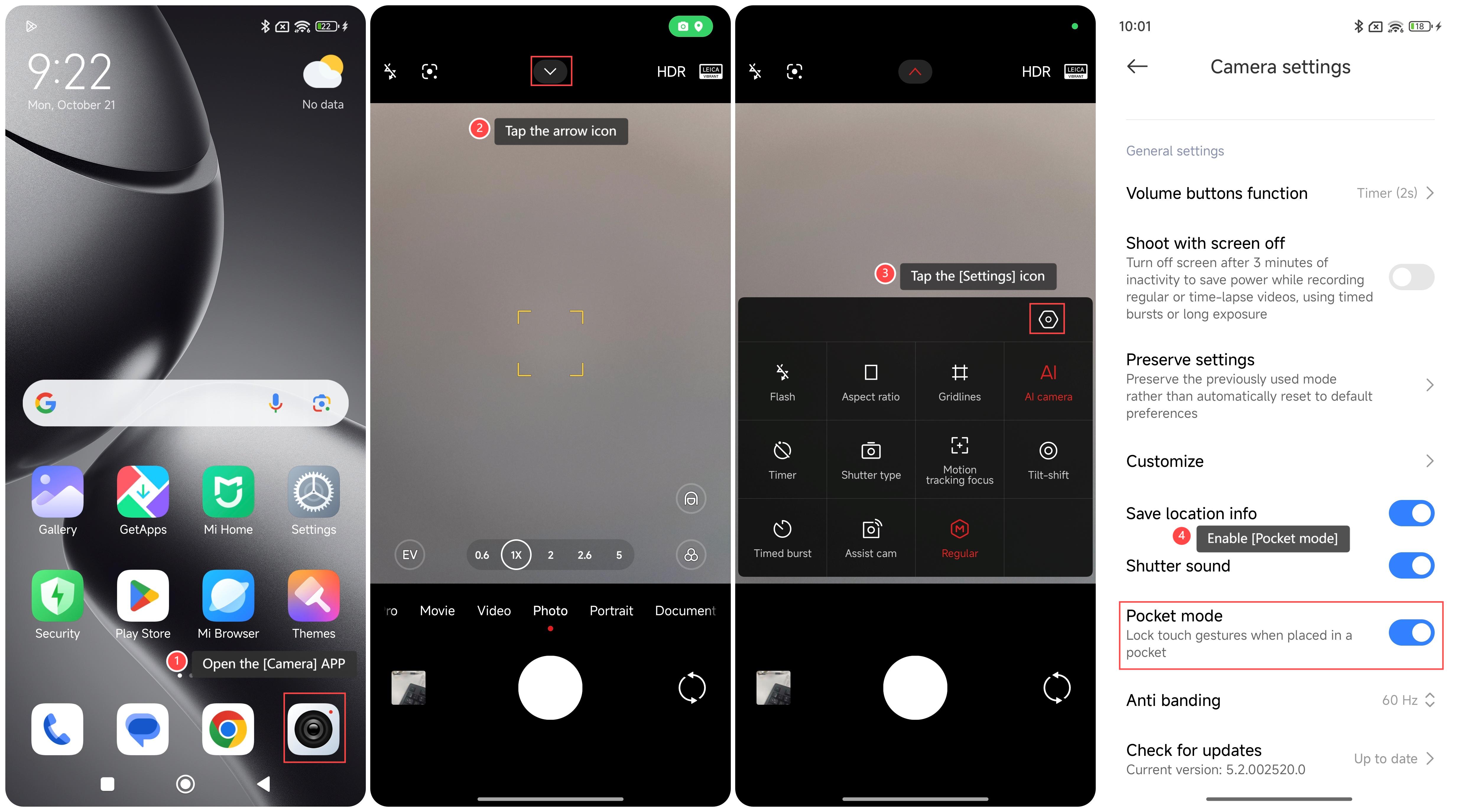
To turn on Pocket mode on the camera of your phone, please refer to the following steps:
1. Open the [Camera] APP on your phone;
2. Tap the arrow icon on the top of the screen;
3. Tap the [Settings] icon;
4. Scroll down and enable [Pocket mode].
Note:
1. It can prevent the camera from accidentally turning on and running continuously, thereby saving power and extending the use time of the phone;
2. This mode can prevent the phone from taking or recording unexpected content when not in use, thereby increasing privacy protection.
To turn on Pocket mode on the camera of your phone, please refer to the following steps:
1. Open the [Camera] APP on your phone;
2. Tap the arrow icon on the top of the screen;
3. Tap the [Settings] icon;
4. Scroll down and enable [Pocket mode].
Note:
1. It can prevent the camera from accidentally turning on and running continuously, thereby saving power and extending the use time of the phone;
2. This mode can prevent the phone from taking or recording unexpected content when not in use, thereby increasing privacy protection.
Does it help?
Yes
No