

How to add photos to a certain album on the Redmi 13C 5G?
The Redmi 13C 5G supports adding photos to a certain album, which can help you group related photos together, making it easier to find and view them later. You can create albums based on events, trips, or themes, enhancing the storytelling aspect of your photos. When you want to share a specific set of photos, having them in one album simplifies the process.
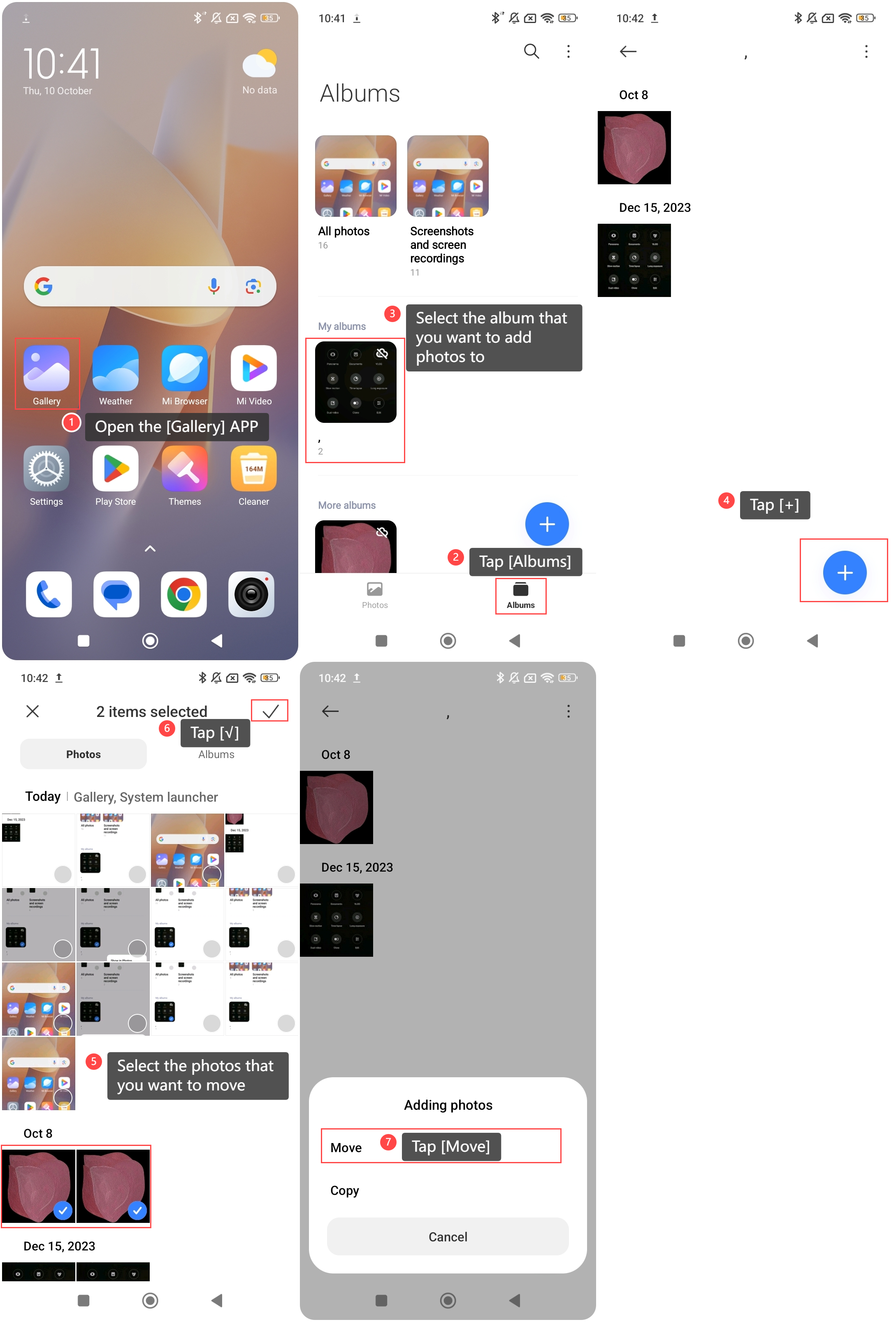
To add photos to a certain album on your phone, please refer to the following steps:
1. Open the [Gallery] APP on your phone;
2. Tap [Albums];
3. Select the album that you want to add photos to;
4. Tap [+] at the right bottom of the screen;
5. Select the photos that you want to move;
6. Tap [√] at the upper right corner of the screen;
7. Tap [Move].
To add photos to a certain album on your phone, please refer to the following steps:
1. Open the [Gallery] APP on your phone;
2. Tap [Albums];
3. Select the album that you want to add photos to;
4. Tap [+] at the right bottom of the screen;
5. Select the photos that you want to move;
6. Tap [√] at the upper right corner of the screen;
7. Tap [Move].
Does it help?
Yes
No