

How to replace the filter on the Xiaomi Faucet Water Purifier?
To replace the filter, please refer to the following steps:
1. Unscrew the filter protection cap following the direction indicated by the arrow, then pull out the filter from the filter protection cap;
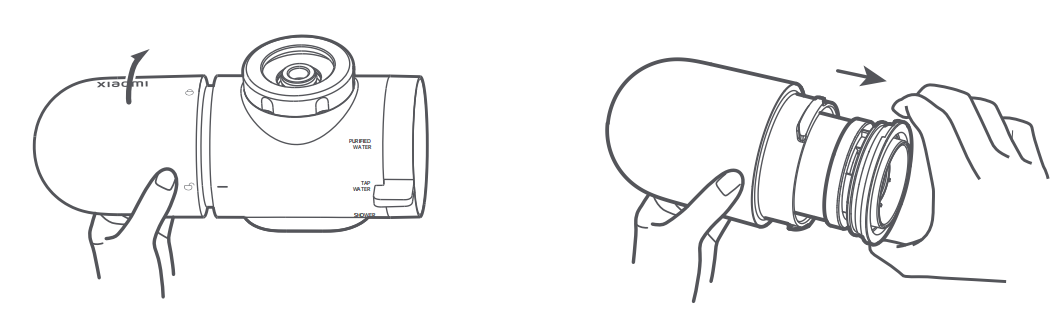
2. Align a new filter with the filter installation port of the water purifier, push it into the water purifier, and press it down until the filter is securely fixed in place;
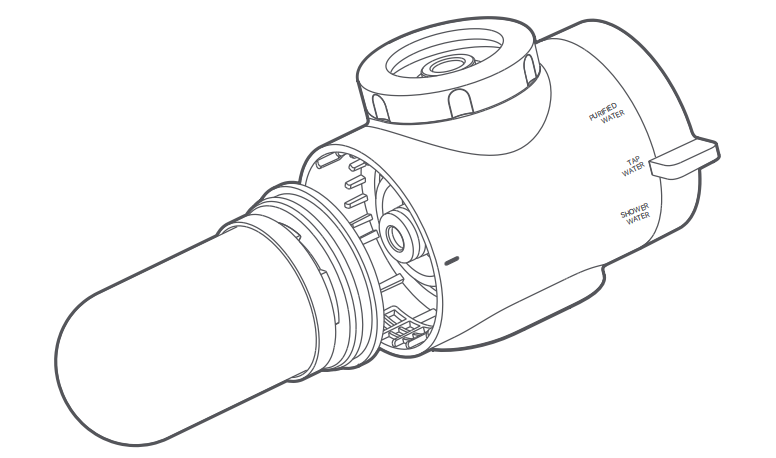
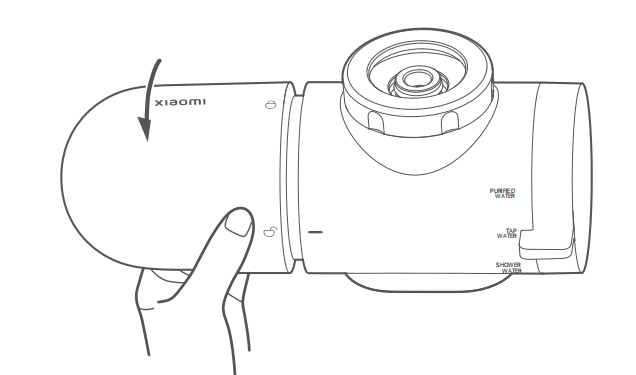
3. After the filter is installed properly, align the unlocking icon on the filter protection cap to the horizontal stripe. Gently screw the filter protection cap following the direction indicated by the arrow until the locking icon is aligned to the horizontal stripe.
1. Unscrew the filter protection cap following the direction indicated by the arrow, then pull out the filter from the filter protection cap;
2. Align a new filter with the filter installation port of the water purifier, push it into the water purifier, and press it down until the filter is securely fixed in place;
3. After the filter is installed properly, align the unlocking icon on the filter protection cap to the horizontal stripe. Gently screw the filter protection cap following the direction indicated by the arrow until the locking icon is aligned to the horizontal stripe.
Does it help?
Yes
No