

What is the HEIF format of the camera on the POCO F6 Pro?
The POCO F6 Pro's camera captures images in the HEIF (High Efficiency Image File Format) format. HEIF is a modern image format that provides better compression and higher quality than traditional formats like JPEG. It efficiently stores multiple images, such as HDR and burst photos, as well as image sequences, all within a single file. This format is increasingly popular in newer smartphones due to its ability to save storage space while maintaining excellent image quality.
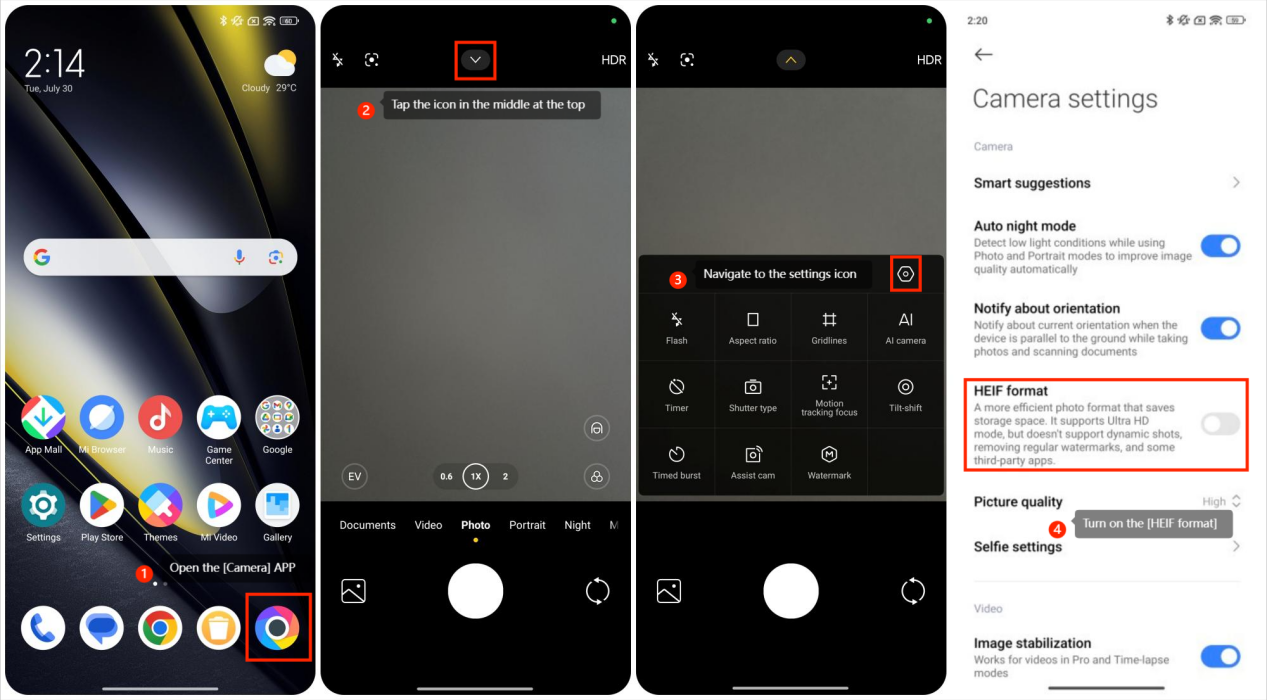
To use the HEIF format, please refer to the following steps:
1. Open the [Camera] APP on your POCO F6 Pro;
2. Tap the icon in the middle at the top;
3. Navigate to the settings icon;
4. Turn on the [HEIF format] to use this feature.
To use the HEIF format, please refer to the following steps:
1. Open the [Camera] APP on your POCO F6 Pro;
2. Tap the icon in the middle at the top;
3. Navigate to the settings icon;
4. Turn on the [HEIF format] to use this feature.
Does it help?
Yes
No