

How to switch between Celsius and Fahrenheit in the Xiaomi Smart Temperature and Humidity Monitor 3? (Fahrenheit is not supported to switch in Korea.)
To switch the temperature unit, please refer to the following steps:
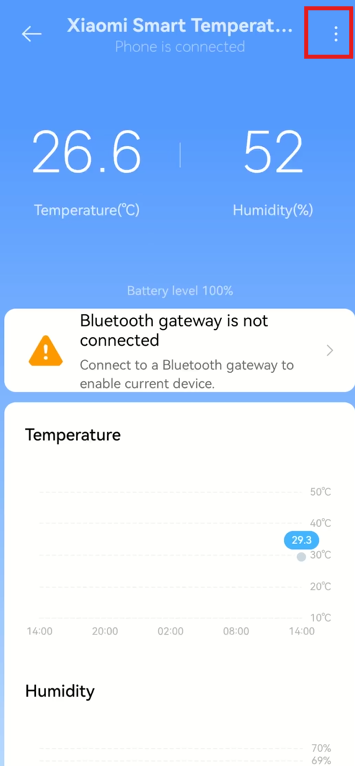
1. Connect the monitor to the APP;
2. You will see the interface of device controlling;
3. Tap [...] at the right top of the screen;
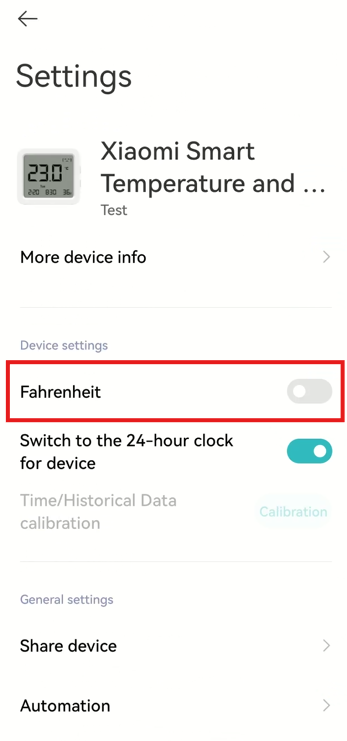
4. Tap [Fahrenheit] to turn on or turn off.
Note:
1. ℃ represents Celsius, and ℉ represents Fahrenheit;
2. If the temperature displayed on the monitor is very high, please check if the Fahrenheit display mode is turned on. Switch to Celsius display mode according to instructions;
3. Fahrenheit is not supported to switch in Korea in the Xiaomi Smart Temperature and Humidity Monitor 3.
1. Connect the monitor to the APP;
2. You will see the interface of device controlling;
3. Tap [...] at the right top of the screen;
4. Tap [Fahrenheit] to turn on or turn off.
Note:
1. ℃ represents Celsius, and ℉ represents Fahrenheit;
2. If the temperature displayed on the monitor is very high, please check if the Fahrenheit display mode is turned on. Switch to Celsius display mode according to instructions;
3. Fahrenheit is not supported to switch in Korea in the Xiaomi Smart Temperature and Humidity Monitor 3.
Does it help?
Yes
No