

How does the Xiaomi Smart Temperature and Humidity Monitor 3 calibrate the time?
The Xiaomi Smart Temperature and Humidity Monitor 3 offers 2 time calibration methods:
1. Automatic time calibration using the Mi Home/Xiaomi Home APP:
Once “Phone is connected” is displayed on the screen of the monitor plug-in in the Mi Home/Xiaomi Home APP, the monitor will automatically perform time calibration. (When the network is disconnected, time calibration cannot be performed and you need to connect to the phone.)
Note:
If “Connected to a Bluetooth gateway” is displayed on the screen of the monitor plug-in in the Mi Home/Xiaomi Home APP, automatic time calibration is unavailable in this mode.
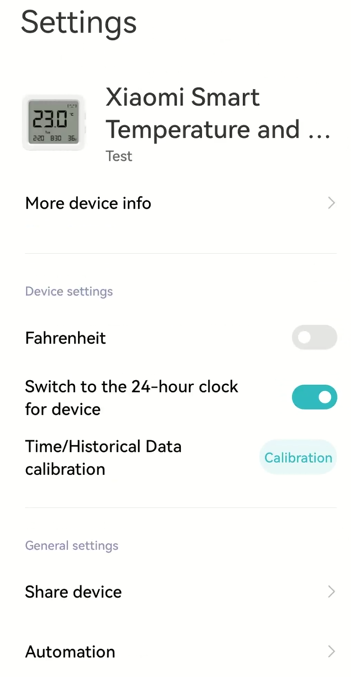
You need to calibrate the value in the [Settings]:
1. Open the [Mi Home/Xiaomi Home] APP;
2. Select the [Xiaomi Smart Temperature and Humidity Monitor 3];
3. Tap [...] at the right top of the screen;
4. Select [Time/Historical Data calibration].
2. Manual time setting:
Please refer to the following steps:
(1). Press and hold the Up Button on the right side of the monitor for 3 seconds until the digits representing “year” blink on the screen, indicating that the monitor has entered the time setting mode;
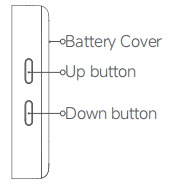
(2). Press both the Up and Down Buttons simultaneously to confirm the current setting item and move to the next one. The screen will display “year”, “month”, “day”, “hour”, and “minute” in sequence;
(3). During blinking, press the Up/Down button to adjust values;
(4). Adjustments save automatically. If there is no operation for more than 15 seconds, it will automatically save and exit the time setting mode.
Note:
The “weekday” information syncs automatically. No separate setup is needed.
1. Automatic time calibration using the Mi Home/Xiaomi Home APP:
Once “Phone is connected” is displayed on the screen of the monitor plug-in in the Mi Home/Xiaomi Home APP, the monitor will automatically perform time calibration. (When the network is disconnected, time calibration cannot be performed and you need to connect to the phone.)
Note:
If “Connected to a Bluetooth gateway” is displayed on the screen of the monitor plug-in in the Mi Home/Xiaomi Home APP, automatic time calibration is unavailable in this mode.
You need to calibrate the value in the [Settings]:
1. Open the [Mi Home/Xiaomi Home] APP;
2. Select the [Xiaomi Smart Temperature and Humidity Monitor 3];
3. Tap [...] at the right top of the screen;
4. Select [Time/Historical Data calibration].
2. Manual time setting:
Please refer to the following steps:
(1). Press and hold the Up Button on the right side of the monitor for 3 seconds until the digits representing “year” blink on the screen, indicating that the monitor has entered the time setting mode;
(2). Press both the Up and Down Buttons simultaneously to confirm the current setting item and move to the next one. The screen will display “year”, “month”, “day”, “hour”, and “minute” in sequence;
(3). During blinking, press the Up/Down button to adjust values;
(4). Adjustments save automatically. If there is no operation for more than 15 seconds, it will automatically save and exit the time setting mode.
Note:
The “weekday” information syncs automatically. No separate setup is needed.
Does it help?
Yes
No