

How do the cameras store videos in the Xiaomi Outdoor Camera Base Station?
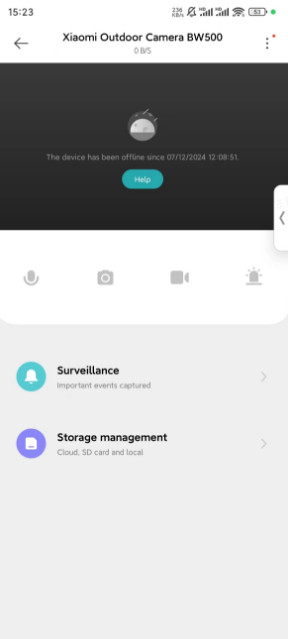
To conduct storage management, please refer to the following steps:
1. Tap the [Mi Home/Xiaomi Home] APP;
2. Tap [Xiaomi Outdoor Camera Base Station];
3. Tap [...] at the right top of the screen;
4. Tap [Storage management];
5. You can select the Cloud or local storage to store videos.

Note:
1. When you select the microSD card of the station to store videos, you can check and manage storage in the correlated interface;
2. After installing the microSD card, conduct formatting in the Xiaomi Home/Mi Home APP first, or after conducting formatting via computer and install it;
3. If there are still problems after conducting formatting or formatting cannot be conducted in the Xiaomi Home/Mi Home APP, the microSD card does not accord with the station. Please use the standard camera SD card.
1. Tap the [Mi Home/Xiaomi Home] APP;
2. Tap [Xiaomi Outdoor Camera Base Station];
3. Tap [...] at the right top of the screen;
4. Tap [Storage management];
5. You can select the Cloud or local storage to store videos.
Note:
1. When you select the microSD card of the station to store videos, you can check and manage storage in the correlated interface;
2. After installing the microSD card, conduct formatting in the Xiaomi Home/Mi Home APP first, or after conducting formatting via computer and install it;
3. If there are still problems after conducting formatting or formatting cannot be conducted in the Xiaomi Home/Mi Home APP, the microSD card does not accord with the station. Please use the standard camera SD card.
Does it help?
Yes
No