

How to install a MicroSD card on the Xiaomi Smart Camera C300?
To install the MicroSD card, please refer to the following methods:
1. Disconnect the USB power cable with the camera;
2. Rotate the lens upward until the MicroSD card slot shows up;
3. Insert the MicroSD card into the card slot with its contact points facing downward.
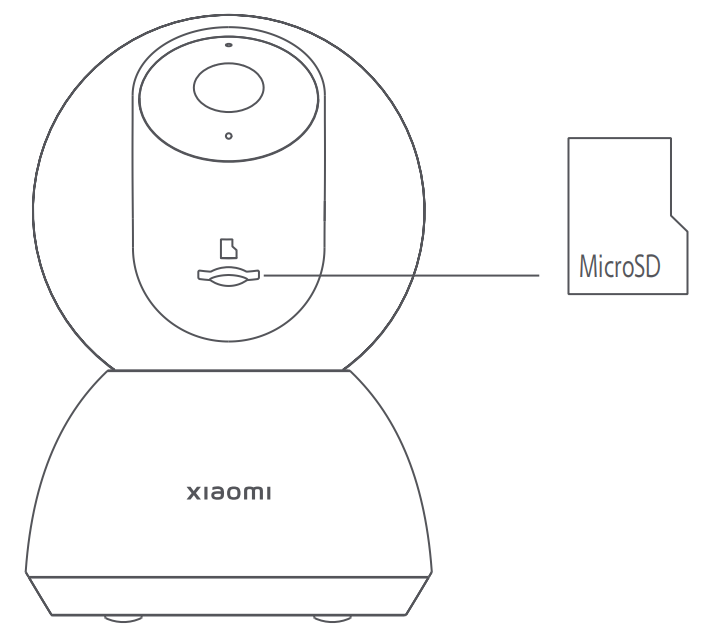
Note:
1. Disconnect the camera from the power before installing or removing a MicroSD card;
2. Please use a genuine MicroSD card (up to 256 GB) manufactured by a qualified supplier;
3. The MicroSD card needs to be purchased separately. It is recommended to use a MicroSD card with a reading/writing speed of no less than U1/Class 10.
1. Disconnect the USB power cable with the camera;
2. Rotate the lens upward until the MicroSD card slot shows up;
3. Insert the MicroSD card into the card slot with its contact points facing downward.
Note:
1. Disconnect the camera from the power before installing or removing a MicroSD card;
2. Please use a genuine MicroSD card (up to 256 GB) manufactured by a qualified supplier;
3. The MicroSD card needs to be purchased separately. It is recommended to use a MicroSD card with a reading/writing speed of no less than U1/Class 10.
Does it help?
Yes
No