

How to set up Camera calibration on the Xiaomi Smart Camera C301?
The Camera calibration function is useful when the device is unable to automatically reposition the lens or if the lens monitoring angle cannot be accurately adjusted.
To set up Camera calibration on your camera, please refer to the following steps:
1. Open the Mi Home/Xiaomi Home APP;
2. Tap on [Device Card];
3. Tap the three-dot icon at the upper right corner;
4. Select [Camera settings];
5. Select [Camera calibration];
6. Wait for the device to be calibrated successfully.
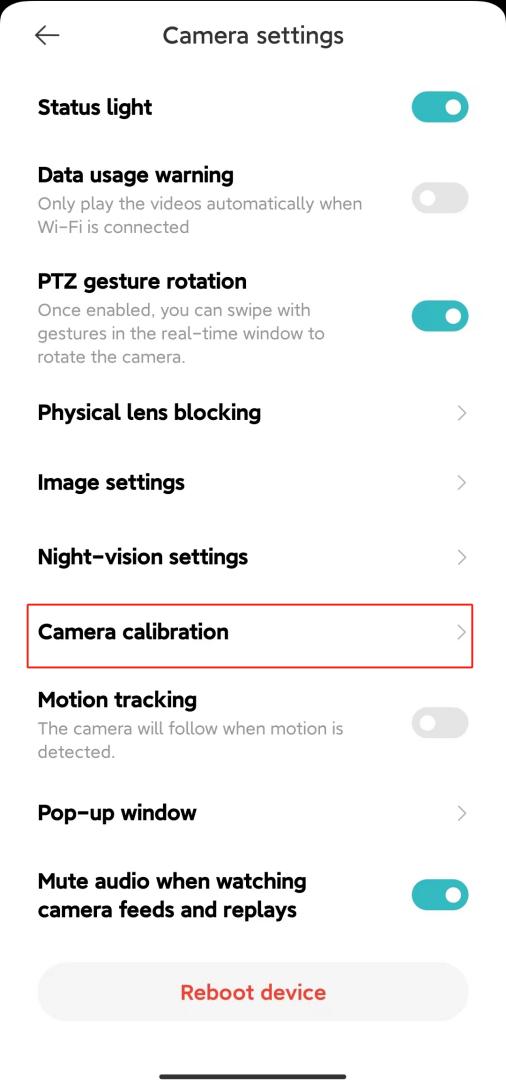
To set up Camera calibration on your camera, please refer to the following steps:
1. Open the Mi Home/Xiaomi Home APP;
2. Tap on [Device Card];
3. Tap the three-dot icon at the upper right corner;
4. Select [Camera settings];
5. Select [Camera calibration];
6. Wait for the device to be calibrated successfully.
Does it help?
Yes
No