

How to set Physical lens blocking on the Xiaomi Smart Camera C301?
To set Physical lens blocking on the camera, please refer to the following methods:
Method 1:
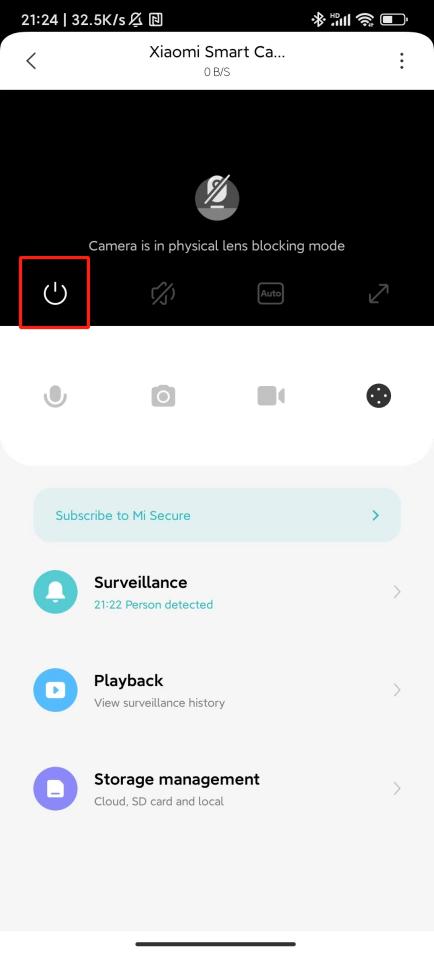
Enter the camera monitoring interface, tap the physical lens blocking icon, and the device will immediately enter the physical lens blocking mode.
Method 2:
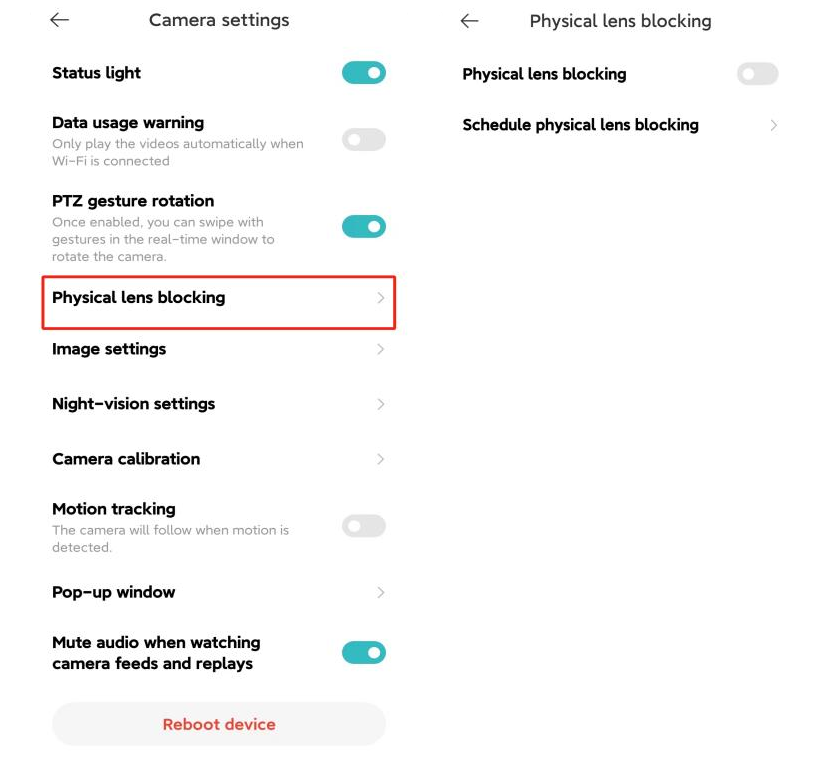
1. Open the Mi Home/Xiaomi Home APP;
2. Tap on [Device Card];
3. Tap the three-dot icon at the upper right corner;
4. Select [Camera settings];
5. Select [Physical lens blocking];
6. You can choose [Physical lens blocking] or set the time of Physical lens blocking by tapping [Schedule physical lens blocking].
Method 1:
Enter the camera monitoring interface, tap the physical lens blocking icon, and the device will immediately enter the physical lens blocking mode.
Method 2:
1. Open the Mi Home/Xiaomi Home APP;
2. Tap on [Device Card];
3. Tap the three-dot icon at the upper right corner;
4. Select [Camera settings];
5. Select [Physical lens blocking];
6. You can choose [Physical lens blocking] or set the time of Physical lens blocking by tapping [Schedule physical lens blocking].
Does it help?
Yes
No