

How to clean the suction inlet of the Xiaomi Dust Mite Vacuum Cleaner Pro?
Remove the dust compartment assembly, and you will see dust mite sensors in the suction inlet. Clean them with a dry cloth or tissue.
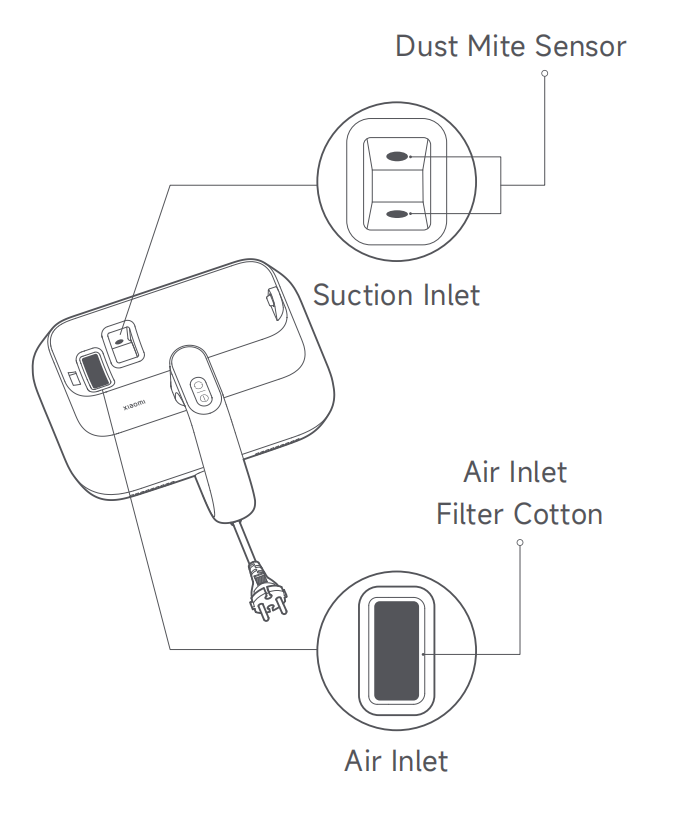
Note:
1. It is normal for dust and other particles to adhere to the suction inlet. Clean it in a timely manner;
2. When the dust mite sensors are dirty, the dust mite density indicator will blink in orange. Clean the dust mite sensors promptly. Frequent cleaning of the dust mite sensors can prevent dust buildup and ensure their detection accuracy;
3. The function of the air inlet filter cotton is filtration. Please do not discard it. If the filter cotton becomes dirty, remove and rinse it with clean tap water. Be sure to thoroughly air-dry it (away from direct sunlight) before re-installation.
Note:
1. It is normal for dust and other particles to adhere to the suction inlet. Clean it in a timely manner;
2. When the dust mite sensors are dirty, the dust mite density indicator will blink in orange. Clean the dust mite sensors promptly. Frequent cleaning of the dust mite sensors can prevent dust buildup and ensure their detection accuracy;
3. The function of the air inlet filter cotton is filtration. Please do not discard it. If the filter cotton becomes dirty, remove and rinse it with clean tap water. Be sure to thoroughly air-dry it (away from direct sunlight) before re-installation.
Does it help?
Yes
No