

What are the functions of the display on the Xiaomi Dust Mite Vacuum Cleaner Pro?
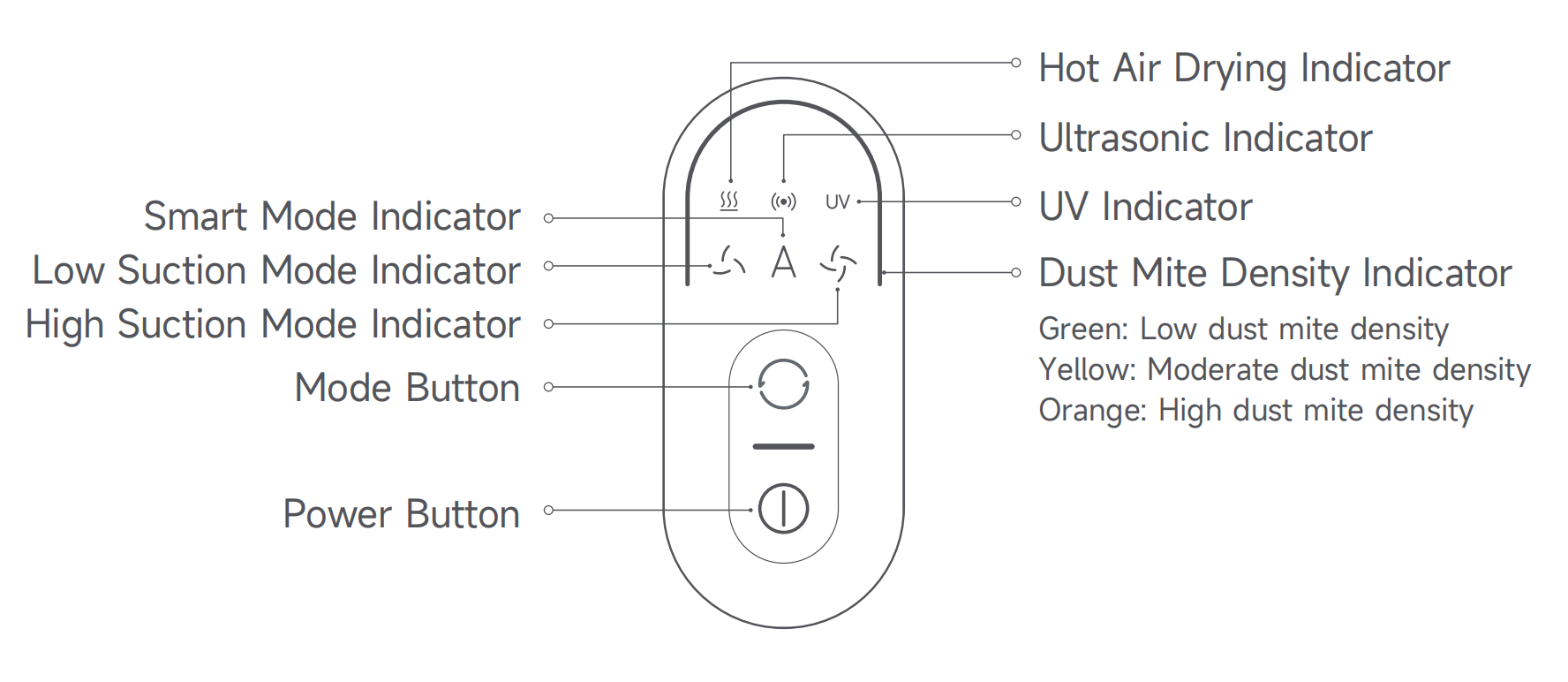
The Xiaomi Dust Mite Vacuum Cleaner Pro’s display has several indicators and buttons on it, including a Hot Air Drying Indicator, an Ultrasonic Indicator, a UV Indicator, a Low Suction Mode Indicator, a Smart Mode Indicator, a High Suction Mode Indicator, a Dust Mite Density Indicator, a Mode Button, and a Power Button.
The Dust Mite Density Indicator has three statuses, including green light (Low dust mite density), yellow light (Moderate dust mite density), and orange light (High dust mite density).
For your reference, the illustration of the display is shown below:
Note:
1. The Hot Air Drying, Ultrasonic, and UV functions are enabled by default;
2. When the UV function is enabled, the UV indicator is on. When the UV function is disabled, the UV indicator is off;
3. It is normal for the UV indicator to go out when you lift (more than 5cm from the textile surface), tilt the dust mite vacuum cleaner during operation, or clean dark-colored textiles;
4. During cleaning, a steady yellow or orange dust mite density indicator indicates a high dust mite density in the current area. It is recommended to clean this area multiple times.
The Dust Mite Density Indicator has three statuses, including green light (Low dust mite density), yellow light (Moderate dust mite density), and orange light (High dust mite density).
For your reference, the illustration of the display is shown below:
Note:
1. The Hot Air Drying, Ultrasonic, and UV functions are enabled by default;
2. When the UV function is enabled, the UV indicator is on. When the UV function is disabled, the UV indicator is off;
3. It is normal for the UV indicator to go out when you lift (more than 5cm from the textile surface), tilt the dust mite vacuum cleaner during operation, or clean dark-colored textiles;
4. During cleaning, a steady yellow or orange dust mite density indicator indicates a high dust mite density in the current area. It is recommended to clean this area multiple times.
Does it help?
Yes
No