

What are the keep warm modes of the Xiaomi Smart Kettle 2 Pro?
1. Rotate the knob to set the temperature and press the Keep Warm button to start heating, then the screen displays a real-time water temperature. After heating is completed, it will automatically enter the keep warm state.
Note:
In standby status, you can press the Keep Warm button and directly enter the keep warm state when the water temperature is between 40℃ and 90℃.
Note:
In standby status, you can press the Keep Warm button and directly enter the keep warm state when the water temperature is between 40℃ and 90℃.
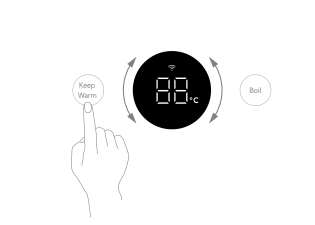
2. Rotate the knob to keep warm temperature and press the Boil button to start heating, then the screen displays a real-time water temperature. After the water boils, it will cool down to the keep warm temperature and then automatically enter the keep warm state.
Note:
1. The status light shows red during the heating process. However, the status light shows blue after reaching the set temperature;
2. The default insulation time of each gear is 12 hours, which can be customized modify on the Mi Home APP. The APP can be adjusted time from 1 to 24 hours;
3. After boiling, the maximum temperature is 99℃.
Note:
1. The status light shows red during the heating process. However, the status light shows blue after reaching the set temperature;
2. The default insulation time of each gear is 12 hours, which can be customized modify on the Mi Home APP. The APP can be adjusted time from 1 to 24 hours;
3. After boiling, the maximum temperature is 99℃.
Does it help?
Yes
No