

What are the features of the Redmi Watch 4 control panel?
The Redmi Watch 4 control panel can be accessed by swiping up on the bottom edge of the dial home screen:
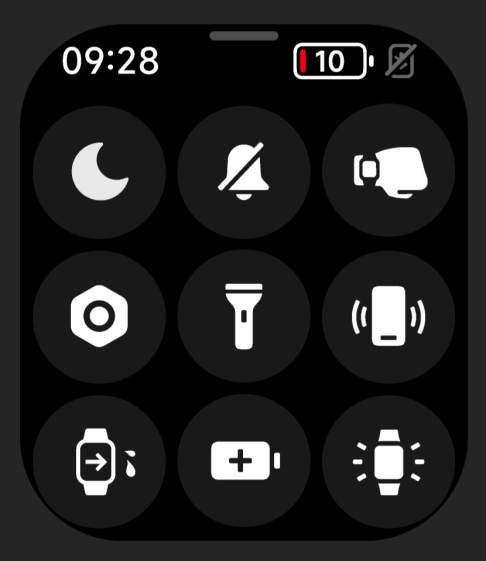
1. The status bar from left to right is:
(1). Do Not Disturb Mode: Tap it to quickly enter the Do Not Disturb Mode setting;
(2). Silent mode: Tap it to quickly turn off/on silent mode;
(3). Wrist lift: Tap it to quickly turn off/on the wrist lift mode;
(4). Settings: Tap it to enter the system settings interface;
(5). Flashlight: Tap it to turn on the flashlight;
(6). Find Phone: Tap it to enter the Find Phone application;
(7). Drain Mode: Tap it to turn on the drain function;
(8). Long life mode: Tap it to turn on the long life mode, rotate the crown or charge to exit the long life;
(9). Always on for 5 minutes: Tap it to keep the screen always on for 5 minutes, after resting the screen to restore the resting time set by the system.
(1). Do Not Disturb Mode: Tap it to quickly enter the Do Not Disturb Mode setting;
(2). Silent mode: Tap it to quickly turn off/on silent mode;
(3). Wrist lift: Tap it to quickly turn off/on the wrist lift mode;
(4). Settings: Tap it to enter the system settings interface;
(5). Flashlight: Tap it to turn on the flashlight;
(6). Find Phone: Tap it to enter the Find Phone application;
(7). Drain Mode: Tap it to turn on the drain function;
(8). Long life mode: Tap it to turn on the long life mode, rotate the crown or charge to exit the long life;
(9). Always on for 5 minutes: Tap it to keep the screen always on for 5 minutes, after resting the screen to restore the resting time set by the system.
Does it help?
Yes
No