

What to do if the Xiaomi Electric Scooter 4 can't be unlocked?
The Xiaomi Electric Scooter 4 features with lock mode and it can be locked via the Mi Home app. If others attempt to move or ride it when the vehicle is in lock mode, the scooter will lock the wheel and alarm with a beeping sound.
If you can’t disable the Lock Mode, please refer to the following troubleshooting steps:
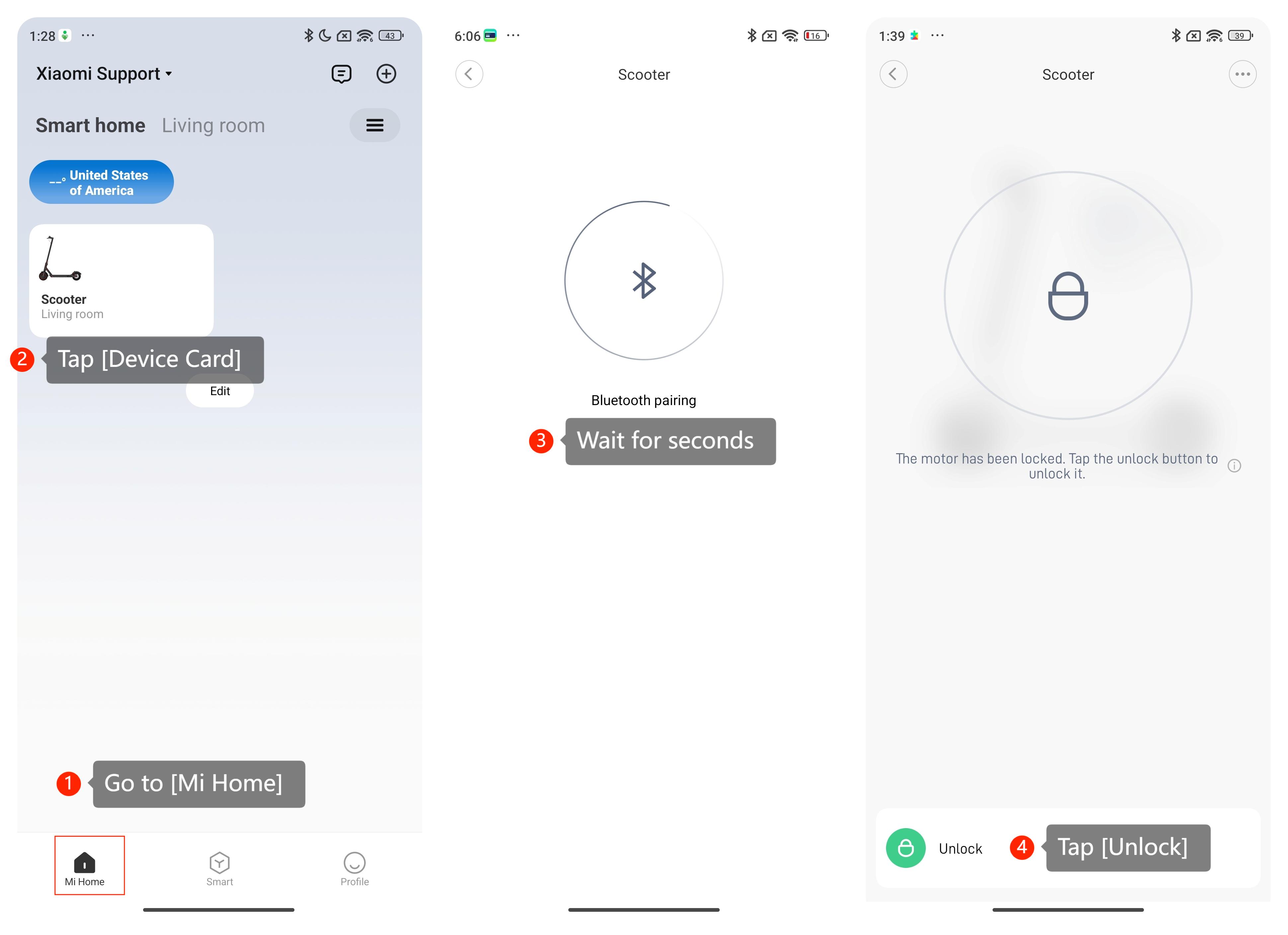
1. Make sure you have the right path to disable the Lock Mode by going to [Mi Home] >> [Device Card] >> [Unlock];
2. Ensure that your smartphone, which is connected to the scooter, has a stable and reliable internet connection;
3. Please check if the Mi Home app has permission to access the Bluetooth, GPS and network;
4. Make sure that both Bluetooth and Location are enabled on the smartphone. And ensure that the Bluetooth connection between your smartphone and the scooter is stable. You can also disable the Bluetooth on your smartphone and enable it again;
5. Please make sure to put your smartphone within a 5-meter range around the scooter;
6. Close the Mi Home app and turn off the scooter, then restart them. This can help refresh the app and establish a new connection with the scooter. If it’s still impossible, please change to another smartphone and have a try;
7. Please clear the Mi Home app’s cache;
8. Please check that the correct region is selected by going to the Mi Home app >> [Profile] >> [Additional settings] >> [Region] >> select the correct region;
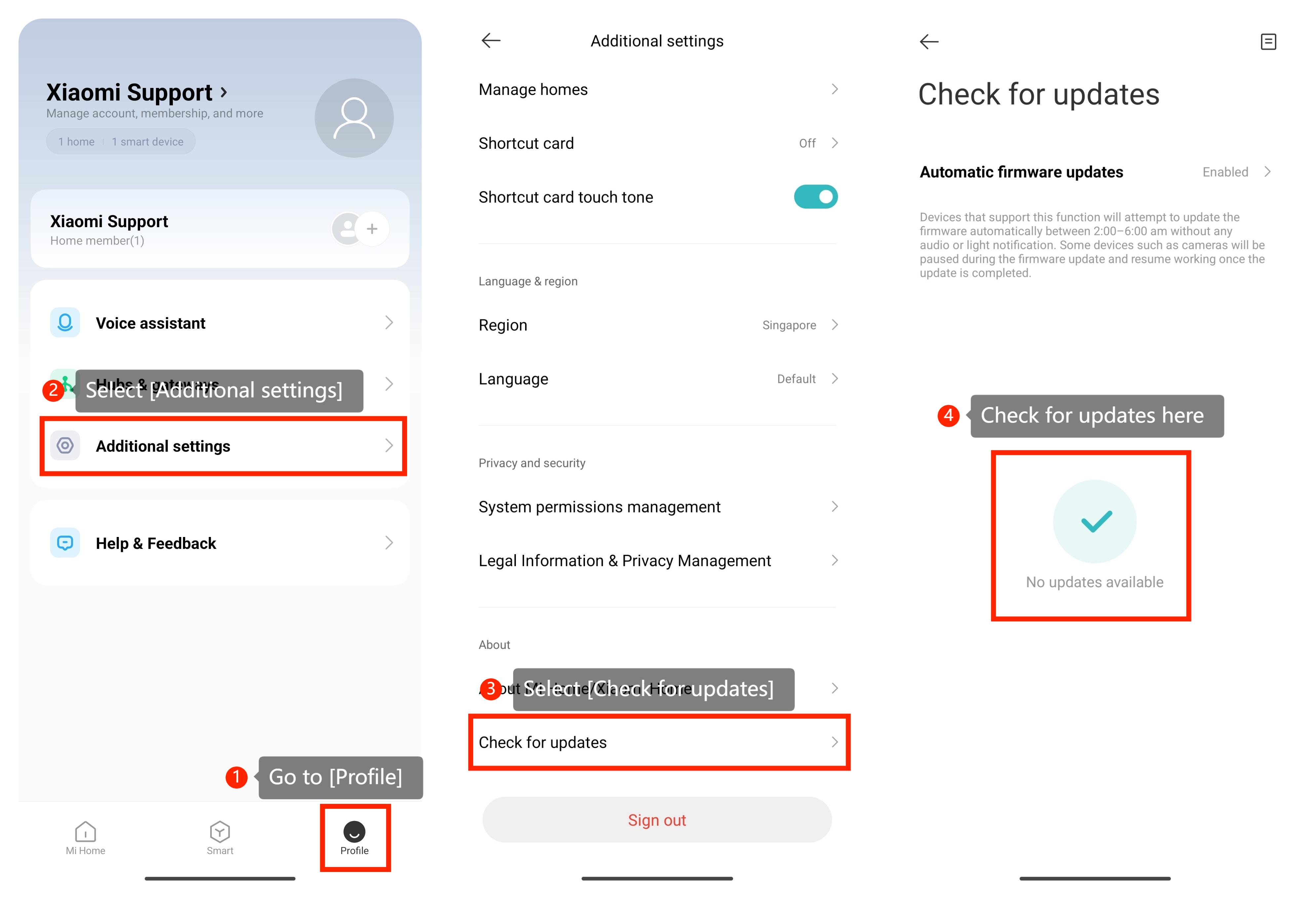
9. Please make sure the Mi Home app is the latest version by going to [Profile] >> [Additional settings] >> [Check for updates] >> [Automatic firmware updates];
10. You can check for updates of the scooter by going to [Mi Home] >> [Device Card] >> [Firmware update] >> [Check for updates];
11. Try uninstalling the Mi Home app and reinstalling it;
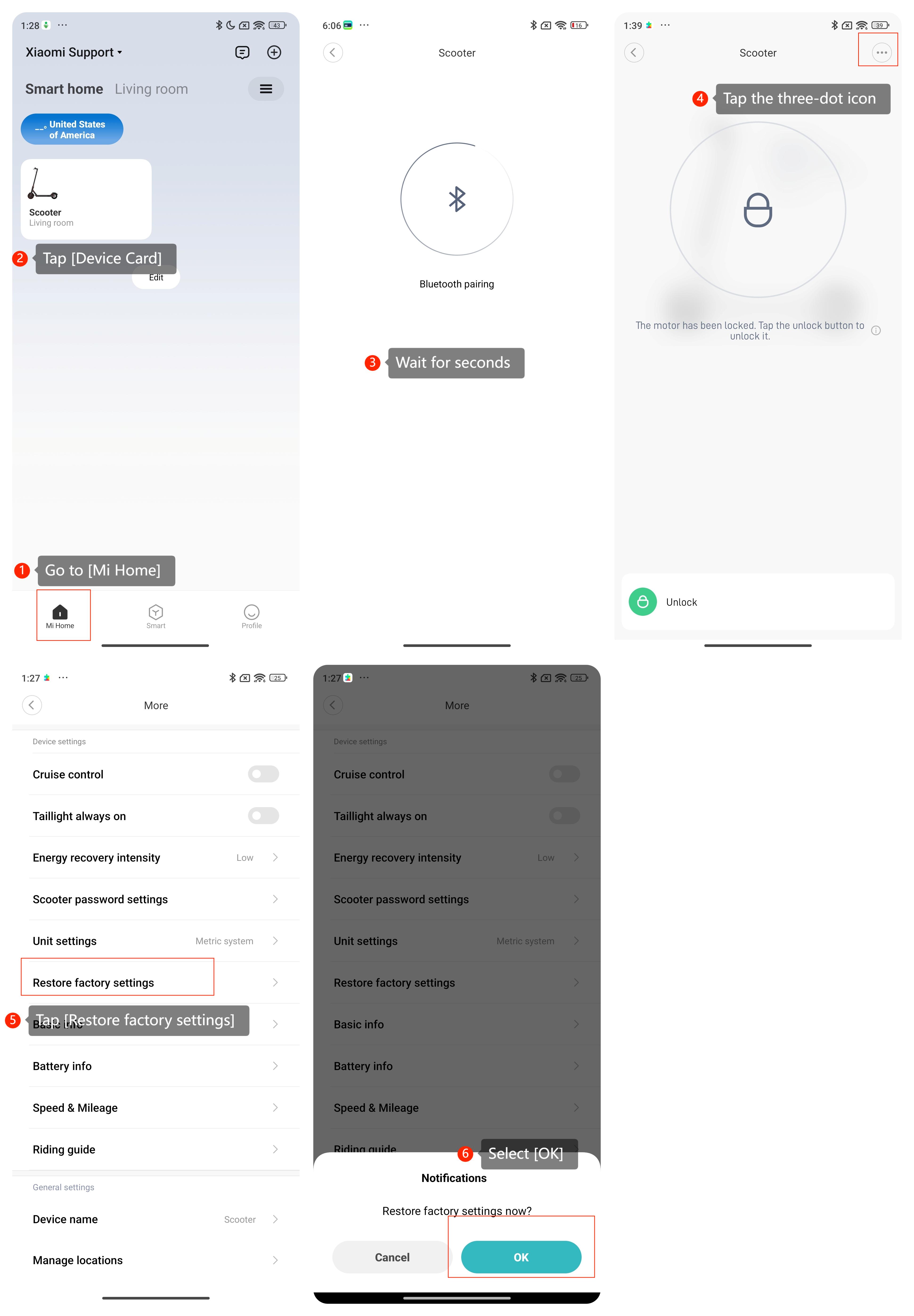
12. Restore the scooter to the factory settings by going to [Mi Home] >> [Device card] >> [Restore factory settings] >> [OK].
If the above troubleshooting methods can’t resolve the issue, please contact our local official service center or your seller for further assistance. They will help you in this regard.
If you can’t disable the Lock Mode, please refer to the following troubleshooting steps:
1. Make sure you have the right path to disable the Lock Mode by going to [Mi Home] >> [Device Card] >> [Unlock];
2. Ensure that your smartphone, which is connected to the scooter, has a stable and reliable internet connection;
3. Please check if the Mi Home app has permission to access the Bluetooth, GPS and network;
4. Make sure that both Bluetooth and Location are enabled on the smartphone. And ensure that the Bluetooth connection between your smartphone and the scooter is stable. You can also disable the Bluetooth on your smartphone and enable it again;
5. Please make sure to put your smartphone within a 5-meter range around the scooter;
6. Close the Mi Home app and turn off the scooter, then restart them. This can help refresh the app and establish a new connection with the scooter. If it’s still impossible, please change to another smartphone and have a try;
7. Please clear the Mi Home app’s cache;
8. Please check that the correct region is selected by going to the Mi Home app >> [Profile] >> [Additional settings] >> [Region] >> select the correct region;
9. Please make sure the Mi Home app is the latest version by going to [Profile] >> [Additional settings] >> [Check for updates] >> [Automatic firmware updates];
10. You can check for updates of the scooter by going to [Mi Home] >> [Device Card] >> [Firmware update] >> [Check for updates];
11. Try uninstalling the Mi Home app and reinstalling it;
12. Restore the scooter to the factory settings by going to [Mi Home] >> [Device card] >> [Restore factory settings] >> [OK].
If the above troubleshooting methods can’t resolve the issue, please contact our local official service center or your seller for further assistance. They will help you in this regard.
Does it help?
Yes
No