

What to do if the Xiaomi TV A Pro 32 can’t play or stream content smoothly from applications?
If the Xiaomi TV A Pro 32 can’t play or stream content smoothly from applications, please refer to the following troubleshooting steps:
1. Please ensure that your TV is connected to the internet. Sometimes, a weak or unstable internet connection can prevent applications from starting or functioning correctly;
2. Restarting your TV can resolve many temporary issues. You can restart your TV by navigating to [Settings] >> [System] >> select [Restart];
3. Navigate to [Settings] >> [Apps] >> select the app >> select [Clear cache] and [Clear data];
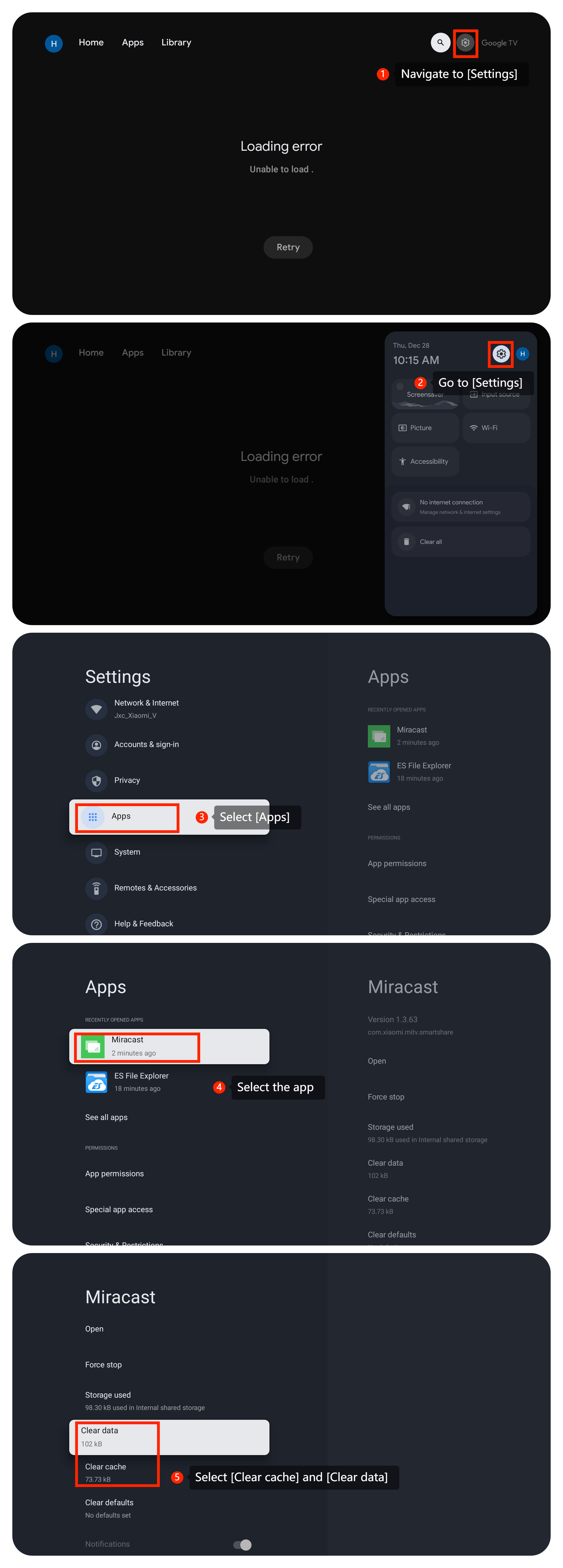
4. If clearing cache and data doesn't work, you can uninstall it and then reinstall it from the Google Play Store;
5. Ensure that your TV's firmware is up to date. You can check for updates in the TV's settings menu by navigating to [Settings] >> select [System] >> select [About] >> select [System update];
6. If the issue persists, you can consider performing a factory reset. Go to [Settings] >> [System] >> [About] >> [Reset] >> [Factory reset]. Be aware that this will erase all data and settings on your TV, so make sure to back up anything important before doing this.
We hope the above methods can resolve the issue. If the issue persists, you could submit your feedback on your TV by going to [Settings] >> [Help & Feedback] >> [Send feedback], you can upload logs with your feedback.
Friendly Tips:
The recommended bit rates of the video stream are shown as below:
1. The 4K UHD video stream requires 10Mbps;
2. The 2K video stream requires 5Mbps;
3. The 720p video stream requires 2.5Mbps.
1. Please ensure that your TV is connected to the internet. Sometimes, a weak or unstable internet connection can prevent applications from starting or functioning correctly;
2. Restarting your TV can resolve many temporary issues. You can restart your TV by navigating to [Settings] >> [System] >> select [Restart];
3. Navigate to [Settings] >> [Apps] >> select the app >> select [Clear cache] and [Clear data];
4. If clearing cache and data doesn't work, you can uninstall it and then reinstall it from the Google Play Store;
5. Ensure that your TV's firmware is up to date. You can check for updates in the TV's settings menu by navigating to [Settings] >> select [System] >> select [About] >> select [System update];
6. If the issue persists, you can consider performing a factory reset. Go to [Settings] >> [System] >> [About] >> [Reset] >> [Factory reset]. Be aware that this will erase all data and settings on your TV, so make sure to back up anything important before doing this.
We hope the above methods can resolve the issue. If the issue persists, you could submit your feedback on your TV by going to [Settings] >> [Help & Feedback] >> [Send feedback], you can upload logs with your feedback.
Friendly Tips:
The recommended bit rates of the video stream are shown as below:
1. The 4K UHD video stream requires 10Mbps;
2. The 2K video stream requires 5Mbps;
3. The 720p video stream requires 2.5Mbps.
Does it help?
Yes
No