

What to do if the Xiaomi TV A Pro 50 cannot adjust brightness or contrast?
If you cannot adjust the brightness or contrast on your Xiaomi TV A Pro 50, please refer to the following scenarios and their troubleshooting methods:
Scenario 1:
If the issue occurs when you are using apps on your TV, please refer to the following methods:
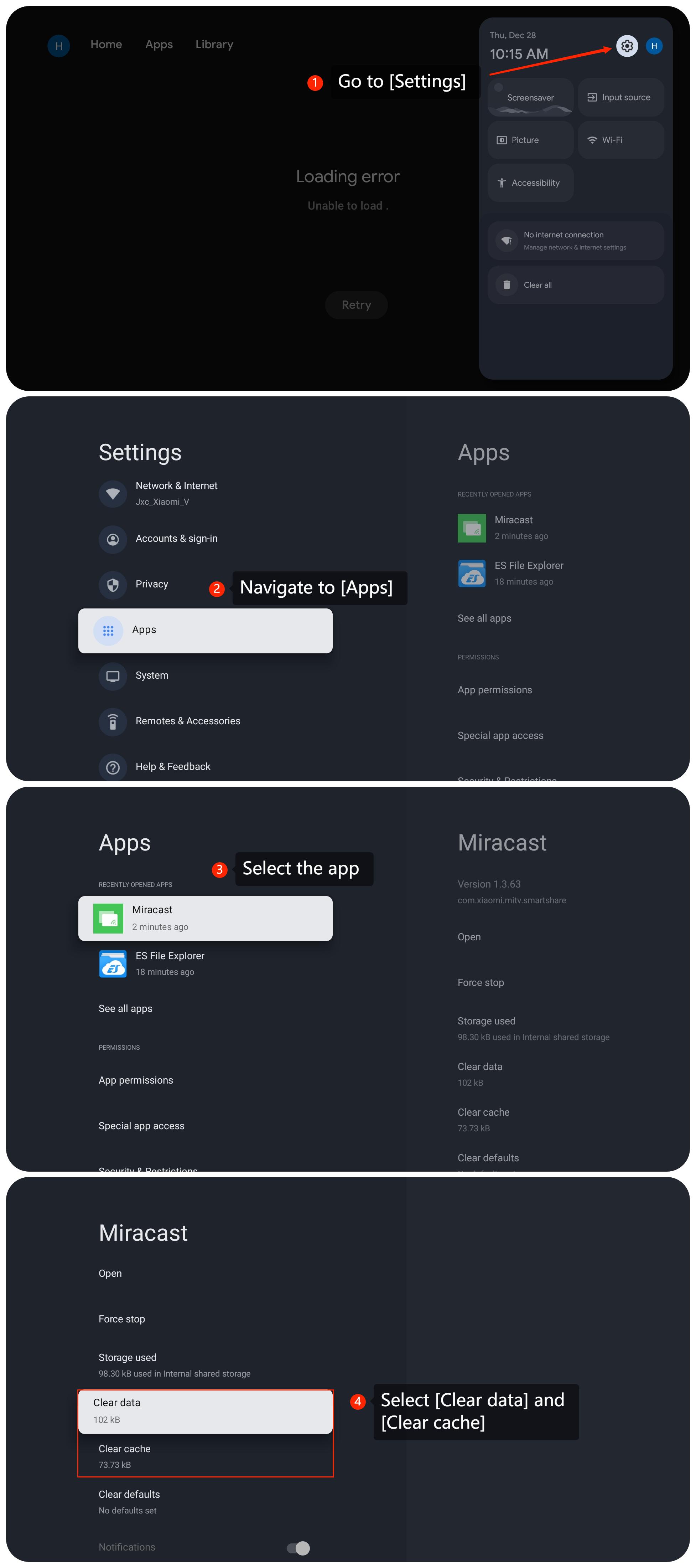
1. Clear the cache or data of the app by navigating to [Settings] >> [Apps] >> select the specific app >> [Clear cache] and [Clear data];
2. Check for updates for the apps installed on your TV. An outdated app can cause compatibility issues;
3. If the above methods don't work, please uninstall and reinstall the app.
Scenario 2:
If the issue occurs when you are using an external device like a DVD player or game console, please refer to the following methods:
1. Ensure that the HDMI cable connecting the external device to the TV is in good condition. Try using a different HDMI cable to rule out any cable-related issues;
2. Ensure that the external device is configured correctly. Check the settings on the external device to see if there are options related to brightness and contrast.
Scenario 3:
If the issue occurs when you are using casting on your TV, please refer to the following methods:
1. Make sure that both your casting device and the TV are connected to the same Wi-Fi network;
2. On your casting device, check the screen mirroring or casting settings. Make sure you have selected the correct TV or casting device;
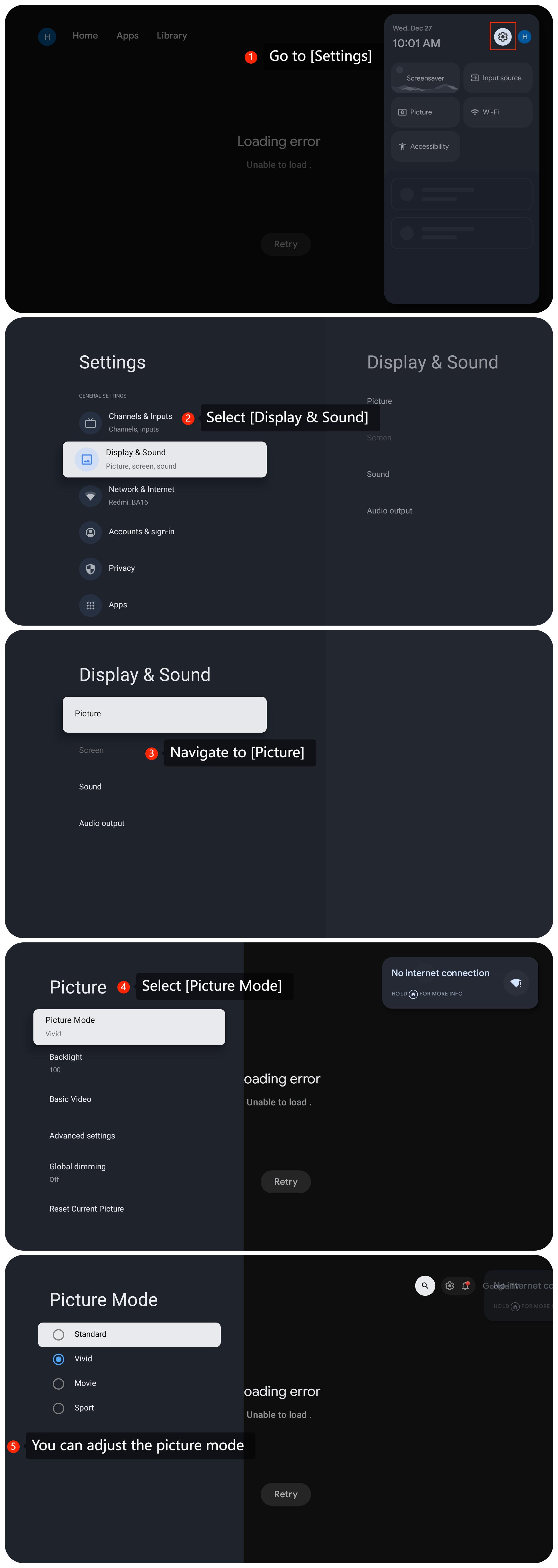
3. Please adjust the picture mode on the TV. Navigate to [Settings] >> [Display & Sound] >> [Picture] >> [Picture Mode]. And you can select [Standard], [Vivid], or other options to see which one can resolve the issues;
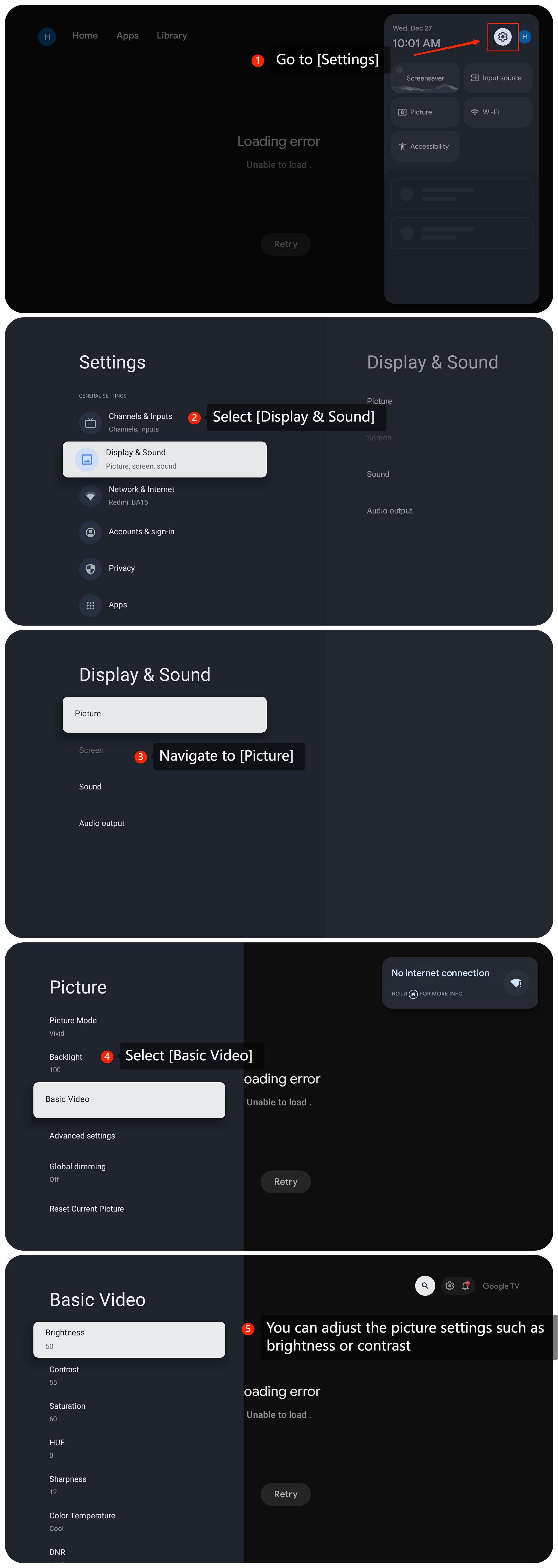
4. You can also make corresponding picture settings. Go to [Settings] >> [Display & Sound] >> [Picture] >> [Basic Video] >> adjust [Brightness] or [Contrast];
5. Check for available updates for the system. You can go to [Settings] >> select [System] >> select [About] >> select [System update];
6. If the issue persists, you may consider performing a factory reset by going to [Settings] >> [System] >> [About] >> [Reset] >> [Factory reset]. Keep in mind that this will erase all data on the device.
If the above troubleshooting methods can’t resolve the issue, please contact our local official service center or your seller for further assistance. They will help you in this regard.
Scenario 1:
If the issue occurs when you are using apps on your TV, please refer to the following methods:
1. Clear the cache or data of the app by navigating to [Settings] >> [Apps] >> select the specific app >> [Clear cache] and [Clear data];
2. Check for updates for the apps installed on your TV. An outdated app can cause compatibility issues;
3. If the above methods don't work, please uninstall and reinstall the app.
Scenario 2:
If the issue occurs when you are using an external device like a DVD player or game console, please refer to the following methods:
1. Ensure that the HDMI cable connecting the external device to the TV is in good condition. Try using a different HDMI cable to rule out any cable-related issues;
2. Ensure that the external device is configured correctly. Check the settings on the external device to see if there are options related to brightness and contrast.
Scenario 3:
If the issue occurs when you are using casting on your TV, please refer to the following methods:
1. Make sure that both your casting device and the TV are connected to the same Wi-Fi network;
2. On your casting device, check the screen mirroring or casting settings. Make sure you have selected the correct TV or casting device;
3. Please adjust the picture mode on the TV. Navigate to [Settings] >> [Display & Sound] >> [Picture] >> [Picture Mode]. And you can select [Standard], [Vivid], or other options to see which one can resolve the issues;
4. You can also make corresponding picture settings. Go to [Settings] >> [Display & Sound] >> [Picture] >> [Basic Video] >> adjust [Brightness] or [Contrast];
5. Check for available updates for the system. You can go to [Settings] >> select [System] >> select [About] >> select [System update];
6. If the issue persists, you may consider performing a factory reset by going to [Settings] >> [System] >> [About] >> [Reset] >> [Factory reset]. Keep in mind that this will erase all data on the device.
If the above troubleshooting methods can’t resolve the issue, please contact our local official service center or your seller for further assistance. They will help you in this regard.
Does it help?
Yes
No