

What to do if you fail to visit websites on the Xiaomi TV A Pro 43?
If you cannot visit websites on the Xiaomi TV A Pro 43, please refer to the following troubleshooting steps:
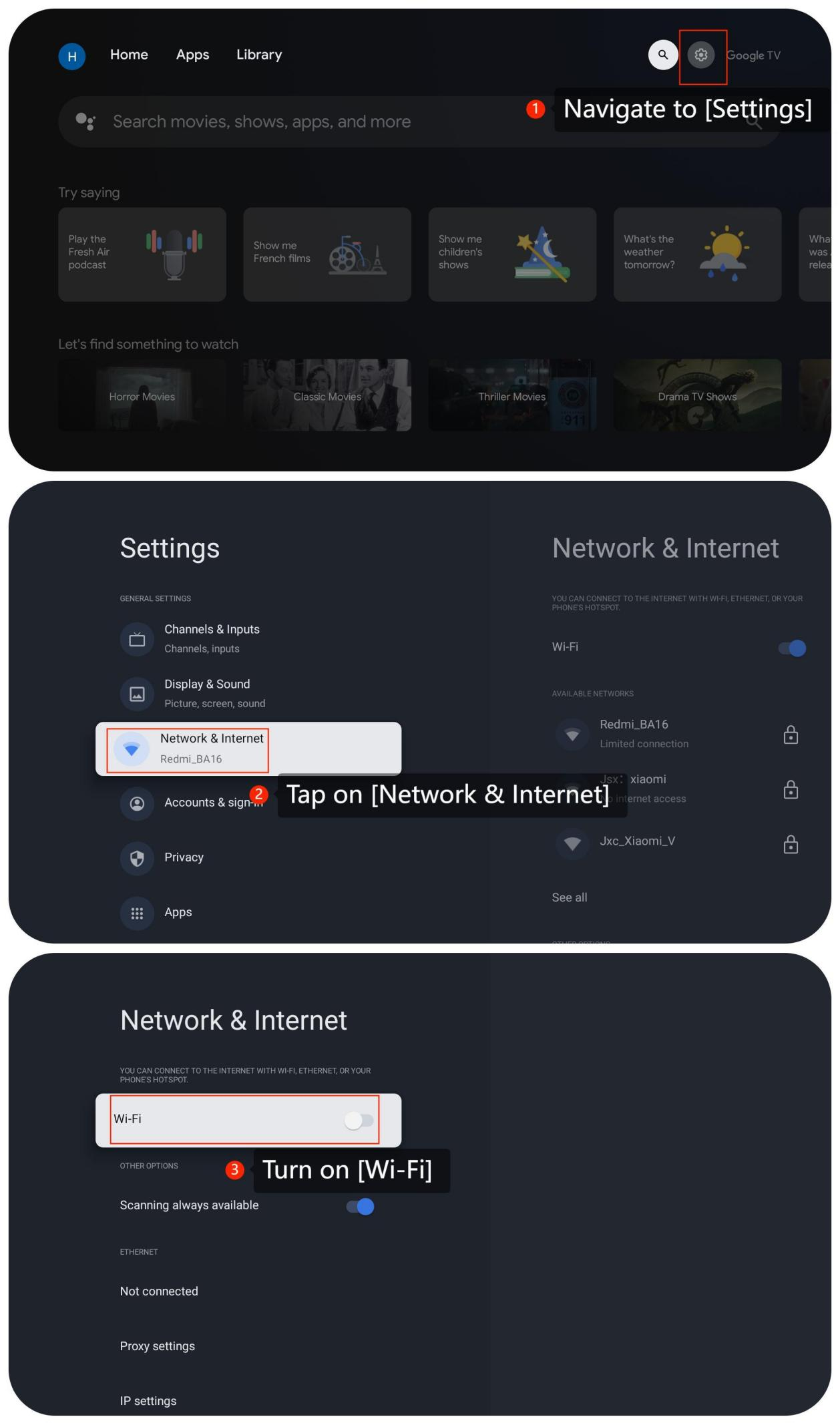
1. Ensure that the TV is connected to the internet. You can check it by going to the settings and checking the network connection by going to [Settings] >> [Network & Internet] >> turn on [Wi-Fi];
2. Turn off the TV, wait for a few seconds, and then turn it back on, which can sometimes resolve connectivity issues;
3. If the issue persists, try using a different web browser or app to access the websites. This can help determine if the problem is specific to a particular application;
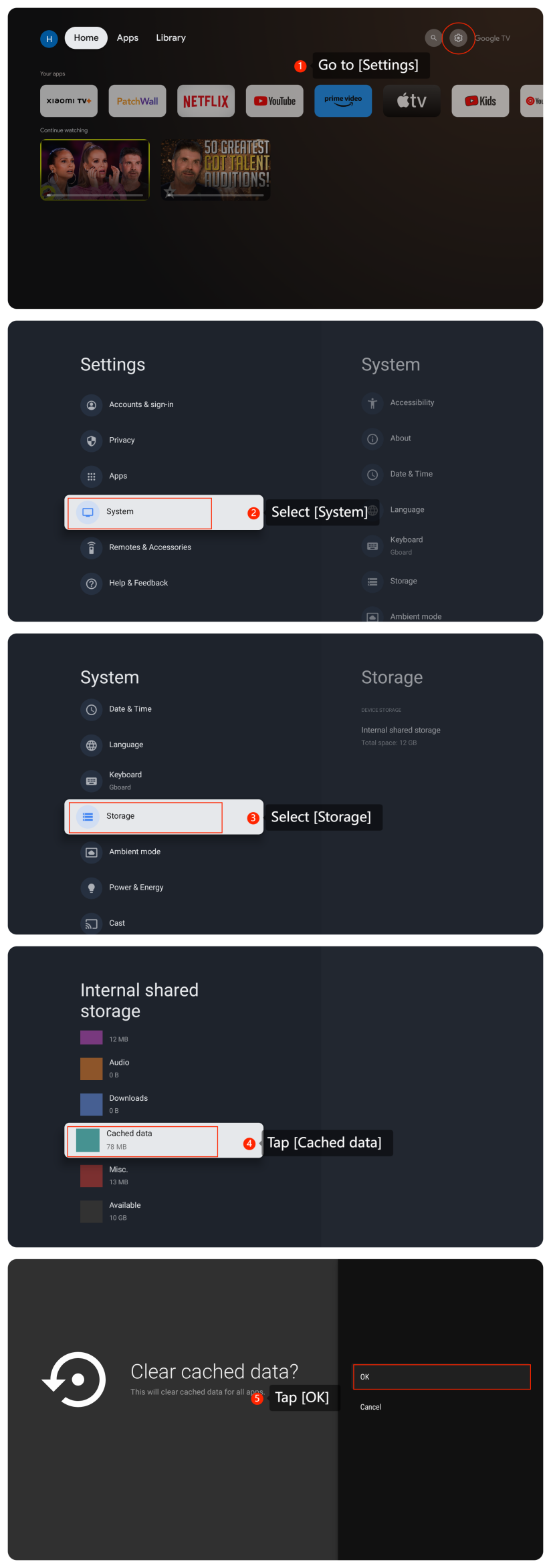
4. If you are using a web browser on the TV, try clearing the cache and data by going to [Settings] >> [System] >> [Storage] >> [Internal shared storage] >> [Cached data] >> tap [OK];
5. Ensure that the web browser or app you are using to access websites is up to date as outdated software may have compatibility issues with certain websites. Please go to [Settings] >> [Apps] >> [Google Play Store] >> [Uninstall updates] >> [OK];
6. If the above methods don't work, please uninstall and reinstall the web browser or app;
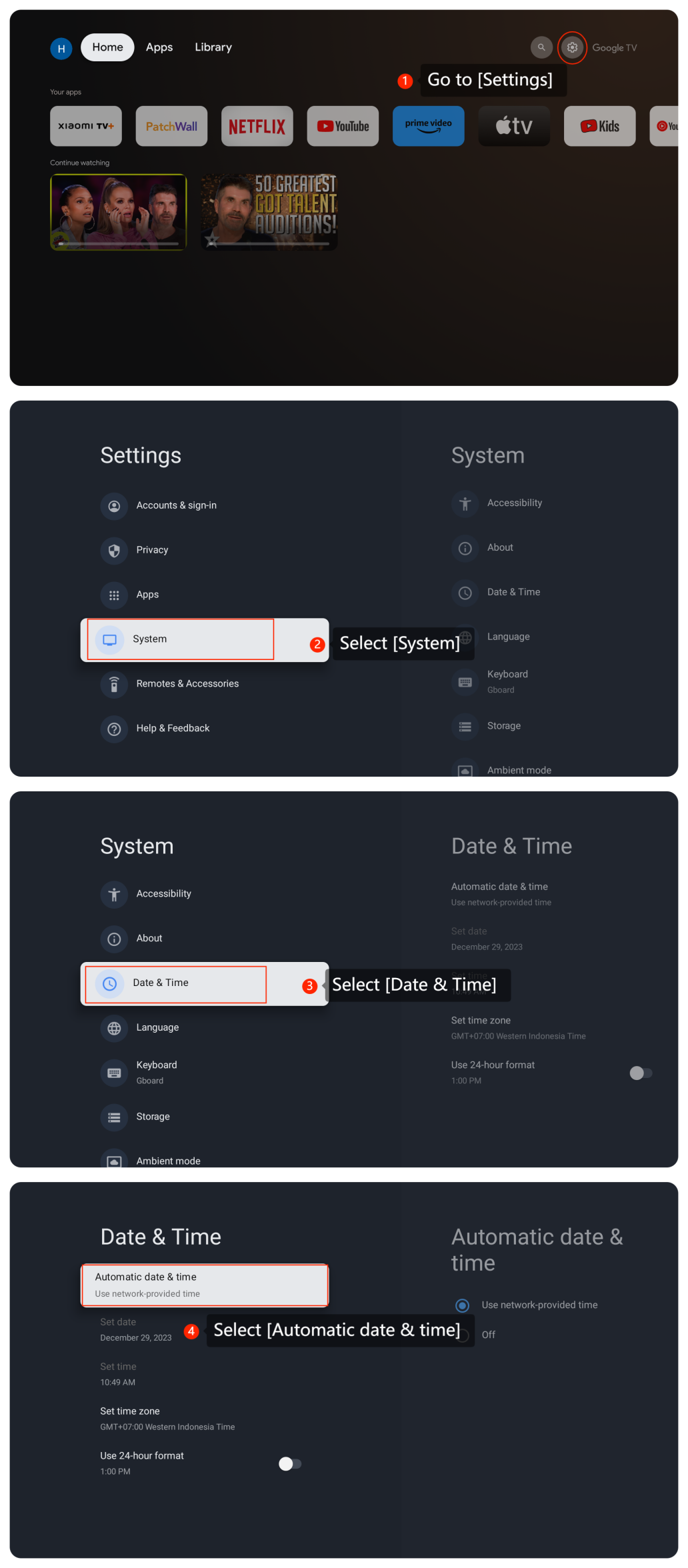
7. Incorrect date and time settings can sometimes cause issues with website access. So please verify the date and time on the TV by going to [Settings] >> [System] >> [Date & Time] >> [Automatic date & time];
8. If the issue persists, try using a different web browser or app to access the websites. This can help determine if the problem is specific to a particular application;
9. Ensure that your TV’s firmware and software are up to date so please go to [Settings] >> [System] >> [About] >> [System update];
10. You can perform a factory default on the TV by going to [Settings] >> [System] >> [About] >> [Reset].
Note:
This will erase all data and settings, returning the device to its default state. So ensure you have backed up any important data before doing this.
We hope the above methods can resolve the issue. If the issue still persists, you could submit your feedback on your TV by going to [Settings] >> [Help & Feedback] >> [Send feedback], you can upload logs with your feedback.
1. Ensure that the TV is connected to the internet. You can check it by going to the settings and checking the network connection by going to [Settings] >> [Network & Internet] >> turn on [Wi-Fi];
2. Turn off the TV, wait for a few seconds, and then turn it back on, which can sometimes resolve connectivity issues;
3. If the issue persists, try using a different web browser or app to access the websites. This can help determine if the problem is specific to a particular application;
4. If you are using a web browser on the TV, try clearing the cache and data by going to [Settings] >> [System] >> [Storage] >> [Internal shared storage] >> [Cached data] >> tap [OK];
5. Ensure that the web browser or app you are using to access websites is up to date as outdated software may have compatibility issues with certain websites. Please go to [Settings] >> [Apps] >> [Google Play Store] >> [Uninstall updates] >> [OK];
6. If the above methods don't work, please uninstall and reinstall the web browser or app;
7. Incorrect date and time settings can sometimes cause issues with website access. So please verify the date and time on the TV by going to [Settings] >> [System] >> [Date & Time] >> [Automatic date & time];
8. If the issue persists, try using a different web browser or app to access the websites. This can help determine if the problem is specific to a particular application;
9. Ensure that your TV’s firmware and software are up to date so please go to [Settings] >> [System] >> [About] >> [System update];
10. You can perform a factory default on the TV by going to [Settings] >> [System] >> [About] >> [Reset].
Note:
This will erase all data and settings, returning the device to its default state. So ensure you have backed up any important data before doing this.
We hope the above methods can resolve the issue. If the issue still persists, you could submit your feedback on your TV by going to [Settings] >> [Help & Feedback] >> [Send feedback], you can upload logs with your feedback.
Does it help?
Yes
No