

What to do if the Mi TV Bezel-less bass effect is abnormal?
If you're experiencing abnormal bass effects on the Mi TV Bezel-less, please refer to the following troubleshooting steps:
Scenario 1:
If the issue occurs when you are using apps on your TV, please refer to the following methods:
1. You can check audio settings by going to [Settings] >> [Device Preferences] >> [Sound] >> [Sound mode] >> select [Standard] to check the bass effects;
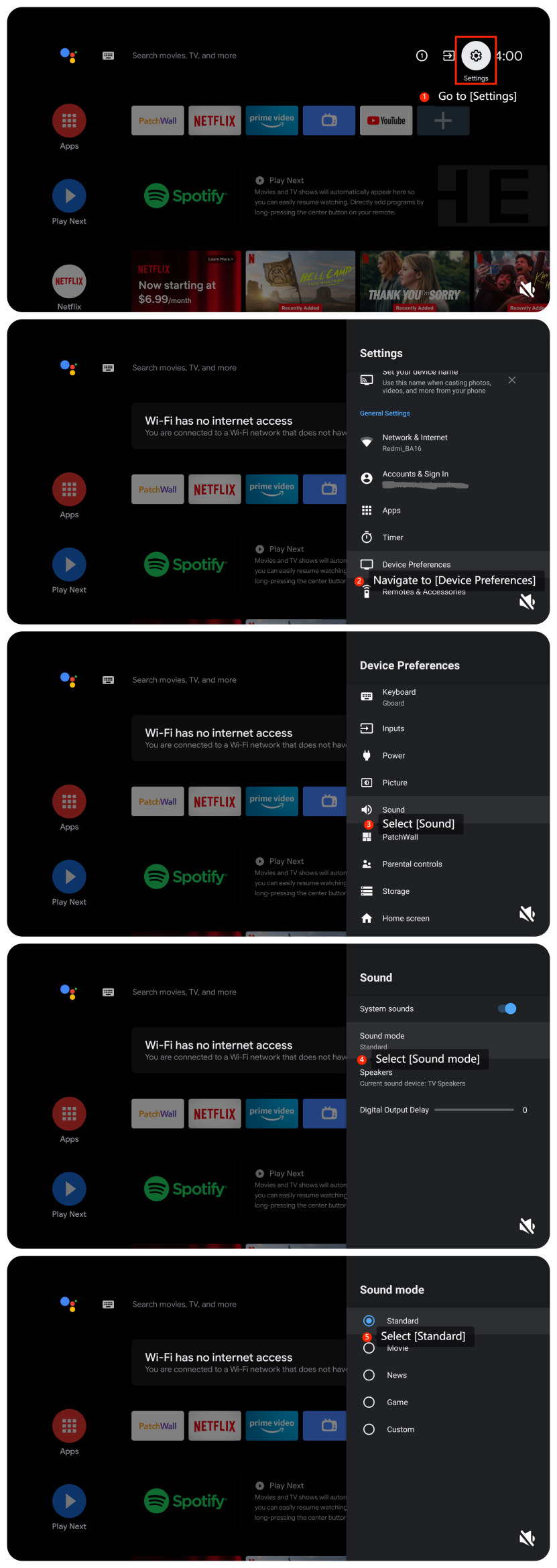
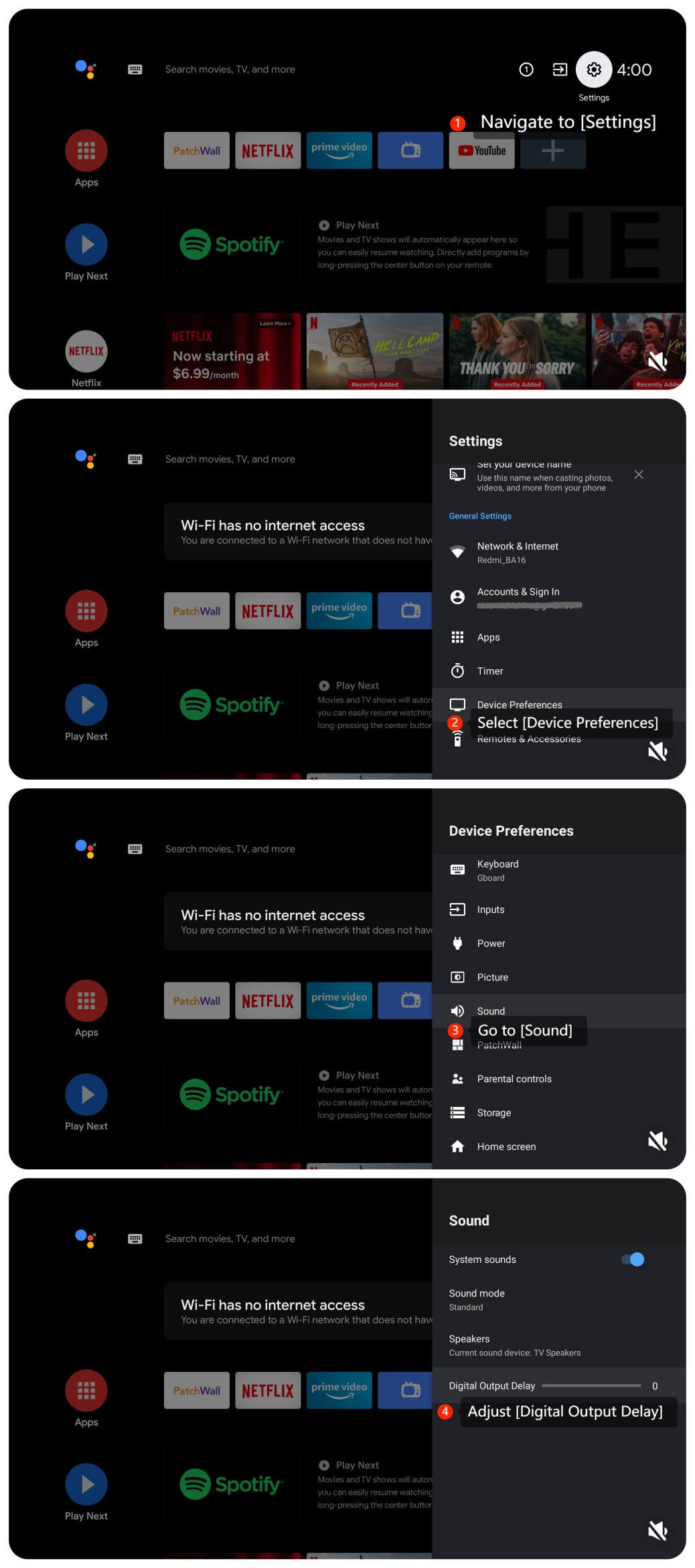
2. Ensure that the audio settings are correctly configured. Check for changes in the audio output mode, equalizer settings, and audio balance. Please navigate to [Settings] >> [Device Preferences] >> [Sound] >> adjust [Digital Output Delay];
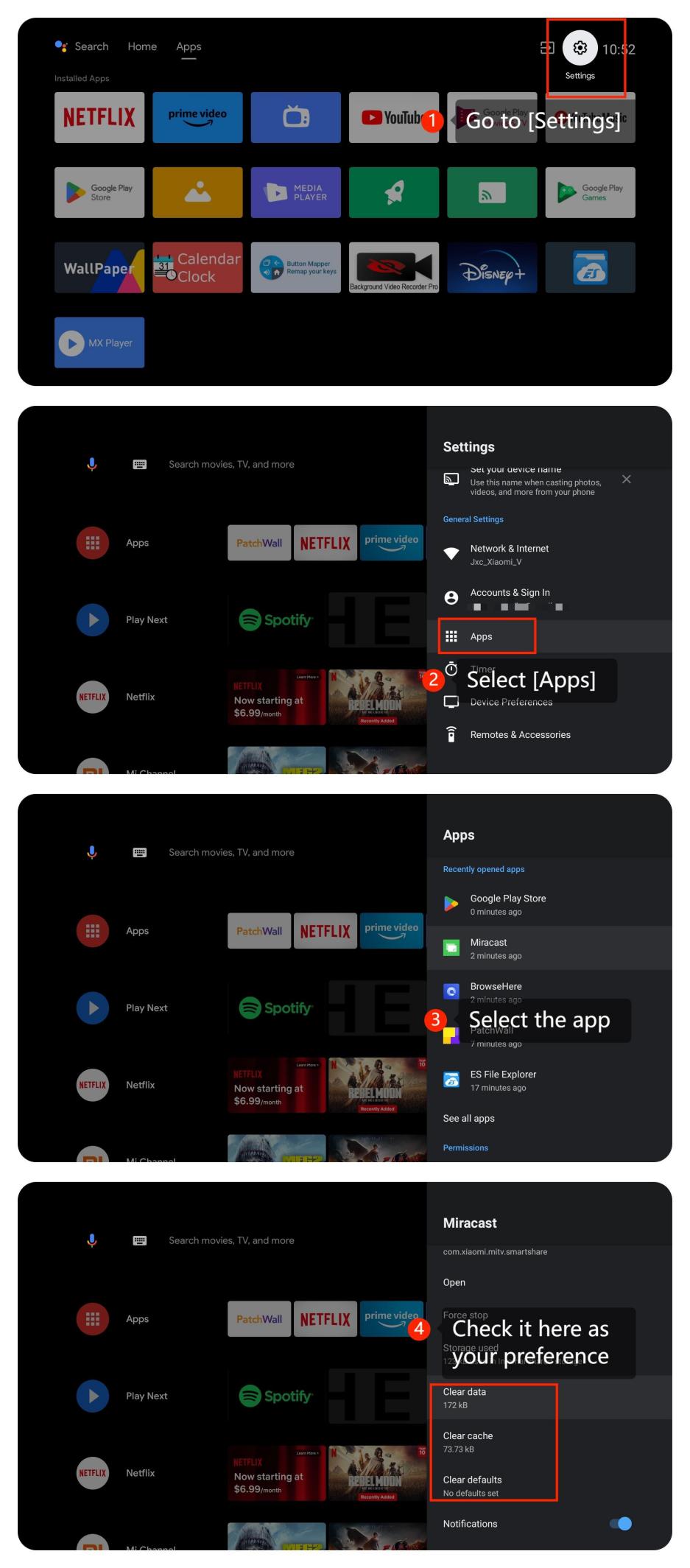
3. Please try clearing the app cache and data by going to [Settings] >> [Apps] >> [Clear data], [Clear cache], [Clear defaults] >> [OK];
4. The bass effect also depends on the content you're watching. Movies, music videos, and certain TV shows might have more pronounced bass effects than others. Try playing different types of content to see if the issue persists;
5. Ensure that the app is the latest version by going to [Google Play Store] >> [Manage apps and games] >> [Updates];
6. If the issue persists, try uninstalling the app and then reinstalling it;
7. Check for system updates by going to [Settings] >> [Device Preferences] >> [About] >> [System update];
8. If the problem persists, you can perform a factory reset by navigating to [Settings] >> [Device Preferences] >> [Reset]. Be aware that this will erase all settings and data on your TV, so use it as a last resort.
Scenario 2:
If the issue occurs when you are using an external device like a DVD player or game console, please refer to the following methods:
1. Ensure the cables connecting external devices to your TV are firmly and correctly plugged into the appropriate ports;
2. Ensure that your HDMI cable is in good condition. If possible, try using a different HDMI cable to see if the issue persists;
3. Check if the app you're using has any specific sound settings on your external devices, and you can adjust these settings if possible.
Scenario 3:
If the issue occurs when you are using casting on your TV, please refer to the following methods:
1. Please ensure that both the casting device such as your computer or your smartphone and your TV are connected to the same Wi-Fi network;
2. Check the casting device (e.g., smartphone, tablet, or computer) for any audio settings. Make sure the casting device is physically intact without any visible damage.
If the above troubleshooting methods can’t resolve the issue, please contact our local official service center or your seller for further assistance. They will help you in this regard.
Scenario 1:
If the issue occurs when you are using apps on your TV, please refer to the following methods:
1. You can check audio settings by going to [Settings] >> [Device Preferences] >> [Sound] >> [Sound mode] >> select [Standard] to check the bass effects;
2. Ensure that the audio settings are correctly configured. Check for changes in the audio output mode, equalizer settings, and audio balance. Please navigate to [Settings] >> [Device Preferences] >> [Sound] >> adjust [Digital Output Delay];
3. Please try clearing the app cache and data by going to [Settings] >> [Apps] >> [Clear data], [Clear cache], [Clear defaults] >> [OK];
4. The bass effect also depends on the content you're watching. Movies, music videos, and certain TV shows might have more pronounced bass effects than others. Try playing different types of content to see if the issue persists;
5. Ensure that the app is the latest version by going to [Google Play Store] >> [Manage apps and games] >> [Updates];
6. If the issue persists, try uninstalling the app and then reinstalling it;
7. Check for system updates by going to [Settings] >> [Device Preferences] >> [About] >> [System update];
8. If the problem persists, you can perform a factory reset by navigating to [Settings] >> [Device Preferences] >> [Reset]. Be aware that this will erase all settings and data on your TV, so use it as a last resort.
Scenario 2:
If the issue occurs when you are using an external device like a DVD player or game console, please refer to the following methods:
1. Ensure the cables connecting external devices to your TV are firmly and correctly plugged into the appropriate ports;
2. Ensure that your HDMI cable is in good condition. If possible, try using a different HDMI cable to see if the issue persists;
3. Check if the app you're using has any specific sound settings on your external devices, and you can adjust these settings if possible.
Scenario 3:
If the issue occurs when you are using casting on your TV, please refer to the following methods:
1. Please ensure that both the casting device such as your computer or your smartphone and your TV are connected to the same Wi-Fi network;
2. Check the casting device (e.g., smartphone, tablet, or computer) for any audio settings. Make sure the casting device is physically intact without any visible damage.
If the above troubleshooting methods can’t resolve the issue, please contact our local official service center or your seller for further assistance. They will help you in this regard.
Does it help?
Yes
No