

What to do if you fail to use AirPlay on the Xiaomi TV F2 32?
If you encounter issues with AirPlay on the Xiaomi TV F2 32, there are several troubleshooting steps that can resolve the problem:
1. Ensure that both your TV and the device attempting to use AirPlay are connected to the same Wi-Fi network. Sometimes, connectivity issues can arise from being on different networks;
2. Try restarting both the TV and the device trying to use AirPlay. Power cycling devices can often resolve temporary glitches;
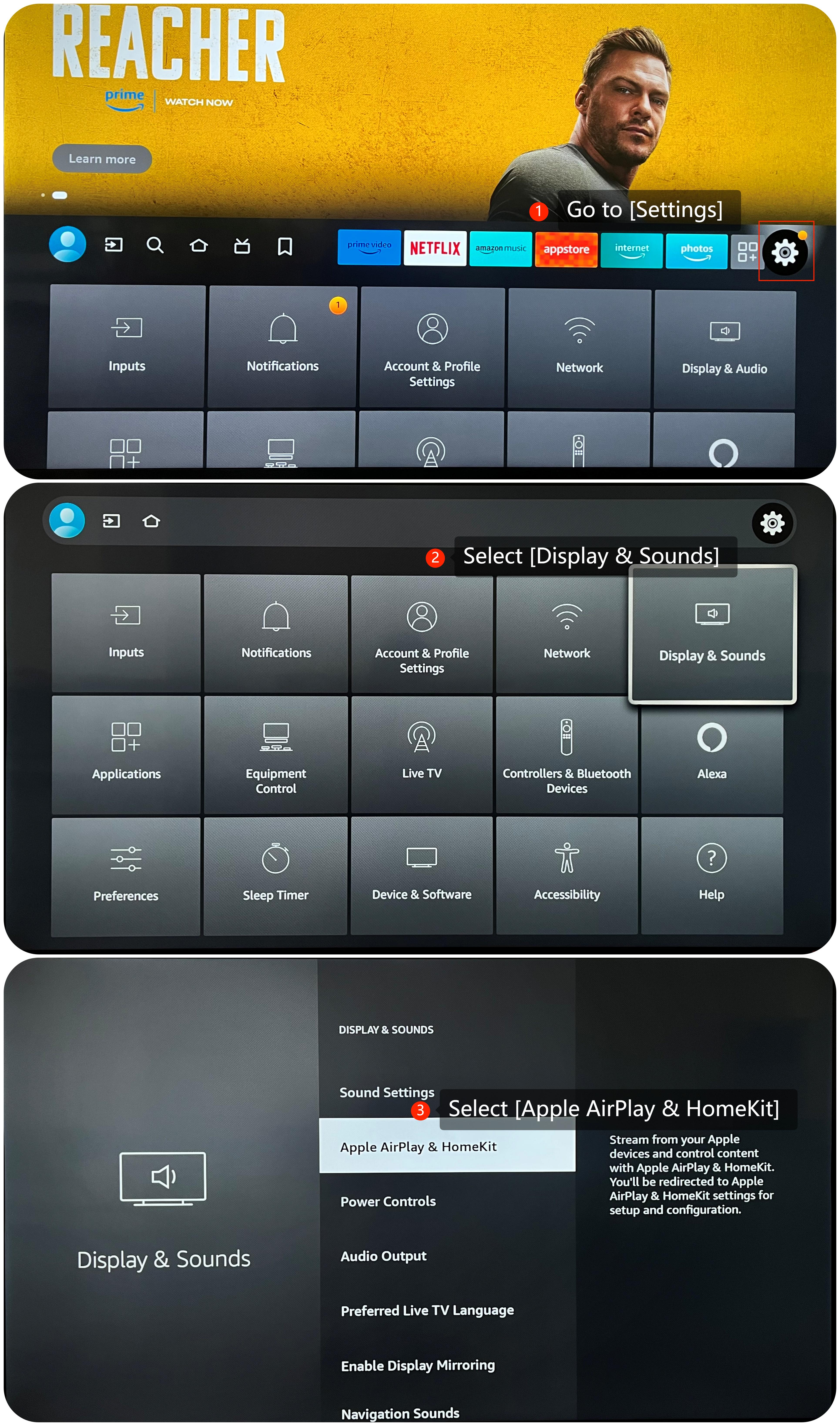
3. Make sure that AirPlay is enabled on the TV by going to [Settings] >> [Display & Sounds] >> [AirPlay & HomeKit] >> turn on the AirPlay;
1. Ensure that both your TV and the device attempting to use AirPlay are connected to the same Wi-Fi network. Sometimes, connectivity issues can arise from being on different networks;
2. Try restarting both the TV and the device trying to use AirPlay. Power cycling devices can often resolve temporary glitches;
3. Make sure that AirPlay is enabled on the TV by going to [Settings] >> [Display & Sounds] >> [AirPlay & HomeKit] >> turn on the AirPlay;
4. Ensure that the device you're using to AirPlay content is compatible with the TV. Some older devices can not be compatible or require specific settings to work with AirPlay;
5. Make sure that your TV's operating system is up-to-date, which often includes bug fixes and improvements. Go to [Settings] >> [Device & Software] >> [About] >> [Check for Updates];
6. As a last resort, you can try performing a factory reset on your TV. Be aware that this will erase all your settings and data, so make sure to back up any important data before proceeding. Navigate to [Settings] >> [Device & Software] >> [Reset to Factory Defaults].
We hope the above methods can resolve the issue. If the issue still persists, you could submit your feedback on your TV by going to [Settings] >> [Help] >> [Send feedback], follow the instructions on this interface.
Does it help?
Yes
No