

What to do if the app on the Xiaomi TV F2 50 lags or freezes?
If your apps on your Xiaomi TV F2 50 lags or freezes, please refer to the following troubleshooting steps:
1. Turn off the TV, unplug it from the power source, wait for a few minutes, and then plug it back in. Also, you can restart your TV by navigating to [Settings] >> [Device & Software] >> [Restart];
2. A poor internet connection can cause apps to lag or freeze. Make sure your TV is connected to a stable and strong Wi-Fi signal. Consider using an Ethernet cable for a more stable connection if possible;
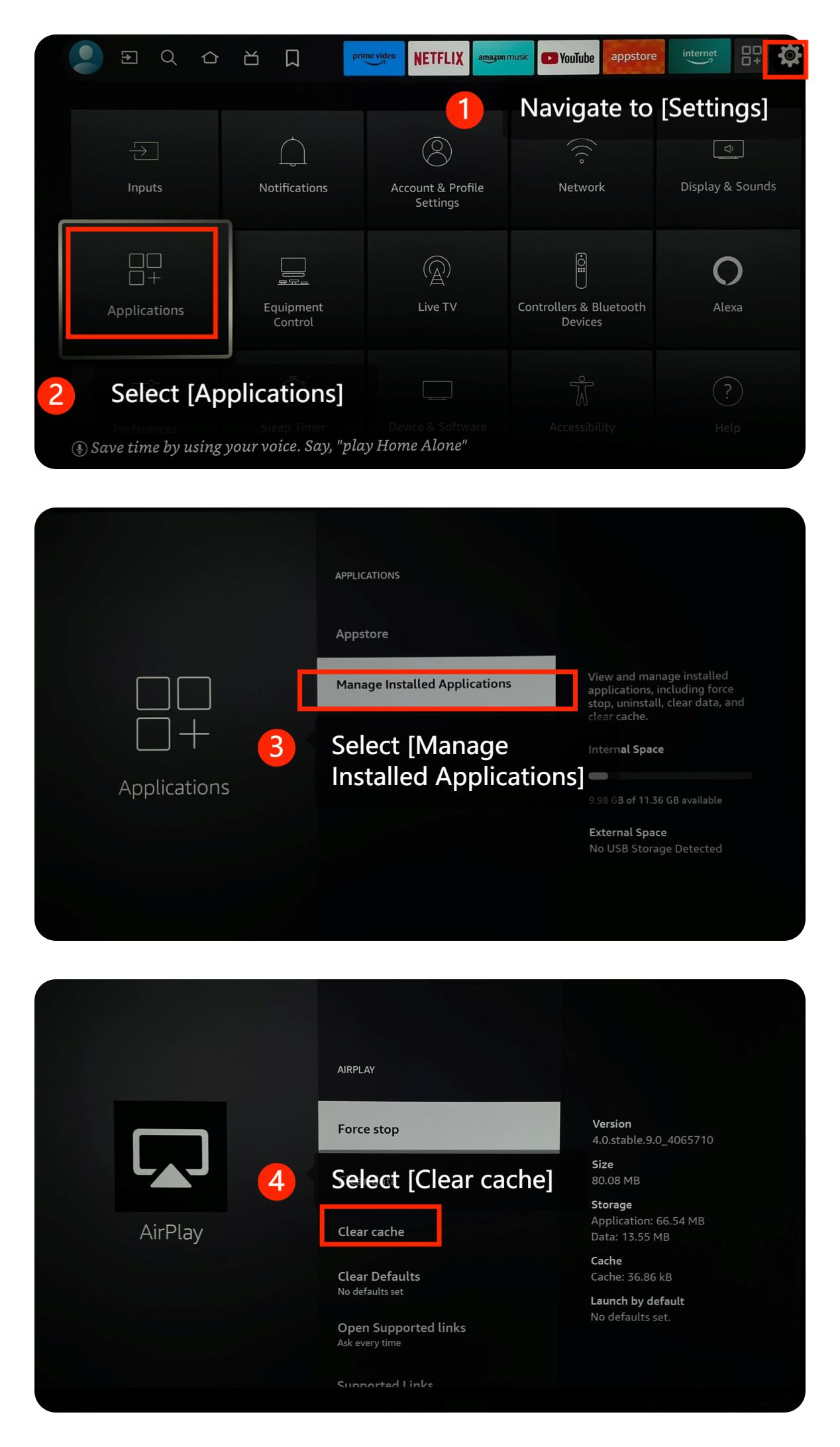
3. Please try clearing the app cache and data by going to [Settings] >> [Applications] >> [Manage Installed Applications] >> [Clear cache];
4. Make sure that your TV's system is the latest version by going to [Settings] >> [Device & Software] >> [About] >> [Install Update];
5. Running multiple apps simultaneously can lead to performance issues. Close background apps that you're not using;
6. If the problem persists, you can perform a factory reset by navigating to [Settings] >> [Device & Software] >> [Reset to Factory Defaults].
Note:
Be aware that this will erase all settings and data on your TV, so use it as a last resort.
We hope the above methods can resolve the issue. If the issue still persists, you could submit your feedback on your TV by going to [Settings] >> [Help] >> [Send feedback], follow the instructions on this interface.
1. Turn off the TV, unplug it from the power source, wait for a few minutes, and then plug it back in. Also, you can restart your TV by navigating to [Settings] >> [Device & Software] >> [Restart];
2. A poor internet connection can cause apps to lag or freeze. Make sure your TV is connected to a stable and strong Wi-Fi signal. Consider using an Ethernet cable for a more stable connection if possible;
3. Please try clearing the app cache and data by going to [Settings] >> [Applications] >> [Manage Installed Applications] >> [Clear cache];
4. Make sure that your TV's system is the latest version by going to [Settings] >> [Device & Software] >> [About] >> [Install Update];
5. Running multiple apps simultaneously can lead to performance issues. Close background apps that you're not using;
6. If the problem persists, you can perform a factory reset by navigating to [Settings] >> [Device & Software] >> [Reset to Factory Defaults].
Note:
Be aware that this will erase all settings and data on your TV, so use it as a last resort.
We hope the above methods can resolve the issue. If the issue still persists, you could submit your feedback on your TV by going to [Settings] >> [Help] >> [Send feedback], follow the instructions on this interface.
Does it help?
Yes
No