

How to check the call logs on the Xiaomi Watch 5?
The Xiaomi Watch 5 supports checking 4 types of call records on the watch, including missed calls, calls ended on the watch, calls answered on the watch, and calls dialed from the watch. You can also tap a record to initiate a call (this is synced with the phone).
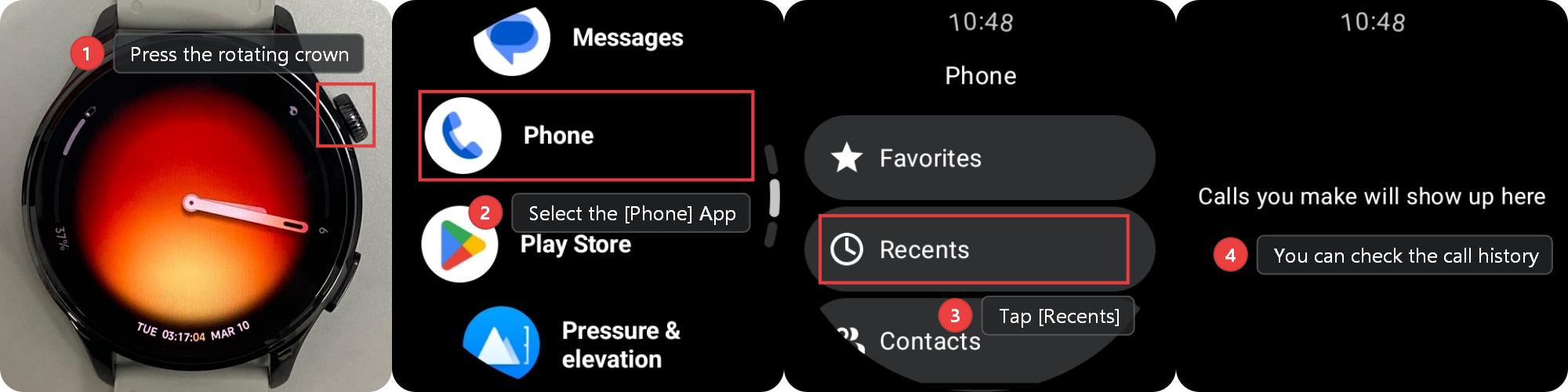
To check the call logs on the Xiaomi Watch 5, please refer to the following steps:
1. Press the rotating crown on the watch to access the App list.
2. Select the [Phone] App.
3. Tap [Recents].
4. You can check the call history.
Note:
1. The watch only stores the most recent 100 call records. Once 100 records are reached, new calls will overwrite the oldest ones.
2. Checking the call logs is not supported in the [Power saver] mode.
Does it help?
Yes
No