

How to format the SD card on the Xiaomi Smart Camera C300 Dual?
The Xiaomi Smart Camera C300 Dual supports formatting the SD card in the Xiaomi Home App, which erases all existing data, allowing for a fresh start and freeing up storage space and helps optimize the card's performance by organizing data and reducing fragmentation.
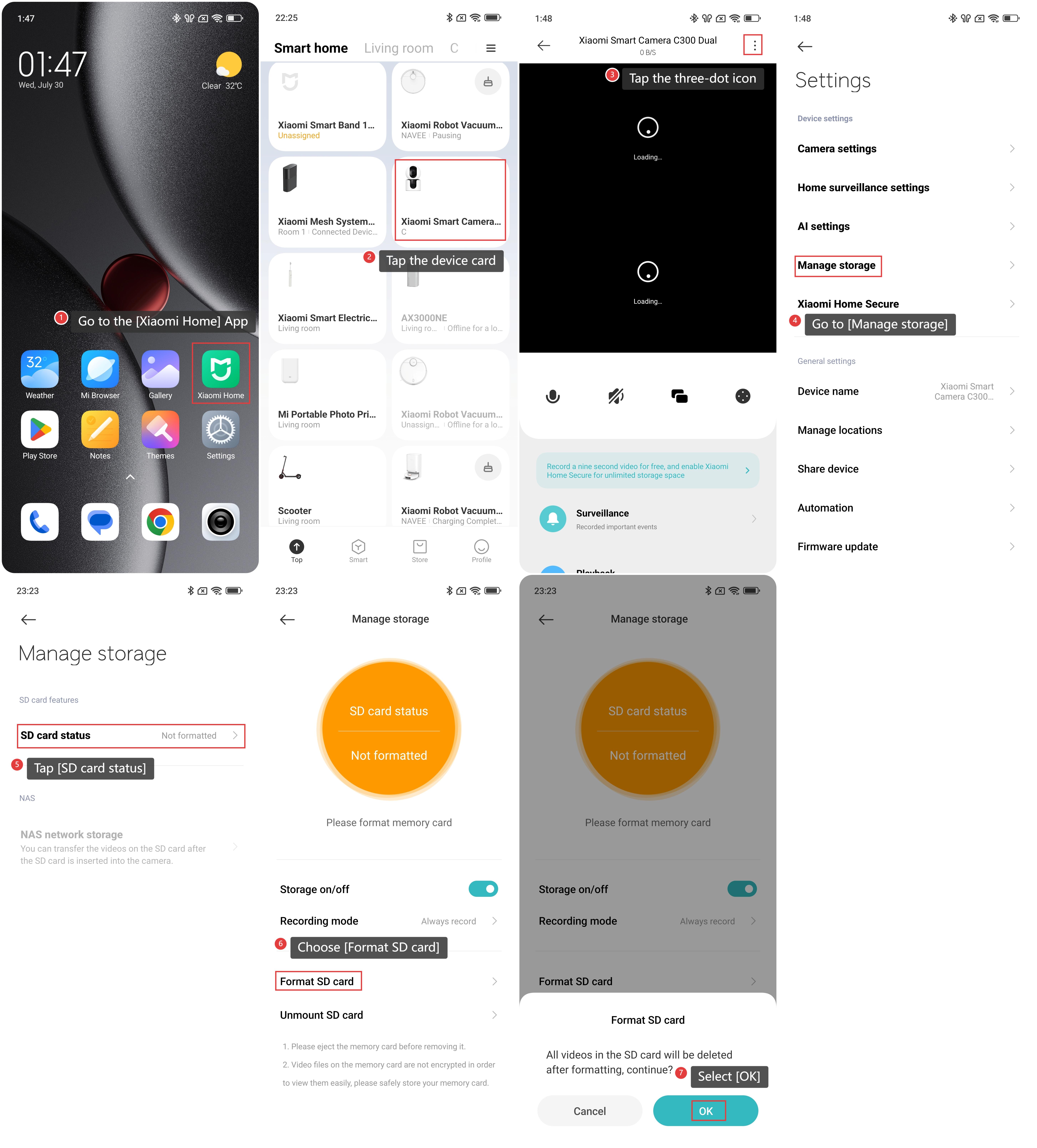
To format the SD card on the camera, please refer to the following steps:
1. Go to the [Xiaomi Home] App.
2. Tap the [Xiaomi Smart Camera C300 Dual] device card.
3. Tap the three-dot icon in the upper right corner to enter the settings.
4. Go to [Manage storage].
5. Tap [SD card status].
6. Choose [Format SD card].
7. Select [OK] to confirm.
Note:
Formatting an SD card will delete all the videos stored in the SD card. Please back up these videos in advance.
Does it help?
Yes
No