

What to do if the Mijia Front Load Washer Dryer Pro 9kg vibrates?
If the Mijia Front Load Washer Dryer Pro 9kg vibrates, please refer to the following methods to troubleshoot:
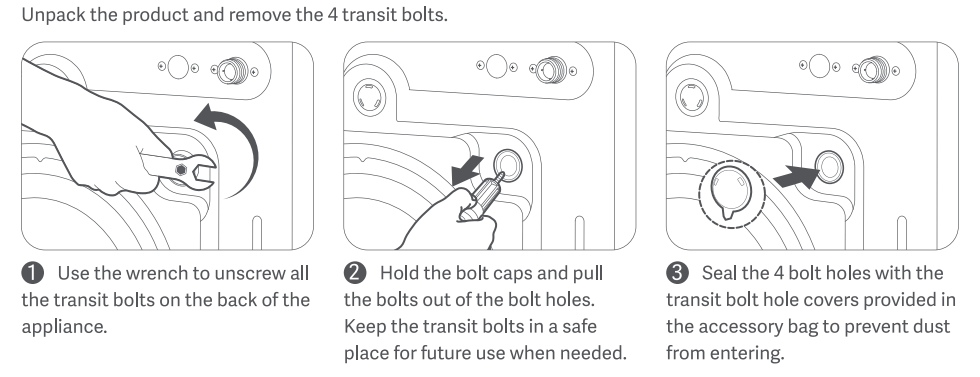
- For new, uninstalled machines, please check that the transit bolts are removed.
(1). Use the wrench to unscrew all the transit bolts on the back of the appliance.
(2). Hold the bolt caps and pull the bolts out of the bolt holes. Keep the transit bolts in a safe place for future use when needed.
(3). Seal the 4 bolt holes with the transit bolt hole covers provided in the accessory bag to prevent dust from entering.
- Check that the floor is level. The washing machine should be placed on a firm, flat, dry surface.
- Check whether the washing machine is placed in a balanced manner. If the washing machine is not placed level, it will cause loud noises. You can adjust the balance of the washing machine by adjusting the feet.
To do this, follow these steps:
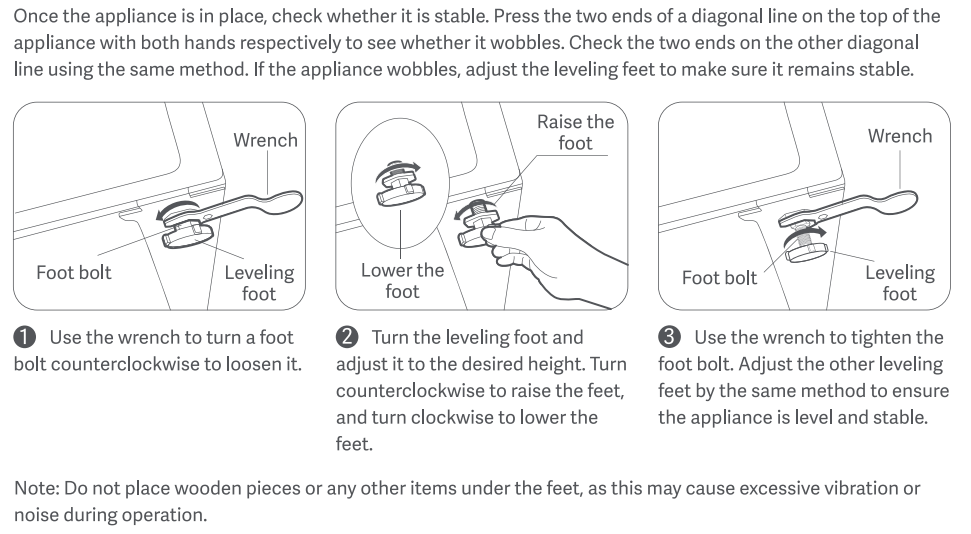
(1). Press down on each diagonal point on the top of the washing machine with both hands to check for any wobbling. This will determine which foot needs adjustment.
(2). Use a wrench to loosen the foot bolts by turning them counterclockwise.
(3). Rotate the horizontal foot to the desired height (turning counterclockwise raises the foot, turning counterclockwise lowers it).
(4). After adjustment, press down on each diagonal point on the top of the washing machine with both hands again to check for any wobbling.
(5). Use a wrench to tighten the foot bolts to secure the feet.
Note:
Do not place wood pieces or any other objects under the feet. This may cause abnormal vibration or noise.
- Check to see if there are too many clothes in the washing machine. Excessive clothing can cause vibration and displacement. Always load the washing machine according to the maximum capacity of each cycle.
- Check to see if the clothes are severely entangled. Pause the machine, remove the clothes, and unwind them before re-adding them to the machine.
If the above methods still do not solve the problem, please apply for local after-sales service center inspection.
Does it help?
Yes
No