

Why does the Xiaomi Pad Mini have a color cast in Reading mode?
The Xiaomi Pad Mini displays a color cast in Reading mode because this mode is designed to reduce eye strain by adjusting the screen’s color temperature and brightness.
When Reading mode is enabled, the display intentionally becomes warmer or slightly yellowish, mimicking the look of paper to provide a more comfortable reading experience. This color temperature shift is normal and helps protect your eyesight during prolonged use.
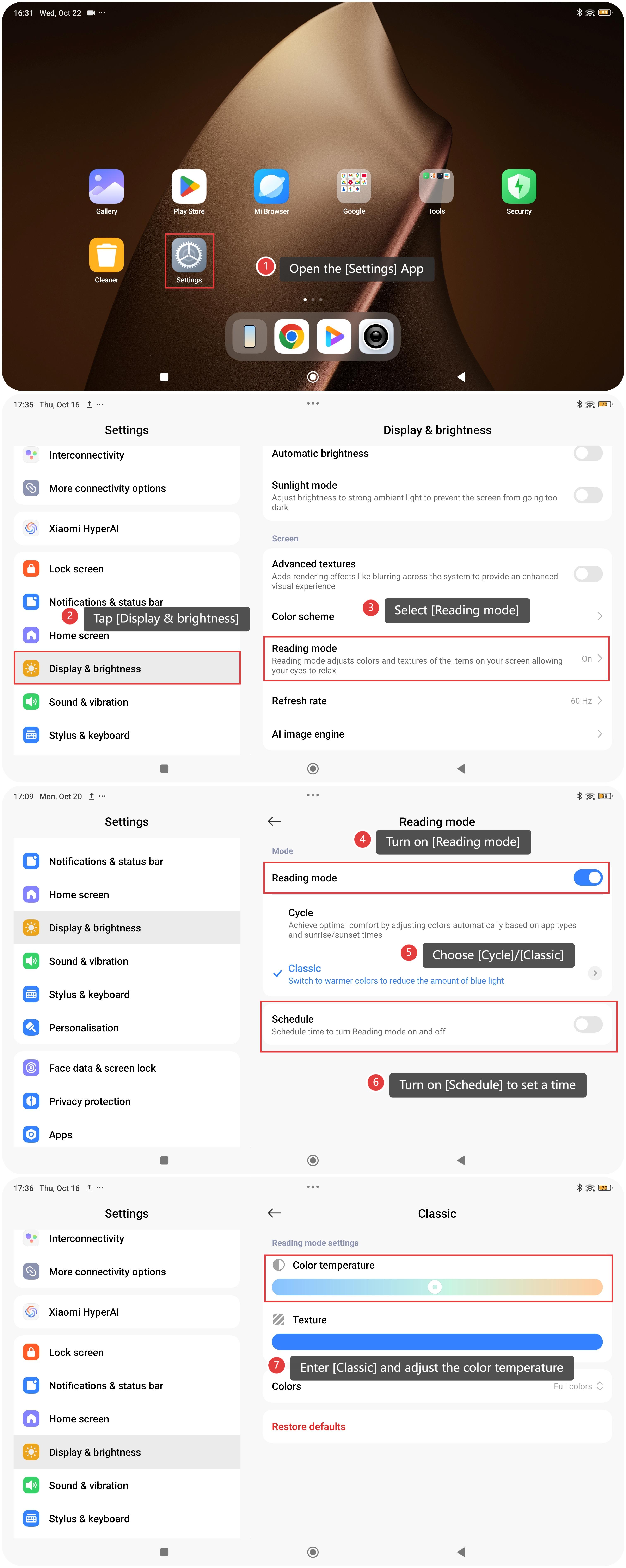
To adjust the Reading mode, please refer to the following steps:
- Open the [Settings] App.
- Tap [Display & brightness].
- Select [Reading mode].
- Turn on [Reading mode].
- Choose [Cycle]/[Classic].
- Turn on [Schedule] to set a time to turn reading mode on and off according to your preferences.
- Enter [Classic] and adjust the color temperature.
Does it help?
Yes
No